95
Editing
E
Audio Dubbing
You can add sound from audio devices (AUDIO IN) or with the built-in or an external
microphone (MIC. IN). With the MV600, audio dubbing can only be performed with
the built-in or an external microphone (MIC. IN).
❍ Use only tapes recorded in SP mode 12-bit audio sound with this camcorder.
Audio dubbing will stop if the tape has a blank section or a section recorded in
LP mode, 16-bit or 12-bit 4-channel sound. In above case, create a copy in SP
mode 12-bit audio sound using the analog line-in function.
❍ Do not connect/disconnect any cable to/from the camcorder while dubbing.
❍ You cannot use the DV terminal for audio dubbing.
❍ If you add sound to a tape not recorded with this camcorder, sound quality
may decrease.
❍ Sound quality may decrease when you add sound to the same scene for more
than 3 times.
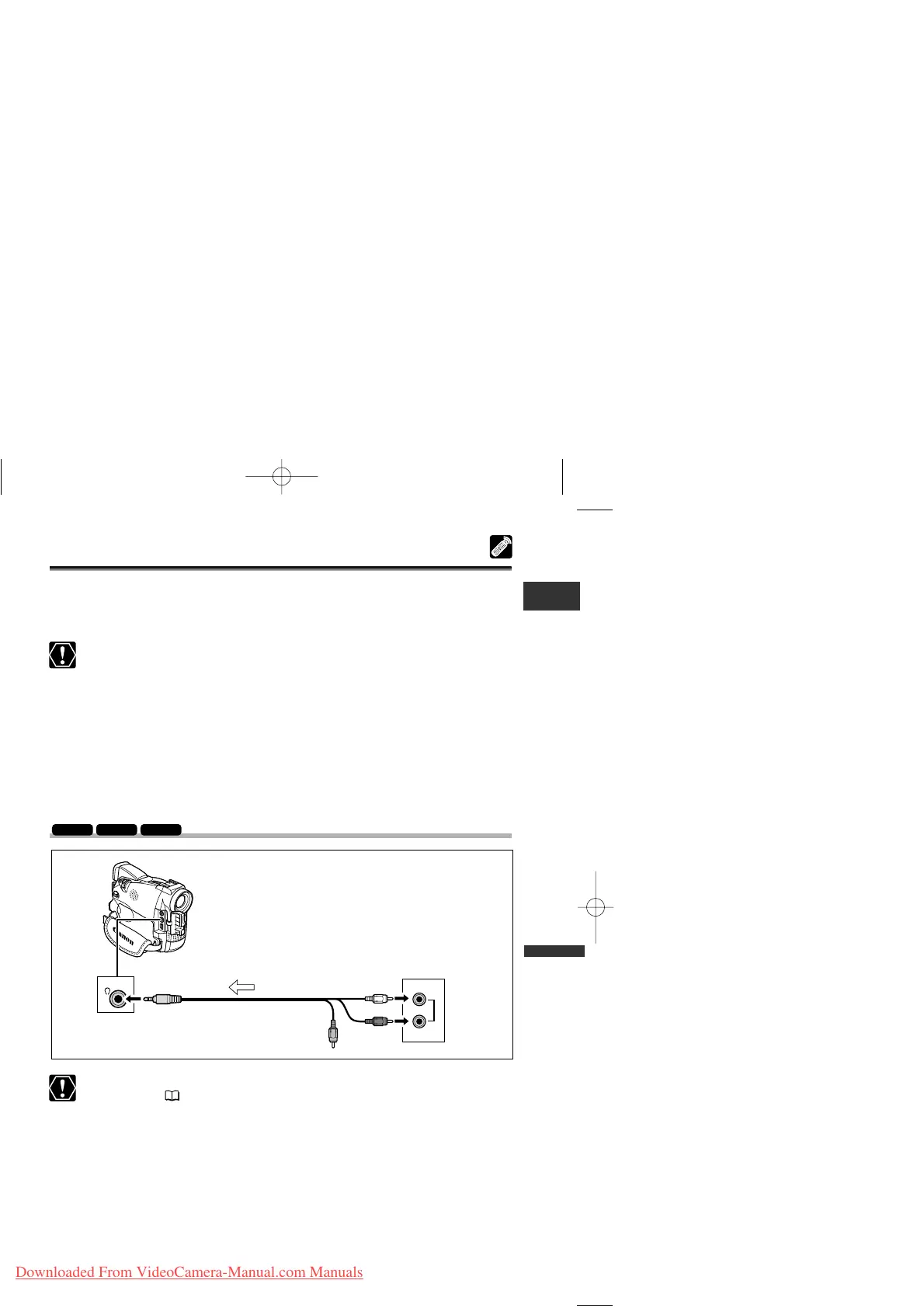
Connecting an Audio Device
❍ Make sure that “H” is not displayed on the screen. If “H” is displayed, change
the setting ( 37).
❍ You can monitor the picture on the LCD screen or a TV connected via the
S-video terminal, and check the sound with the built-in speaker.



 To Next Page