V. WARNINGS AND
ACTIONS TO TAKE
A. Jam Indicator
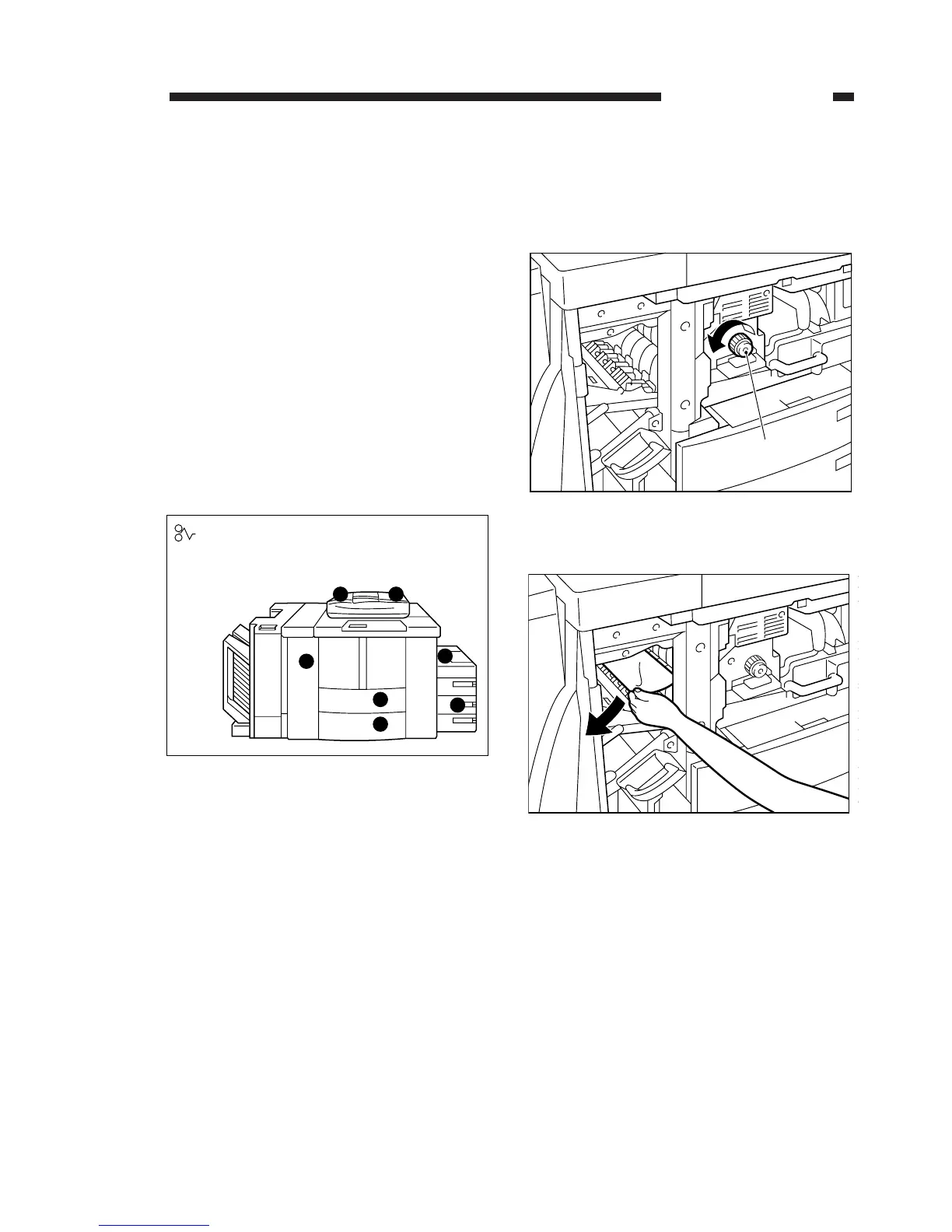
When a jam occurs, the copier indicates the
Jam message on the control panel while identify-
ing the location of the jam as in Figure 1-25.
Locate the jam, and perform the steps that follow.
(For a jam in the sorter or the RDF, see their
respective Service Manuals.)
In the case of jams in the copier, be sure to
check the pick-up assembly, separation/feeding
assembly, fixing/delivery assembly, cleaning
assembly, and duplexing/feeding assembly to
remove all pieces of paper. Make use of the jam
location indicator behind the front door.
Figure 1-25
1. Jams in the Delivery Assembly
1) Release the delivery assembly.
2) Turn the fixing assembly knob in the direction
of the arrow to forward the jam.
Figure 1-26
Figure 1-27
3) Set the delivery assembly.
4) Close the front door.
1. GENERAL INTRODUCTION
COPYRIGHT © 1996 CANON INC. CANON NP6085 REV.0 JULY 1996 PRINTED IN JAPAN (IMPRIME AU JAPON)
1-27




 To Next Page