B. Separation Claw Drive
Assembly
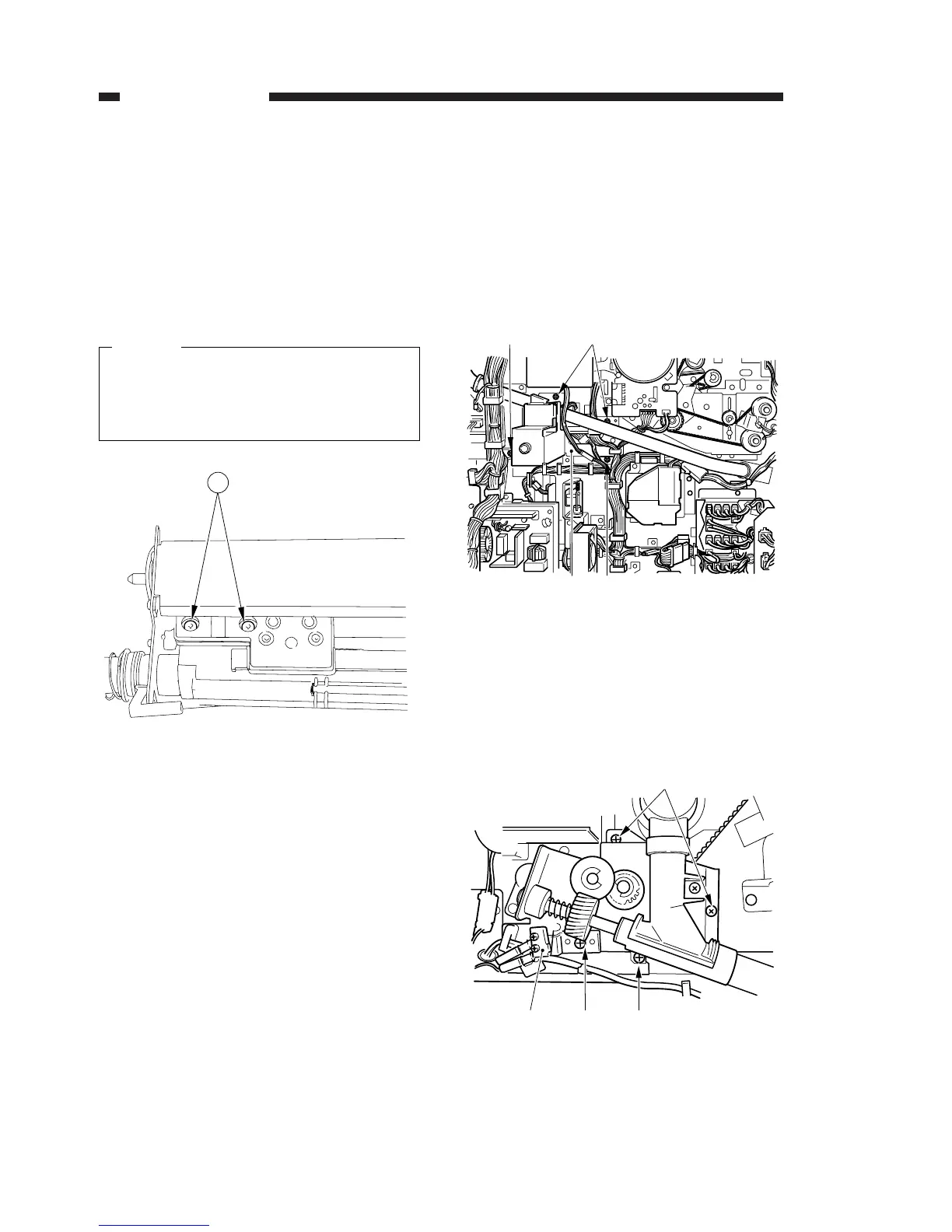
1. Removing the Separation Claw Drive Assembly
from the Drum Unit
1) Remove the drum unit from the copier. (p. 4-64)
2) Remove the two mounting screws q, and
remove the separation claw drive assembly.
1.Take care not to break the separation
claw.
2.Take care not to damage the photosensi-
tive drum.
Figure 4-709
C. Waste Toner Feeding
Assembly
1) Slide out the drum unit from the copier. (p. 4-64)
2) Remove the two mounting screws q, and
remove the harness guide.
3) Remove the four mounting screws w, and
remove the mounting plate e.
Figure 4-710
4) Remove the mounting screw r, and remove
the waste toner feeding screw lock detecting
assembly t.
5) Remove the three mounting screws y, and
remove the waste toner feeding assembly from
the copier.
Figure 4-711
4. MECHANICAL SYSTEM
COPYRIGHT © 1996 CANON INC. CANON NP6085 REV.0 JULY 1996 PRINTED IN JAPAN (IMPRIME AU JAPON)
4-82




 To Next Page