EasyManua.ls Logo

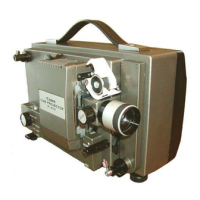
Canon P 400 - User Manual

Canon P 400
14 pages
Print Icon
To Next Page IconTo Next Page
Loading...
Question and Answer IconNeed help?

Do you have a question about the Canon P 400 and is the answer not in the manual?

Summary

Voltage Setting and Projection Prep

Setting the Correct Voltage

Importance of voltage selection for projector function and safety to prevent damage.

Initial Projection Adjustments

Image Size and Focus Adjustment

Setting projection size with the zoom lens and achieving sharp focus.

Film Loading and Projection Operation

Activating Lamp and Fine Tuning

Turning on the lamp and making focus and framing adjustments for the projected image.

Mid-Projection Film Removal

Safe Shutdown Procedure

Turning the switch knob to OFF to safely stop operation before removing film.

Film Extraction and Cord Winding

Film Extraction Steps

Instructions for removing film from guides, cover, and driving claws.

Frequency and Fuse Management

Changing Operating Frequency

Adjusting the internal supply belt and frequency conversion plug for 50 or 60 cps.
Summary

Voltage Setting and Projection Prep

Setting the Correct Voltage

Importance of voltage selection for projector function and safety to prevent damage.

Initial Projection Adjustments

Image Size and Focus Adjustment

Setting projection size with the zoom lens and achieving sharp focus.

Film Loading and Projection Operation

Activating Lamp and Fine Tuning

Turning on the lamp and making focus and framing adjustments for the projected image.

Mid-Projection Film Removal

Safe Shutdown Procedure

Turning the switch knob to OFF to safely stop operation before removing film.

Film Extraction and Cord Winding

Film Extraction Steps

Instructions for removing film from guides, cover, and driving claws.

Frequency and Fuse Management

Changing Operating Frequency

Adjusting the internal supply belt and frequency conversion plug for 50 or 60 cps.

Canon P 400 Specifications

General IconGeneral
BrandCanon
ModelP 400
CategoryProjector
LanguageEnglish

Related product manuals