Examining the Nozzle Check Pattern
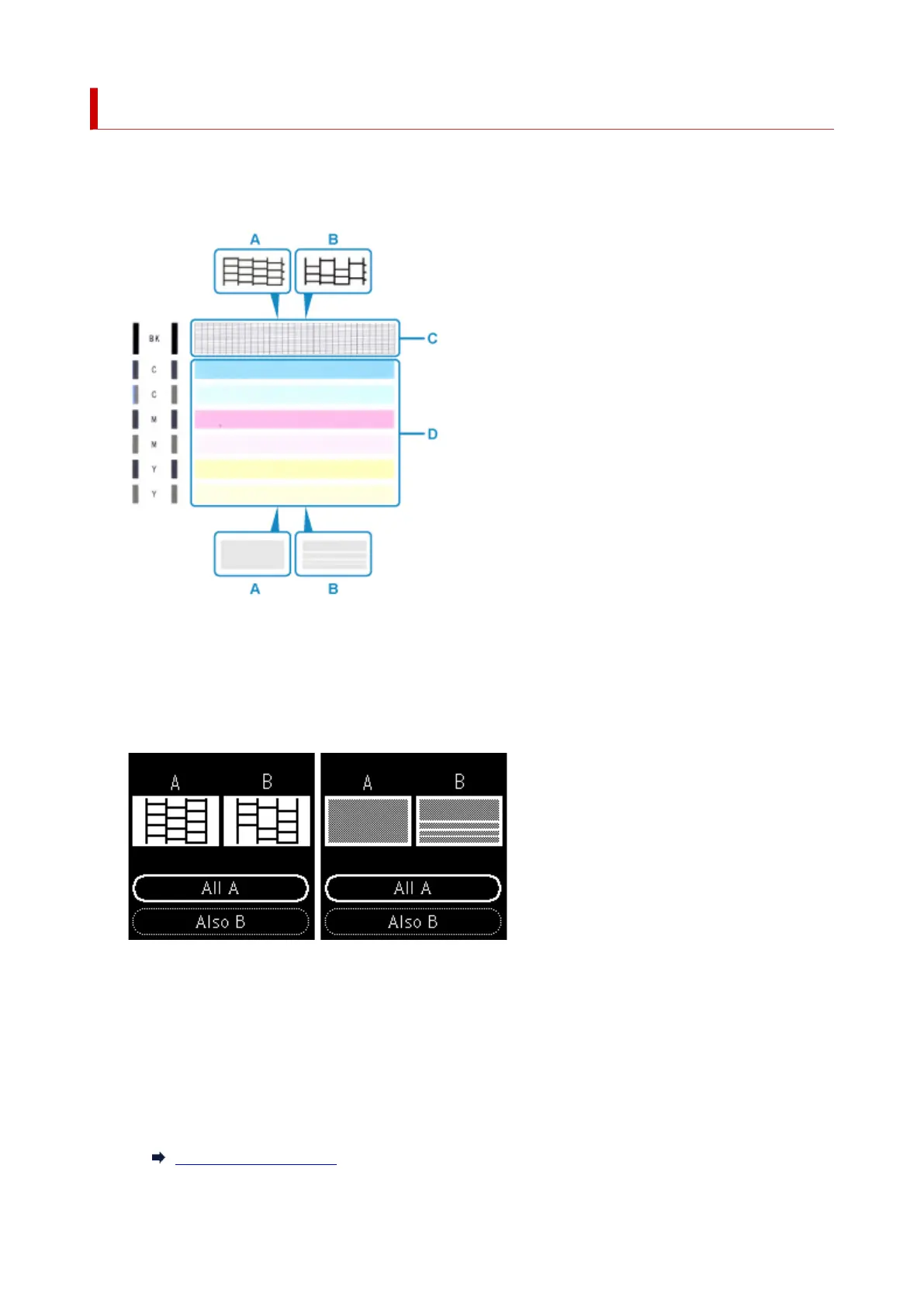
Examine the nozzle check pattern, and clean the print head if necessary.
1. Check if there are missing lines in the pattern C or horizontal white streaks in the pattern D.
A: No missing lines/No horizontal white streaks
B: Lines are missing/Horizontal white streaks are present
2.
Select the pattern that is closer to the printed nozzle check pattern on the confirmation
screen.
For A (no missing lines or no horizontal white streaks) in both the pattern C and pattern D:
The cleaning is not required. Select All A, confirm the message, then select OK.
For B (lines are missing or horizontal white streaks are present) in the pattern C or pattern D, or
in both patterns:
The cleaning is required. Select Also B, then select Yes on the cleaning confirmation screen.
The printer starts cleaning the print head.
Cleaning the Print Head
93











 To Next Page