4-19
VB Administration Tools
Preset Tour
A Preset Tour can tour and monitor two or more specified Presets.
You can also set Preset Tour with “Presetting Best Shot” in Chapter 3, “Basic Settings” (→ P.3-11).
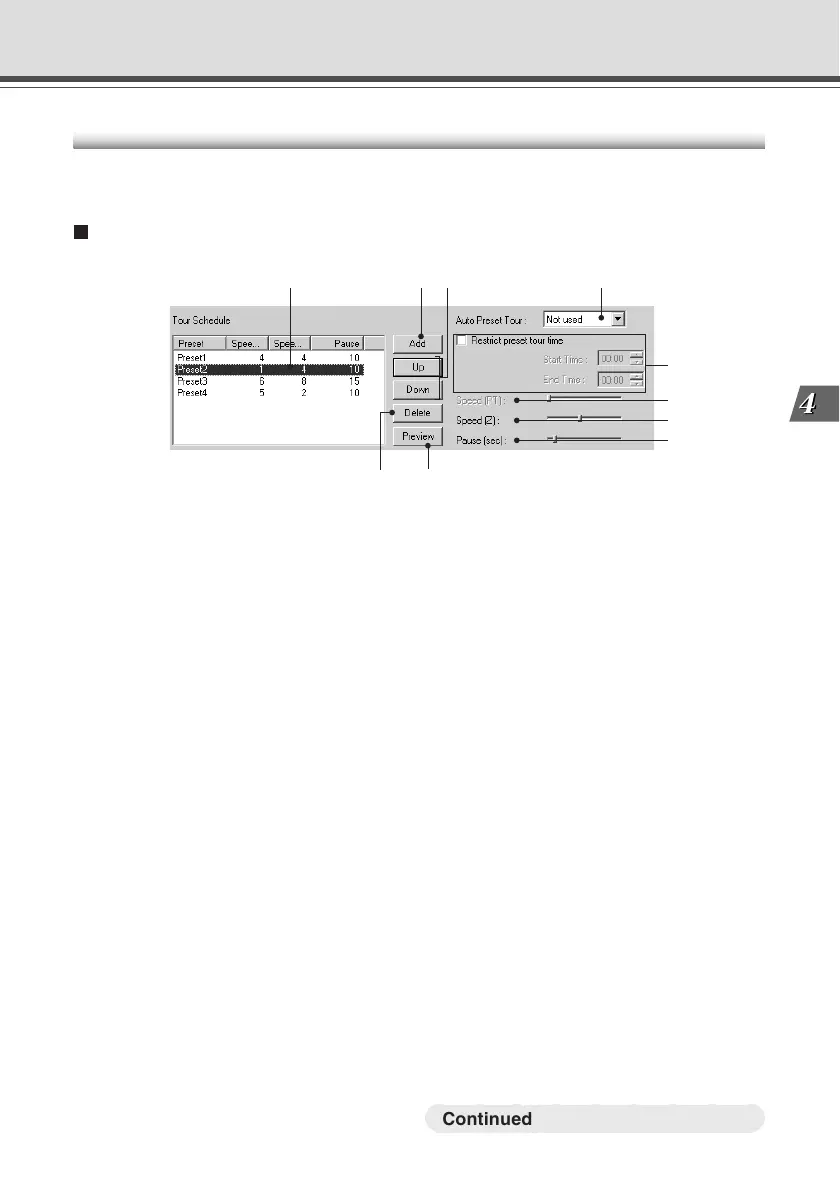
Preset Tour Settings Area Display Screen
q w y
i
o
!0
q Tour Schedule list
Displays a list of the presets which have Preset Tour settings.
w “Add” button
Adds a preset to the Tour Schedule List.
e “Up” and “Down” button
Select a Preset from the list, and click the “Up” or “Down” button to change the order of the
Preset Tour. The Preset Tour commences from the preset at the top of the list.
r “Delete” button
Deletes the selected Preset.
t “Preview” button
Reflects the settings for the selected preset in the Preset Preview frame. The camera zoom
positions set in the device switch to the specified values and can be confirmed from the Admin
Viewer.
y Auto Preset Tour
Select an option for a Preset Tour from the following.
Not Used: Preset Tour does not operate.
For Viewers: Operates if a Viewer is open.
Always: Preset Tour always operates.
u “Restrict preset tour time”
Click to set the start time and end time of the Preset Tour.
i Speed (PT)
* Not available with the VB-C50Fi.
r t
e
u
Preset Setting Tool
○○○○○○○○○
Continued on the following page. a



 To Next Page