[Network] Setting Administrator Password, LAN, IP Address, DNS, etc
5-7
5
Setting Page
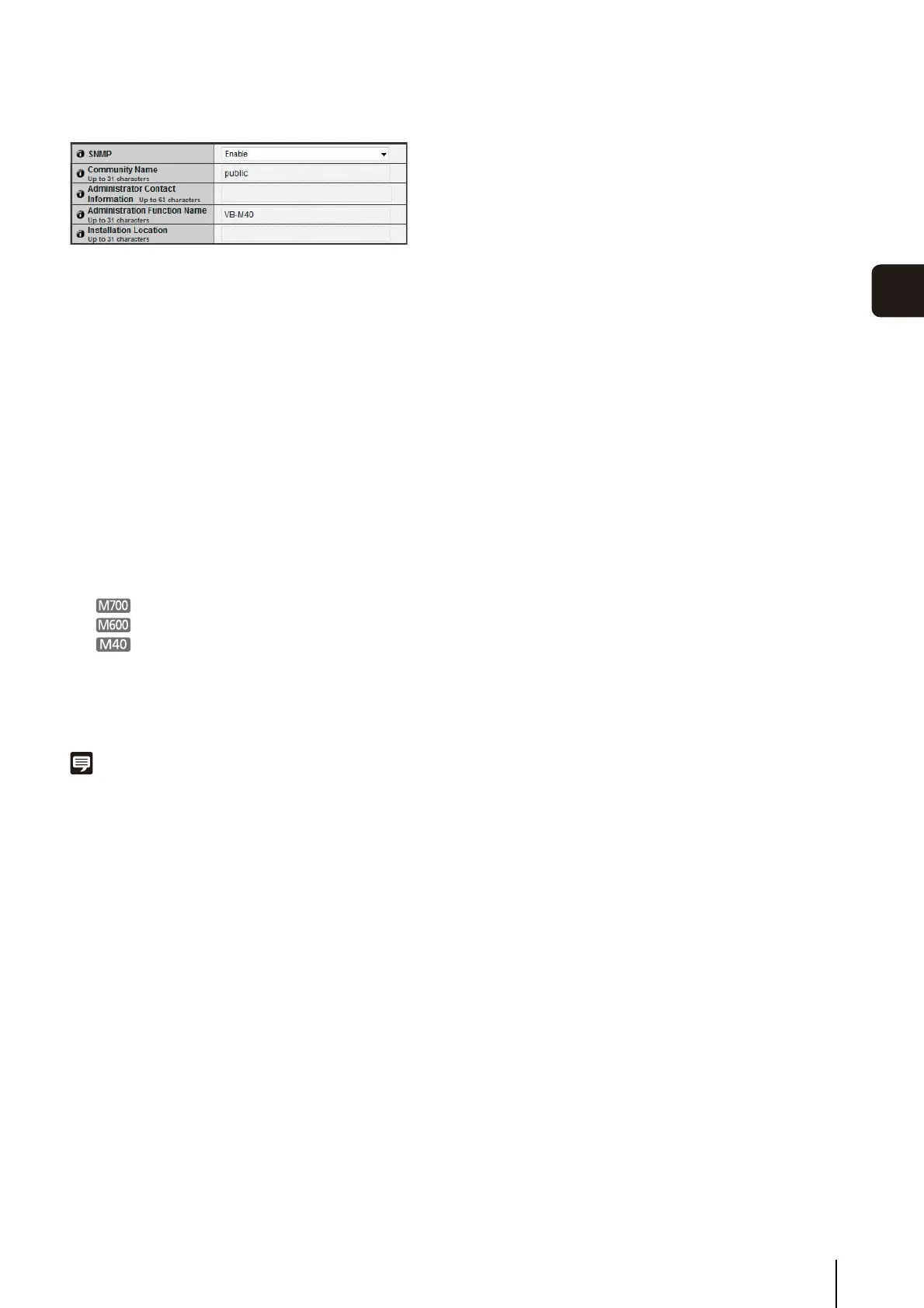
SNMP
(1) [SNMP]
Set SNMP use to [Disable] or [Enable]. Camera
information can be referenced by the SNMP Manager
if [Enable] is specified.
(2) [Community Name]
Set a community name for SNMP. It is recommended
that you change the community name to ensure
system security.
(3) [Administrator Contact Information]
Set contact information (e-mail address, etc.) for the
Administrator of the camera. Setting information can
be referenced by the SNMP manager.
(4) [Administration Function Name]
Set the camera name used for administration. Setting
information can be referenced by the SNMP manager.
If left blank, the following will be used by default:
VB-M700
VB-M600
VB-M40
(5) [Installation Location]
Set information regarding the installation location of
this camera. Setting information can be referenced by
the SNMP manager.
Note
• The information set in the camera is read-only from the SNMP
manager.
• Use the SNMP Manager that supports SNMP MIB2 (supporting
RFC1213).
• Supports SNMP protocol versions v1 and v2c (v3
unsupported).



 To Next Page