Adjustment
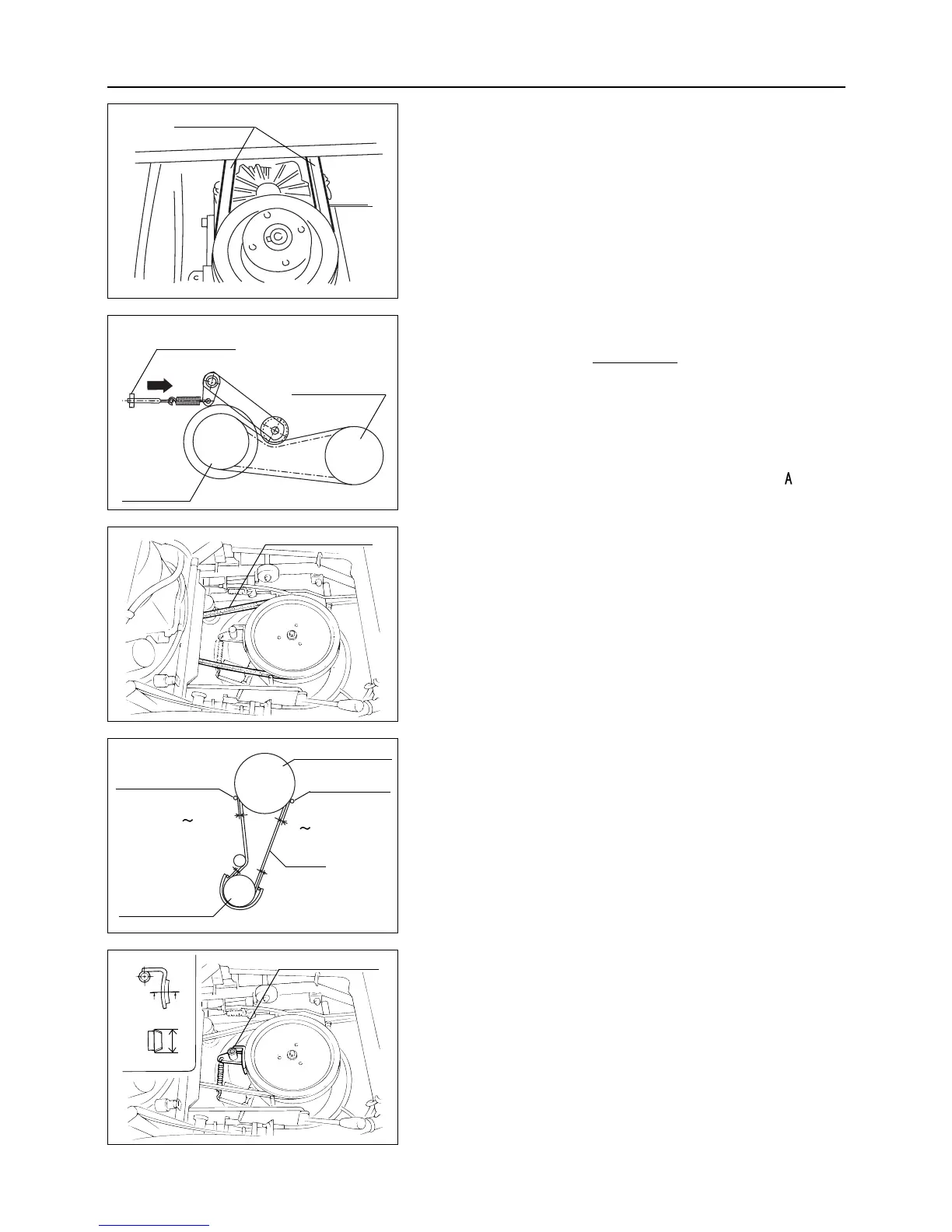
Adjust V belt only when V belt slips during driv-
ing. V belt should be always in tension during
operation.
1. To adjust V belt, turn adjusting nut in direction
.
7.8.2 Blade Rotary V Belt
Inspection
1. Visually check for damage on V belt. If any damage is
found, replace the V belt.
Adjustment
After replacing V belt, make adjustment as follows :
1. Set the engine side clearance at belt stopper A 2 to 4 mm
and B 10 mm.
2. Set the clearance between rotary belt holder and V belt
with 3 to 5 mm (when belt slips out of rotary, check the
clearance on belt holder at rotary side).
– 41 –
7
MAINTENANCE
7.8 ADJUSTMENT
7.8.1 V Belt for Driving
Inspection
1. Visually check for damage on V belt. If any damage is
found, replace the V belt.
7.8.3 Rotary Stopper
Inspection
1. Inspect and check whether blade stops within 4 seconds
after putting blade clutch lever to OFF. If cutter does not
stop within 4 seconds, check wearing of lining. If lining
is 20 mm or less, ask the dealer to replace it.
Driving V belt
A
Engine pulley
Adjusting nut
HST pulley
Rotary V belt
Rotary belt holder
Engine pulley
V belt
3
5mm
A
B
3
5mm
20
Rotary belt holder
Cutting blade pulley
Rotary stopper



 To Next Page