CTR12000 Car-O-Liner Group AB
41644, EN - rev. 2, 2012-09 5
1 Operation
1.1 General
Your welding machine offers multiple functions and a large range of differ-
ent settings though the number of control elements is quite reduced. This
“economy of switches“ results from the high-tech microprocessor control
system.
The most important control element – the rotary encoder – is located on the
power source’s control panel. Together with the large, easy-to-read display,
this switch offers to the user unique operating convenience: You may easily
switch between different programs for different – and also very demanding –
welding tasks and with the same convenience; you may also adapt the pro-
grammed combination of parameters to special requirements.
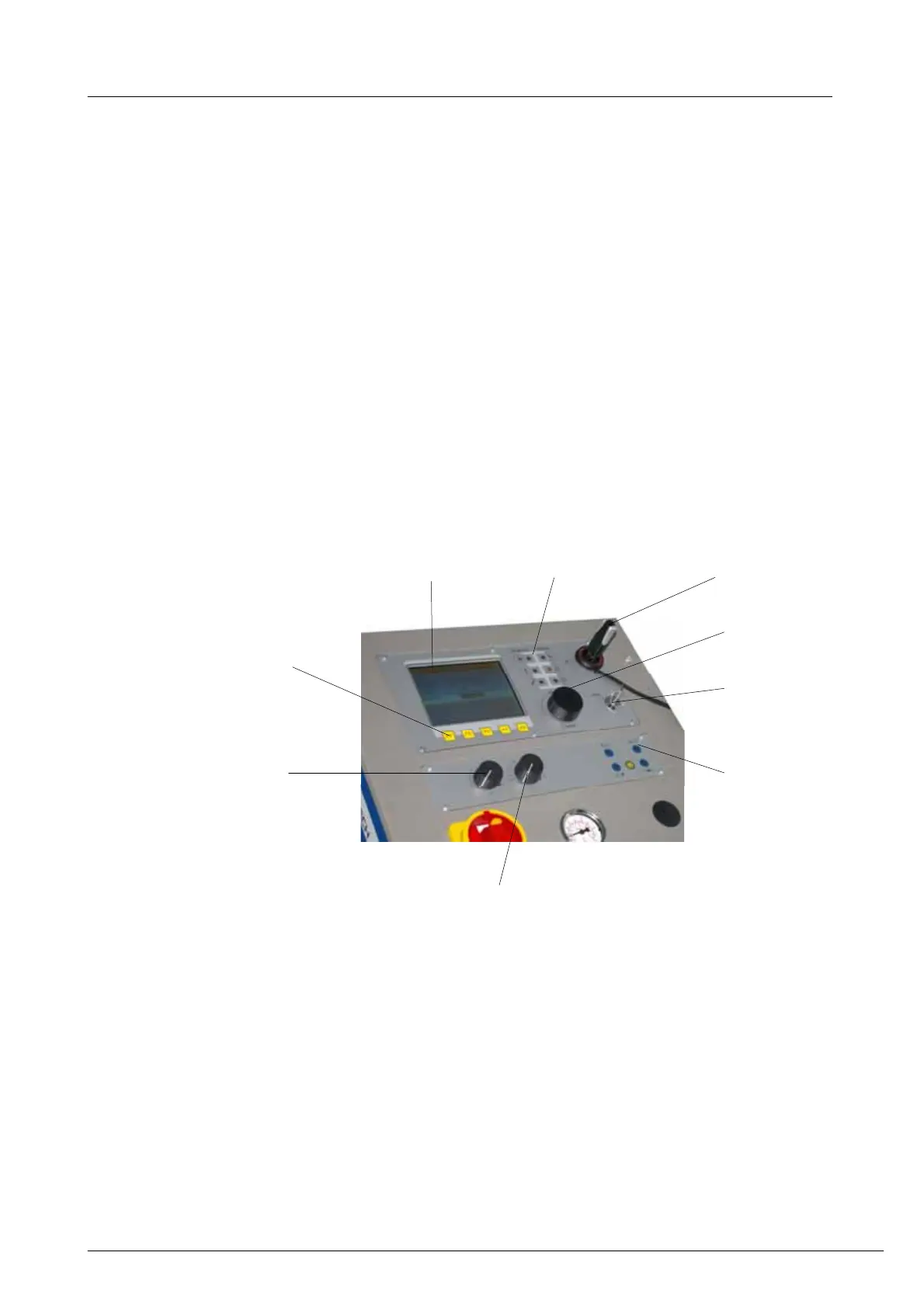
1.1.1 Display (1)
The machine has a liquid crystal display (LCD). For detailed information on
the different screens, such as for the different welding programs, see chapter
2 Welding menus.
5
10. LED indicators
1. Display
3. Soft keys
11. USB Device
12-15. LED indicators /
Reset button Q
(also
being incorporated in the
welding tong’s handle)
18. Power I/kA
potentiometer
19. Time t/s
potentiometer
4. Rotar
encode
2. Key operated switch
AUTO/EDIT


 To Next Page