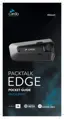
The Cardo PACKTALK EDGE is a communication and entertainment system designed for motorcycle helmets, offering a range of features for riders to stay connected and entertained on the road.
Function Description:
The PACKTALK EDGE provides three distinct intercom communication modes: traditional Bluetooth protocol, Live Intercom, and Cardo's Dynamic Mesh Communications (DMC) technology. DMC is highlighted as the optimal mode for group communication, enabling the creation or joining of dynamic, fluid networks of up to 15 riders for full conference mode. Unlike Bluetooth, DMC allows riders to roam freely without disrupting ongoing conversations, automatically reconnecting when within range. The system also supports private chats within a DMC intercom group. For non-DMC devices, Bluetooth intercom allows connection to Cardo Bluetooth units or other Bluetooth-enabled devices, with a maximum of four riders in a chain.
Beyond intercom, the PACKTALK EDGE integrates with Bluetooth devices like mobile phones, GPS devices, and TFT Bike Infotainment systems. It supports hands-free phone calls, allowing users to make and receive calls using voice dial options, speed dial, or redialing the last number. The device can manage two mobile phones simultaneously, enabling users to toggle between calls on different phones.
For entertainment, the PACKTALK EDGE allows streaming music from paired devices and features a built-in FM radio. Music can be shared with a passenger or another rider, though Bluetooth intercom calls are disabled during music sharing. The system also supports parallel audio streaming, allowing users to hear GPS instructions during intercom calls or while listening to music/FM radio. The device intelligently manages audio source priorities, ensuring important alerts like GPS instructions and phone calls take precedence over music or intercom.
Usage Features:
The PACKTALK EDGE can be operated through multiple interfaces: physical buttons on the unit, the Cardo Connect App on a mobile device, and natural voice commands.
- Basic Audio Functions: Volume control is managed by rolling the Control Wheel left (up) or right (down). The microphone can be muted and speaker volume lowered by simultaneously tapping the Media and Intercom buttons. Unmuting is achieved by repeating the same action.
- Phone Calls: To make a call, users can tap the Mobile button or use voice commands like "Hey Siri" or "OK Google" for mobile phone voice dial. Redialing the last number involves pressing the Mobile button for 2 seconds or saying "Hey Cardo, redial number." Speed dial numbers can be set via the Cardo Connect App and called by tapping the Mobile button twice. Incoming calls can be answered by tapping the Mobile button or Control Wheel, or by saying "Answer." Calls can be ignored by rolling the Control Wheel outward or saying "Ignore," and ended by tapping the Mobile button or Control Wheel, or saying "Hey Cardo, End Call."
- Music Streaming: Music streaming is initiated by tapping the Media button or saying "Hey Cardo, music on." To stop, tap the Control Wheel or say "Hey Cardo, music off." Skipping tracks involves tapping the Media button once (next) or twice (previous), or using voice commands like "Hey Cardo, next track" or "Hey Cardo, previous track." Music sharing with another rider is activated by pressing the Intercom button for 2 seconds or saying "Hey Cardo, share music."
- FM Radio: The FM radio is turned on by tapping the Media button twice or saying "Hey Cardo, radio on." It turns off by tapping the Control Wheel or saying "Hey Cardo, radio off." Users can skip to the next station by tapping the Media button once or saying "Hey Cardo, next station," and to the previous station by tapping it twice or saying "Hey Cardo, previous station." Scanning for stations involves tapping the Media button three times, and a desired station can be selected by tapping the Media button again. Scanned stations can be stored as presets using the Cardo Connect App.
- DMC Intercom: Creating a DMC group involves all riders pressing the Intercom button for 5 seconds. Joining an existing group is done by pressing the Intercom button for 5 seconds, with the group admin allowing the new rider via the Cardo Connect App. Private chats within a DMC group are initiated by tapping the Intercom button twice. Muting/unmuting the DMC group is achieved by pressing the Control Wheel for 2 seconds. Sharing a phone call with the DMC group is done by pressing the Intercom button for 2 seconds.
- Bluetooth Intercom: To set up a non-DMC intercom, ensure the Cardo unit is in Standby Bluetooth intercom mode and the non-Cardo unit is in phone pairing mode. Two-way pairing is initiated by a specific button combination. Additional riders are added sequentially, with pairing initiated on the other device. Communication with a rider is started/ended by tapping the Intercom button once (Rider 1) or twice (Rider 2), or using voice commands like "Hey Cardo, call intercom" or "Hey Cardo end intercom."
- Voice Commands: The device supports natural voice operation for various functions, including answering/ignoring/ending calls, redialing, controlling music and radio, managing intercom calls, and checking battery status. The default language is English, but it can be changed.
Maintenance Features:
- Charging: The PACKTALK EDGE battery should be charged for at least 4 hours initially. It offers 2 hours of talk time after 20 minutes of fast charging, with a full charge taking 1.5-2 hours. The unit can also be charged while riding. The battery provides up to 13 hours of talk time. An LED indicator shows charging status (red on for charging, off for complete). Battery status can be checked via the Cardo Connect App or by saying "Hey Cardo, battery status."
- Software Updates: Before first use and whenever available, the unit's software should be updated to ensure optimal performance and access to new functionalities. Updates can be performed Over the Air via the Cardo Connect App (a pop-up will appear) or by connecting the unit to a computer using the Cardo Update tool.
- Troubleshooting:
- Soft Reset: If the unit stops responding, it can be reset by turning it off and on again, or by simultaneously pressing the Media and Intercom buttons for 10 seconds.
- Factory Reset: This option deletes all paired units, devices, and configuration settings. It can be performed through the unit by simultaneously pressing the Media, Mobile, and Intercom buttons for 10 seconds while in Standby mode, or via the Cardo Connect App.
- Personalization: Settings can be customized using the Cardo Connect App on iOS or Android devices to suit personal preferences and riding conditions. This includes configuring parallel audio streaming and understanding audio source priorities.
The PACKTALK EDGE is designed for ease of use and robust connectivity, enhancing the riding experience through advanced communication and entertainment capabilities.

 Need help?
 General













 To Next Page