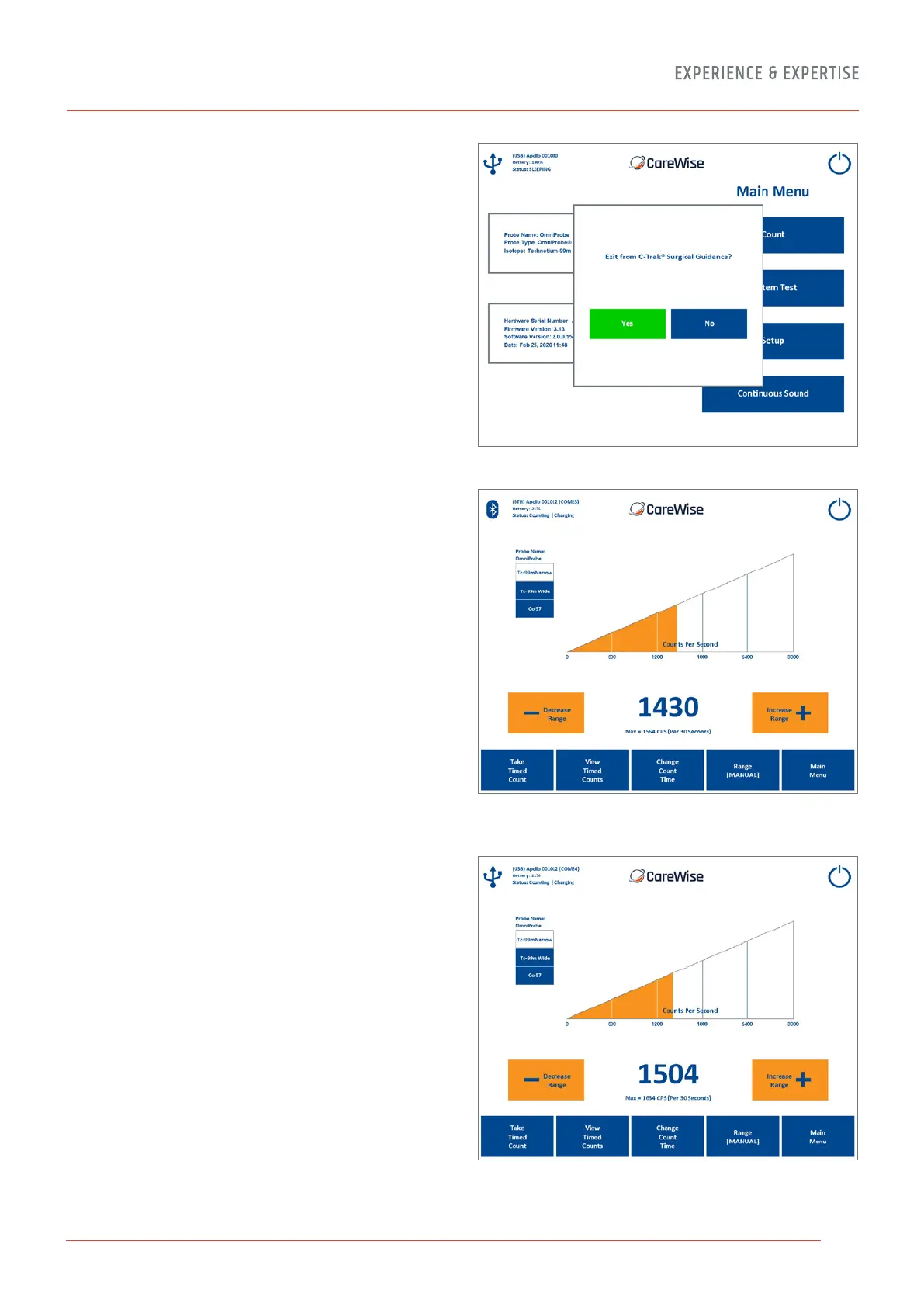
2.4-13 Shutdown Screen
The Shutdown Screen [Figure 20] appears if the ‘power button’
icon in the top right-hand corner is pressed and allows the user
to turn o the Apollo System. Pressing ‘No’ will return the User
to whichever screen was live before the power button icon was
pressed. Pressing ‘Yes’ will shut down the system.
2.4-14 Probe Connection
Connecting to an Apollo wireless probe handset via USB or
Bluetooth can be achieved by pressing the icon in the top
left-hand corner of the main Counts screen (note icon may be
Bluetooth, USB or No Connection).
Note: When using the wired OmniProbe connection, the icon will
appear as the USB probe connection [Figure 22] due to the fact
that this mode of operation uses an internal USB connection.
Important Note: When delivered, the system will already be
paired to the supplied Apollo handsets. Any new handsets must
be paired by the manufacturer and cannot be done by the User.
Please contact your local representative or Care Wise directly for
further information.
Figure 20 – Shutdown Screen
Figure 21a – Main Count Screen showing the Bluetooth icon
for the active wireless Apollo handset mode of operation
Figure 21b – Main Count Screen showing the USB icon for
the active USB wired Apollo handset mode of operation
17


 To Next Page