Page | 23
Carlson Software
Inserng and Removing the MicroSD Card/SIM Card
To remove the MicroSD card or SIM card:
• Open the baery compartment A.
• Remove the baery.
• Remove the cover for the SD or SIM card.
• Gently slide the tray backward unl it clicks out of place.
• Gently li the tray up and remove the card.
Note: When you insert either card make sure the contacts on the card are
facing downward (toward the top of the unit).
Cauon: Use electrostac discharge (ESD) protecon, such as wearing an
ESD strap that is aached to an earth ground before inserng or removing
the SIM card on the BRx7. If an ESD strap is not available, then touch a
metal object prior to accessing the SIM card holder.
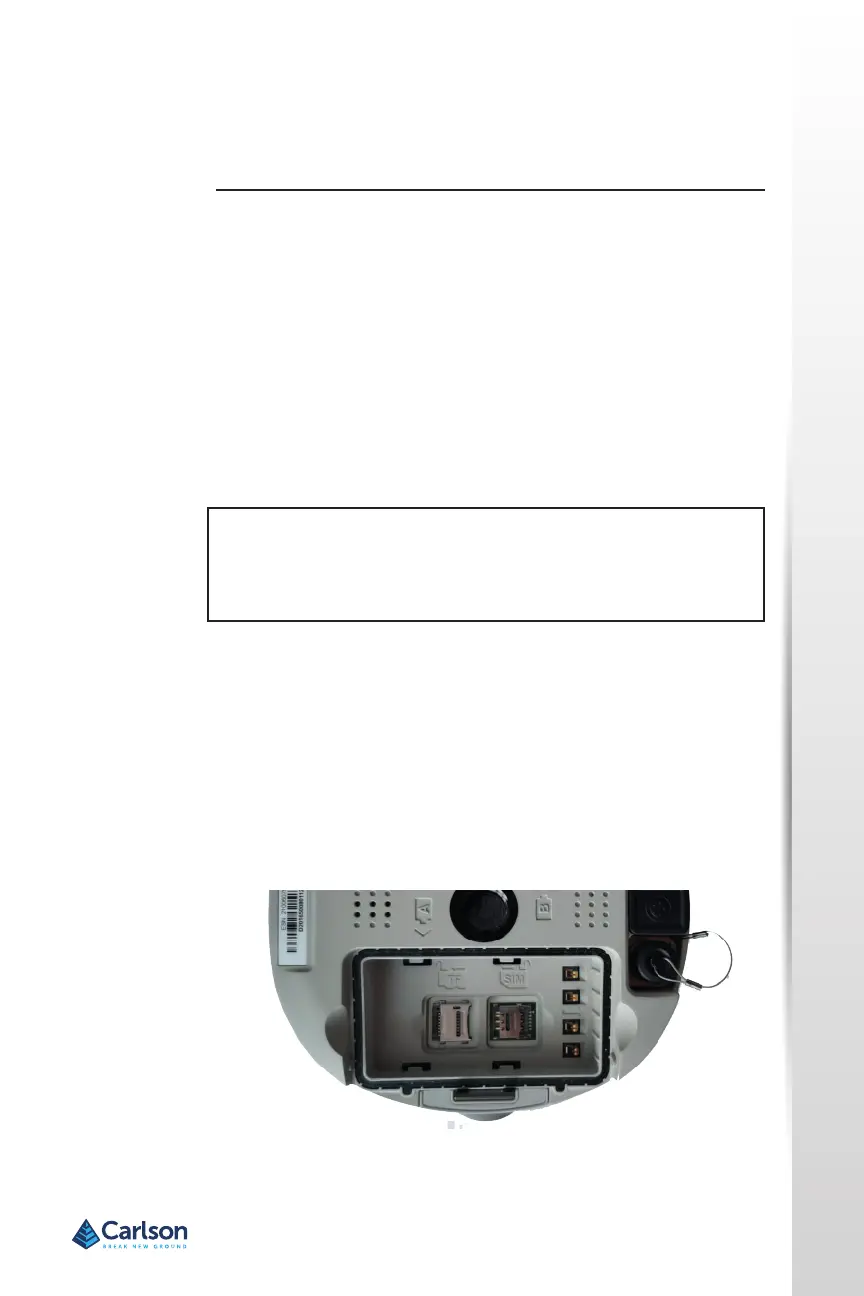
The MicroSD card and the SIM card are only accessible by rst opening
baery compartment A, where:
• The “SIM” card slot is posioned on the le side of the baery
opening.
• The “TF” card slot is posioned on the right side of the baery
opening.
Warning! Ensure the unit is powered o when inserng or removing the
SIM card.
Inserng and
Removing the
MicroSD Card/
SIM Card
Figure 2‐11: MicroSD/SIM card slot


 To Next Page