EasyManua.ls Logo

Carrier i-Vu XT - User Manual

Carrier i-Vu XT
50 pages
Print Icon
To Next Page IconTo Next Page
Loading...
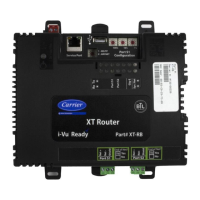
i-Vu® XT Router (drv_gen5)
Installation and Start-up Guide
©2022 Carrier. All rights reserved. • Catalog No. 11-808-826-01 • 6/10/2022

Questions and Answers

  • S
    Steven UnderwoodAug 20, 2025
    Why is there excessive communication errors on Carrier i-Vu XT ARCNET/MSTP?
    • J
      James WolfAug 20, 2025
      Excessive communication errors on ARCNET/MSTP may occur if the network cable is not properly connected, or if the baud rate is incorrect. Ensure that the network cable is securely connected and that the baud rate is set correctly.
  • S
    Sydney HendrixAug 21, 2025
    What to do if no other devices detected on Carrier i-Vu XT Network Router ARCNET/MSTP?
    • J
      Jonathan WestAug 21, 2025
      If no other devices are detected on ARCNET/MSTP, verify that the network cable is properly connected and that the baud rate is correct.
  • S
    Shelia NovakAug 23, 2025
    What to do if Carrier i-Vu XT has an Ethernet connection problem?
    • T
      Travis WhiteAug 25, 2025
      If you are experiencing an Ethernet connection problem, connect the Ethernet cable. Also, check other network components to ensure they are functioning correctly.
  • W
    wmyersAug 26, 2025
    What to do if Carrier Network Router experiences Event System Error - FPGA RX FIFO full?
    • M
      Monica GardnerAug 26, 2025
      If you encounter an Event System Error indicating that the FPGA RX FIFO is full, check the network configuration for a circular route. Additionally, increase the time between COVs to reduce excessive COV traffic.
  • C
    Charles HuffAug 28, 2025
    What to do if Carrier i-Vu XT Network Router default IP address mismatch?
    • M
      mike59Aug 28, 2025
      To resolve a default IP address mismatch, use the controller setup Ports tab to set the IP address. Then cycle the power to accept the new IP address. Alternatively, change the rotary switches to match the current default IP address.
  • T
    Timothy HernandezAug 30, 2025
    What to do if Carrier i-Vu XT experiences Auto restart delay due to system error on startup?
    • W
      William GarciaAug 30, 2025
      If the Carrier Network Router experiences an auto restart delay due to a system error on startup, allow the 5-minute delay to expire. If the condition occurs again after the delay, cycle the power.
  • N
    Nancy MartinAug 31, 2025
    What to do if Carrier i-Vu XT Network Router has ARCNET/MSTP firmware error?
    • D
      Danielle JohnstonSep 1, 2025
      To address an ARCNET/MSTP firmware error, change the rotary switch to select a valid protocol and then cycle the power.
  • S
    slewisSep 2, 2025
    What to do if Carrier Network Router has Duplicate address on ARCNET/MSTP?
    • S
      Samuel NicholsonSep 2, 2025
      If there is a duplicate address on ARCNET/MSTP, change the rotary switch to a unique address.
  • B
    Brooke SantiagoSep 5, 2025
    What to do if Carrier i-Vu XT has Invalid address selection for ARCNET/MSTP?
    • M
      Maurice HallSep 5, 2025
      If there is an invalid address selection for ARCNET/MSTP, change the rotary switch to a valid address.
  • A
    Andrew VargasSep 7, 2025
    How to fix BACnet/IP error on Carrier Network Router?
    • K
      Kyle CamposSep 7, 2025
      To resolve a BACnet/IP error, cycle the power.

Carrier i-Vu XT Specifications

General IconGeneral
BrandCarrier
Modeli-Vu XT
CategoryNetwork Router
LanguageEnglish

Related product manuals