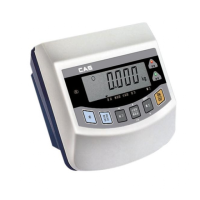
ZERO lamp : ON when the current weight is °∞0°±.
TARE lamp : ON when the TARE weight is saved.
GROSS weight lamp : ON at displaying the total weight.
NET weight lamp : ON at displaying the pure weight.
Hold lamp : ON at weighing the moving object.
BAT lamp : In case of rechargeable battery, display the battery
recharging time.
In case of general Mn/Alkaline battery, display the battery
replacing time.
CHARGE lamp : OFF when the charging is completed at charging
in use of adapter.
POWER lamp : ON at connecting DC 12V adapter.
lamp : ON when the current weight exceeds normal weight.
lamp : ON when the current weight is normal.
lamp : ON when the current weight is 80-90% of normal
weight
lamp: ON when the current weight is 50-80% of normal
weight
lamp: ON when the current weight is below 50% of normal
weight.
6
Display part
KEY PART
KEY FUNCTIONS
KEY:Use to power ON/OFF.
KEY:Use in case of rezero(within 2% of max. capacity)
or to enter the system mode by pressing for 2 sec.
KEY:Use at weighing in use of TARE.
KEY:Use to turn ON/OFF BACK LIGHT.(Option)
ZERO GROSS NET TARE HOLD
POWER
CHARGE



 To Next Page
 Loading...