SECTION 2 - CONTROLS, INSTRUMENTS AND OPERATION
2ï82
SERVICE
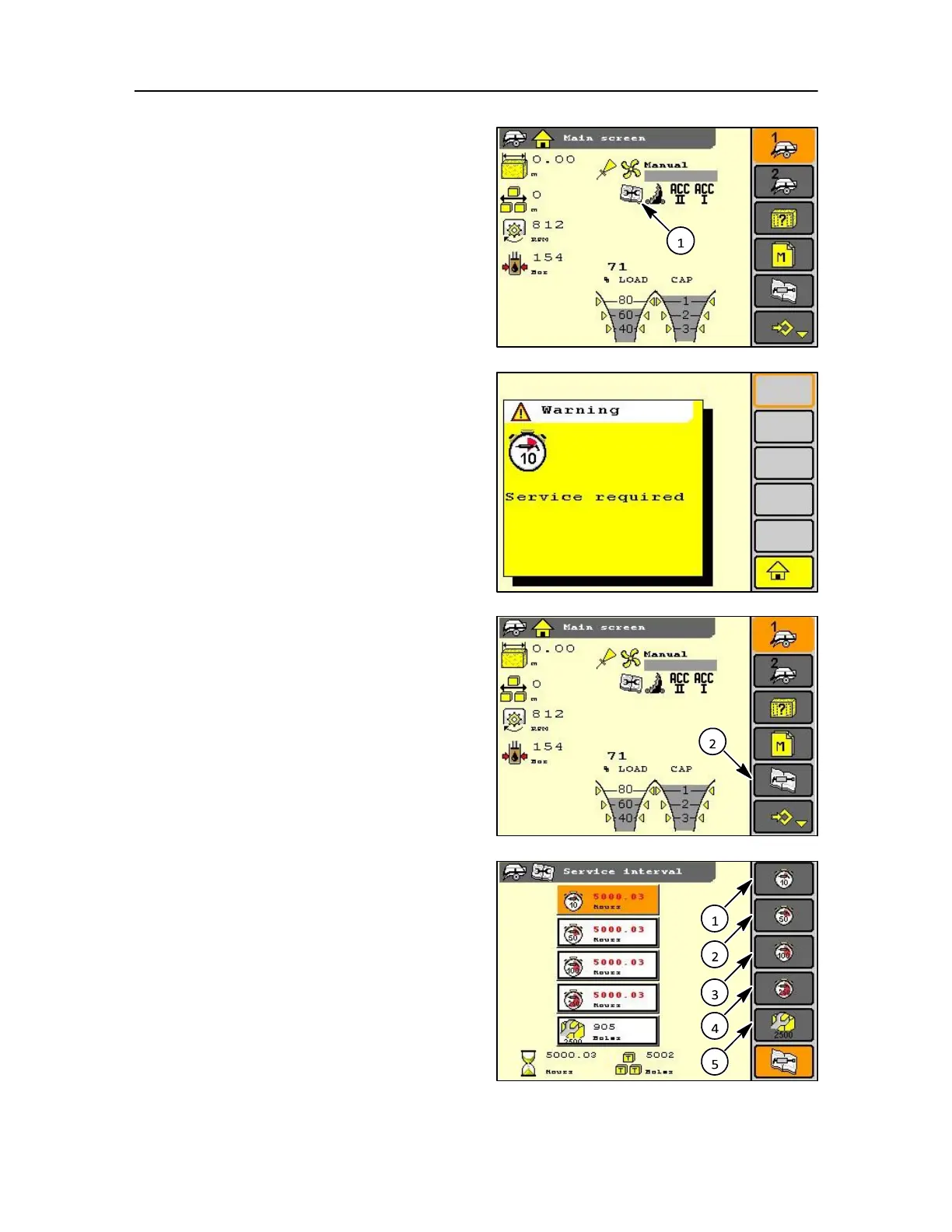
At the service interval a tools icon (1) will appear in
the status bar and flash for a short time. The icon will
remain in the status area until the service is confirmed
as okay.
NOTE: The bale counter is set to zero on service completed
and can only increase from then on.
If a service interval is active in this screen it will be displayed
in text.
A pop-up window may be displayed also at the same
which will show one of the intervals along with a
possible service message.
When the service icon is displayed and flashing the
service screen can be selected (2) by use of the soft
key, encoder, or touch screen.
The service screen then allows selection of the
service log screen by use of the soft key, encoder, or
touch screen.
NOTE: Where hours shown exceeds the allocated period
i.e 12 hours is shown in the 10 hour interval box the
number will be highlighted or in red (colour display only).
1. 10 hour interval
2. 50 hour interval
3. 100 hour interval
4. 250 hour interval



 To Next Page