Alarm
The watch will beep when an alarm time is
reached. You can set up to five different
alarms. The hourly time signal causes the
watch to beep every hour on the hour.
●
The alarm sounds when your current Home
City time (T-1) matches an alarm time
setting.
Configuring Alarm Settings
Your watch provides you with five alarms,
each of which can be set as one of the alarm
types described below.
●
Daily alarm: The alarm sounds at a set time
each day.
●
One-time alarm: The alarm sounds once
and is then cleared.
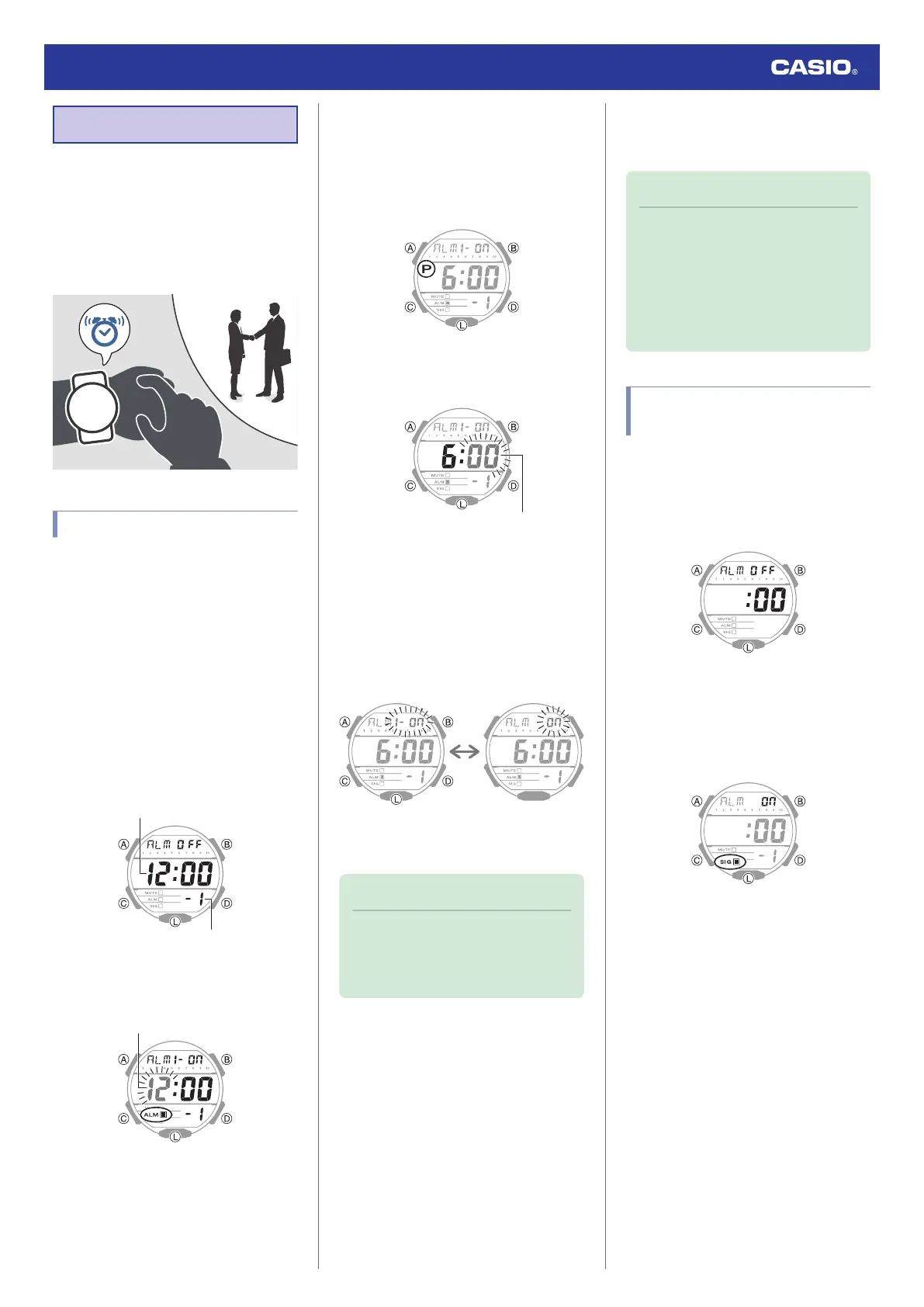
1. Enter the Alarm Mode.
l
Navigating Between Modes
2. Press (D) to scroll through alarm numbers
([1] to [5]) until the alarm you want to
configure is displayed.
3. Hold down (A) for at least one second.
This causes the hours digits to flash.
4. Use (B) and (D) to change the hour setting.
●
Holding down (B) or (D) scrolls through
settings at high speed.
●
If you are using 12-hour timekeeping,
[P] indicates p.m.
5. Press (C).
This causes the minutes digits to flash.
6. Use (B) and (D) to set the minute setting.
7. Press (C).
8. Use (D) to select the alarm type you want.
[1-on]: One-time alarm on
[on]: Daily alarm on
Daily AlarmOne-Time Alarm
9. Press (A) to complete the setting
operation.
Note
●
While the setting is being configured,
the watch will exit the setting operation
automatically after about two or three
minutes of non-operation.
●
Testing the alarm
In the Alarm Mode, hold down (D) to sound the
alarm.
●
To stop the alarm
To stop the alarm after it starts to sound when
an alarm time is reached, press any button.
Note
●
A beeper will sound for 10 seconds to
let you know when the alarm time is
reached.
●
The watch will automatically return to
the Timekeeping Mode from the Alarm
Mode after two or three minutes of non-
operation.
Configuring the Hourly Time
Signal Setting
1. Enter the Alarm Mode.
l
Navigating Between Modes
2. Press (D) to display the hourly time signal
screen ([:00]).
3. Press (A) to toggle the hourly time signal
between enabled and disabled.
●
[SIG] (hourly time signal) is shown on
the display while the hourly time signal
is enabled.
Watch Operation Guide 3569
11



 To Next Page