●
Switching between 12-hour and 24-
hour Timekeeping
You can specify either 12-hour format or 24-
hour format for the time display.
1. Enter the Timekeeping Mode.
l
Navigating Between Modes
2. Hold down (A) for at least one second.
Release the button when the seconds
start to flash.
3. Press (C) five times.
This causes [12H] or [24H] to flash on the
display.
4. Press (D) to select [12H] (12-hour
timekeeping) or [24H] (24-hour
timekeeping).
24-hour timekeeping12-hour timekeeping
5. Press (A) to complete the setting
operation.
Note
●
While the setting is being configured,
the watch will exit the setting operation
automatically after about two or three
minutes of non-operation.
Multi Time
In the Timekeeping Mode, you can use Multi
Time to switch between four different cities
and view the current time in each (T-1: Time 1
through T-4: Time 4). Each of the times,
named T–1 through T–4 can be assigned a
different city. T-1 is your Home City time, while
T-2, T-3, and T-4 are used for local times that
are synced with your Home City time. Times
T-2, T-3, and T-4 come in handy when you
need to keep track of the current times in other
time zones outside of your Home City zone.
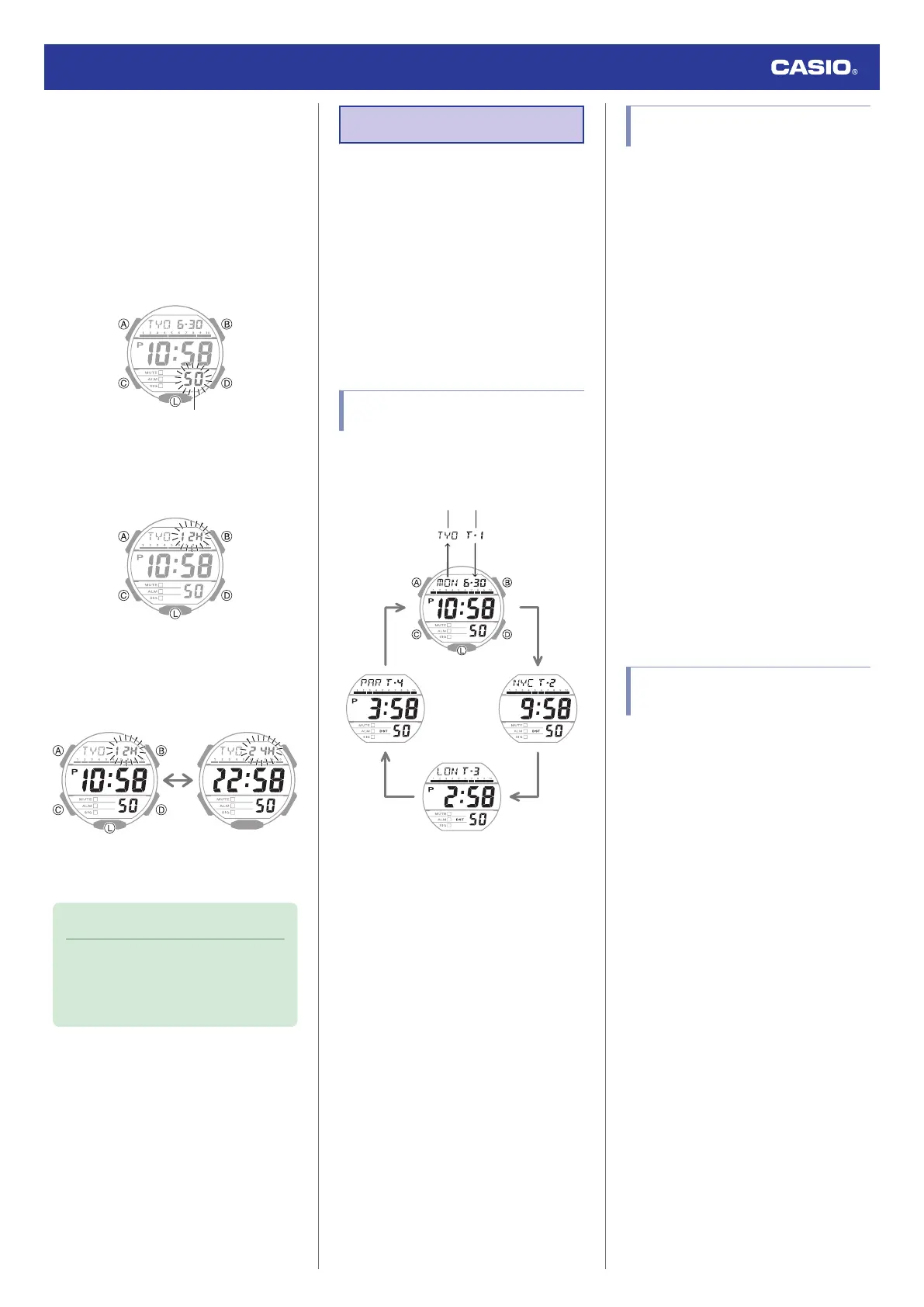
Navigating Between Multi Time
Times (T-1 through T-4)
Each press of (D) cycles through the Multi
Time times as shown below.
D
D
D
D
A
Displayed for one
second
Time numberCity code
●
Pressing (A) while your Home City time is
displayed displays your Home City’s city
code and [T-1] for about one second in
place of the month, day, and day of the
week.
●
The current time setting can be adjusted for
your Home City time (T-1) only.
●
In the case of the local times (T-2, T-3, T-4),
you can change only the city and DST
(except for UTS) settings.
●
Scrolling Sequentially Through Current
Times (T–1 through T–4)
In the Timekeeping Mode, holding down (D)
for at least three seconds causes the display
to continually scroll through times T-1 through
T-4.
To return to your current Home City time,
press any button.
Specifying Local Time Cities
(T-2, T-3, T-4)
Specifying Your Local Time Cities (T-2, T-3,
T-4). If you are in an area that observes
summer time, you can also configure summer
time settings.
1. Enter the Timekeeping Mode.
l
Navigating Between Modes
2. Use (D) to display the local time (T-2, T-3,
T-4) you want to configure.
3. Hold down (A) for at least two seconds.
Release the button when the city code
starts to flash.
4. Use (B) and (D) to change the current
Local Time City.
●
Holding down (B) or (D) scrolls through
settings at high speed.
5. Press (C).
6. Use (D) to change the summer time
setting.
[OFF]: Standard Time
[on]: Summer Time
7. Press (A) to complete the setting
operation.
Swapping Your Home City
Time and a Local Time City
You can your current Home City time (T-1)
with any one of your Local Times (T-2, T-3,
T-4).
1. Enter the Timekeeping Mode.
l
Navigating Between Modes
2. Press (D) to display the Local Time (T-2 to
T-4) you wish to specify as your new Home
City time.
3. Press (A) and (B) at the same time.
The Local Time you select in step 2 will be
swapped with your current Home City
time.
Watch Operation Guide 3569
9



 To Next Page