EasyManua.ls Logo

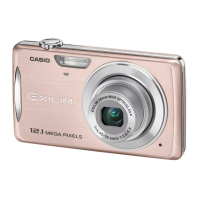
Casio EX-Z200 - User Manual

Casio EX-Z200
171 pages
Print Icon
To Next Page IconTo Next Page
Loading...
1
E
Thank you for purchasing this CASIO product.
Before using it, be sure to read the precautions contained in this User’s Guide.
Keep the User’s Guide in a safe place for future reference.
For the most up-to-date information about this product, visit the official EXILIM
Website at http://www.exilim.com/
K1142PCM1DMX
Digital Camera
User’s Guide

Table of Contents

Questions and Answers

  • J
    Juan Sexton DDSJul 29, 2025
    Why is the auto focus not working on my Casio Digital Camera?
    • V
      Vanessa WhitneyJul 29, 2025
      If your Casio Digital Camera's auto focus isn't working properly, first clean the lens. If that doesn't work, ensure your subject is in the center of the focus frame. If your subject isn't compatible with Auto Focus, use manual focus. Also, avoid moving the camera while shooting and half-press the shutter button, allowing time for auto focus to work.
  • N
    nathan57Aug 2, 2025
    Why does my Casio EX-Z200 Digital Camera keep turning off?
    • N
      natasha17Aug 2, 2025
      If your Casio Digital Camera suddenly powers down, it may be due to Auto Power Off being activated, so turn the power back on. The battery may be dead, so charge it. The camera's protection function may have activated because the temperature is too high, so turn off the camera and let it cool down.
  • M
    Michele SchwartzAug 6, 2025
    How to fix USB transfer issues with Casio Digital Camera?
    • J
      Jeffrey FisherAug 7, 2025
      If images are not transferring via USB on your Casio Digital Camera, check that the USB cable is securely connected. For Windows 98SE or 98, ensure the USB driver is installed correctly. Also, confirm the correct USB communication protocol is selected and the camera is turned on.
  • T
    thollandAug 10, 2025
    Why is the flash not working on my Casio Digital Camera?
    • J
      Jacob BrownAug 11, 2025
      If the flash on your Casio Digital Camera isn't firing, check if the flash mode is set to Flash Off. If so, change to another mode. If the battery is dead, charge it. If a BEST SHOT scene that uses Flash Off is selected, change to a different flash mode or select a different BEST SHOT scene.
  • J
    Jason McintyreAug 14, 2025
    What to do if the subject is out of focus on my Casio Digital Camera?
    • S
      Sarah WallsAug 15, 2025
      If the subject appears out of focus in your recorded image with Casio Digital Camera, ensure the subject is located inside the focus frame when composing the image.
  • L
    laura92Aug 25, 2025
    Why is the color off on my Casio Digital Camera playback images?
    • E
      Emily GonzalezAug 25, 2025
      If the playback image color differs from the monitor screen on your Casio Digital Camera, sunlight may be shining directly into the lens. Reposition the camera to avoid direct sunlight.
  • L
    Lindsay YoungSep 10, 2025
    Why does my Casio Digital Camera turn off during Self-timer?
    • J
      Jacqueline WheelerSep 12, 2025
      If your Casio Digital Camera powers down during the Self-timer countdown, the battery may be dead. Charge the battery.

Casio EX-Z200 Specifications

General IconGeneral
BrandCasio
ModelEX-Z200
CategoryDigital Camera
LanguageEnglish

Related product manuals