EasyManua.ls Logo

Casio EX-Z200 - General Guide

Casio EX-Z200
171 pages
Print Icon
To Next Page IconTo Next Page
To Previous Page IconTo Previous Page
Loading...
153
Appendix
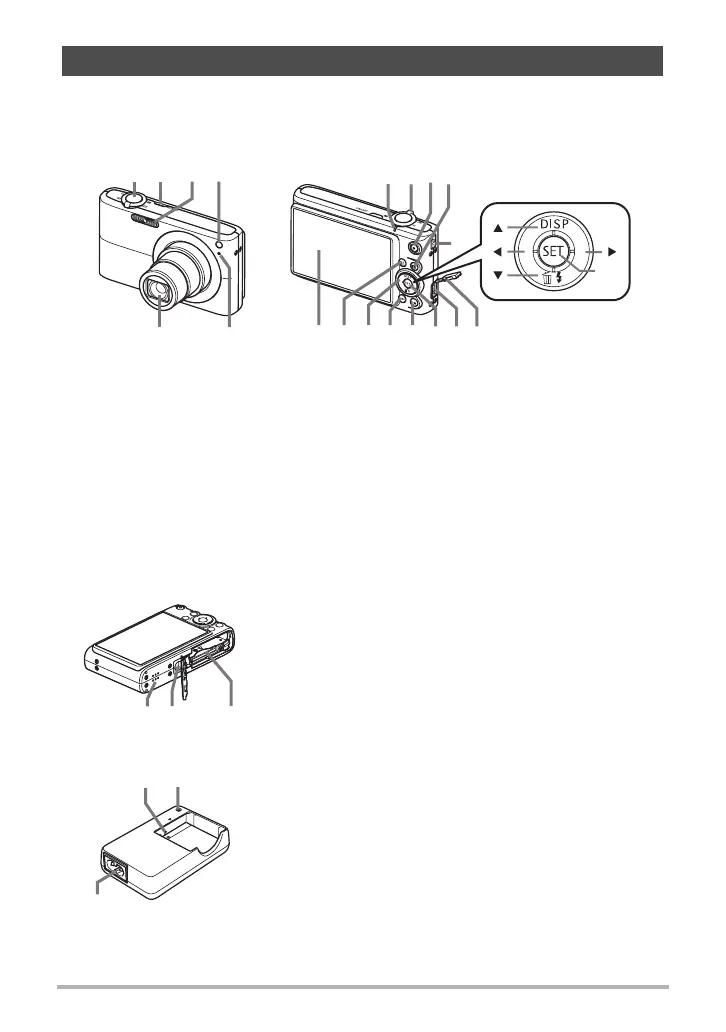
The numbers in parentheses indicate the pages where each item is explained.
. Camera
. Charger Unit
General Guide
1
Shutter button (page 16)
2
[ON/OFF] (Power)
(page 22)
3
Flash (page 26)
4
Front lamp
(pages 18, 65, 68)
5
Microphone
(pages 45, 98)
6
Lens
7
Back lamp
(pages 16, 22, 26)
8
Zoom controller
(pages 16, 42, 81, 82)
9
[0] (movie) button
(page 45)
bk
[r] (REC) button
(pages 16, 22)
bl
Strap hole (page 2)
bm
Connector cover
bn
USB/AV port (pages
82, 102, 110, 119)
bo
[SET] button (page 23)
bp
[BS] button (page 50)
bq
[MENU] button
(page 59)
br
Control button
([8][2][4][6])
(page 23)
bs
[p] (PLAY) button
(pages 19, 22)
bt
Monitor screen
(pages 137, 154)
21
6
5
4
3
89bk7
bl
bpbqbrbsbt bo bmbn
[ ]
[ ]
[ ]
[ ]
[
SET
]
Front Back
ck
Battery/memory card slots (pages 12, 14, 148, 150)
cl
Tripod hole
Use this hole when attaching to a tripod.
cm
Speaker
ckclcm
Bottom
3
2
1
1
+- Contacts
2
[CHARGE] Lamp
3
AC jack

Table of Contents

Related product manuals