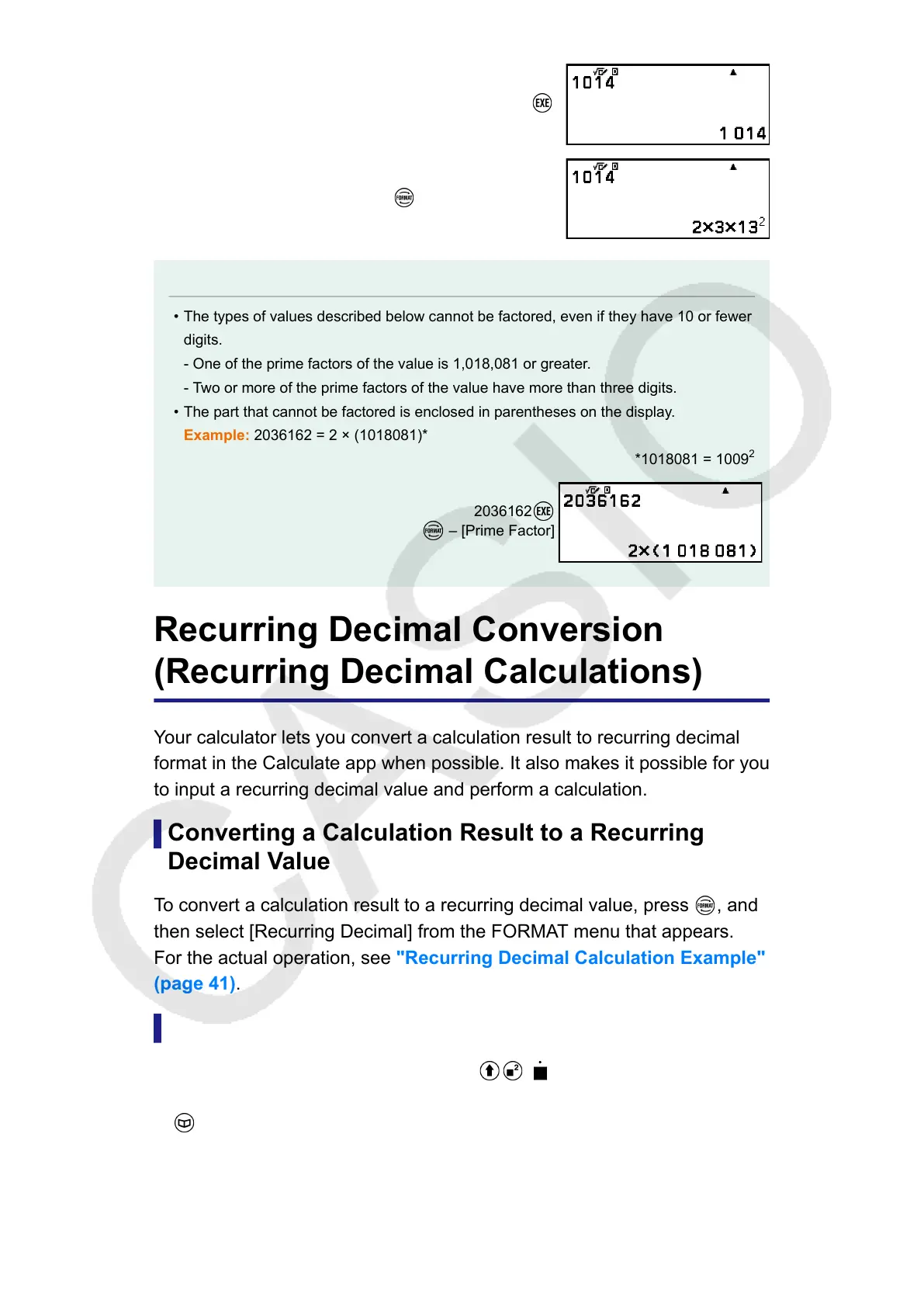
1014
– [Prime Factor]
Note
• The types of values described below cannot be factored, even if they have 10 or fewer
digits.
- One of the prime factors of the value is 1,018,081 or greater.
- Two or more of the prime factors of the value have more than three digits.
• The part that cannot be factored is enclosed in parentheses on the display.
Example: 2036162 = 2 × (1018081)*
*1018081 = 1009
2
2036162
– [Prime Factor]
Recurring Decimal Conversion
(Recurring Decimal Calculations)
Your calculator lets you convert a calculation result to recurring decimal
format in the Calculate app when possible. It also makes it possible for you
to input a recurring decimal value and perform a calculation.
Converting a Calculation Result to a Recurring
Decimal Value
To convert a calculation result to a recurring decimal value, press
, and
then select [Recurring Decimal] from the FORMAT menu that appears.
For the actual operation, see "Recurring Decimal Calculation Example"
(page 41).
Inputting a Recurring Decimal
To input a recurring decimal value, use ( ) or the CATALOG menu
item shown below.
– [Numeric Calc] > [Recurring Decimal]
For the actual operation, see "Recurring Decimal Calculation Example"
(page 41).
40



 To Next Page