Same Result Setting
When executing a Dice Roll or Coin Toss simulation with Same Result at
its initial default setting (Off), each execution displays a different (random)
result. If the Same Result setting is changed to something other than Off,
the displayed results are those determined by the calculator. Using the #1,
#2, or #3 setting is useful when you want the same result to be displayed
by all the calculators being used by the students in a class.
Note
• To have multiple calculators display the same result, make sure that the settings below
are identical on all of the calculators.
- Number of dice or coins
- Number of trials (rolls or tosses)
- Same Result setting (#1, #2, or #3)
Coin Toss
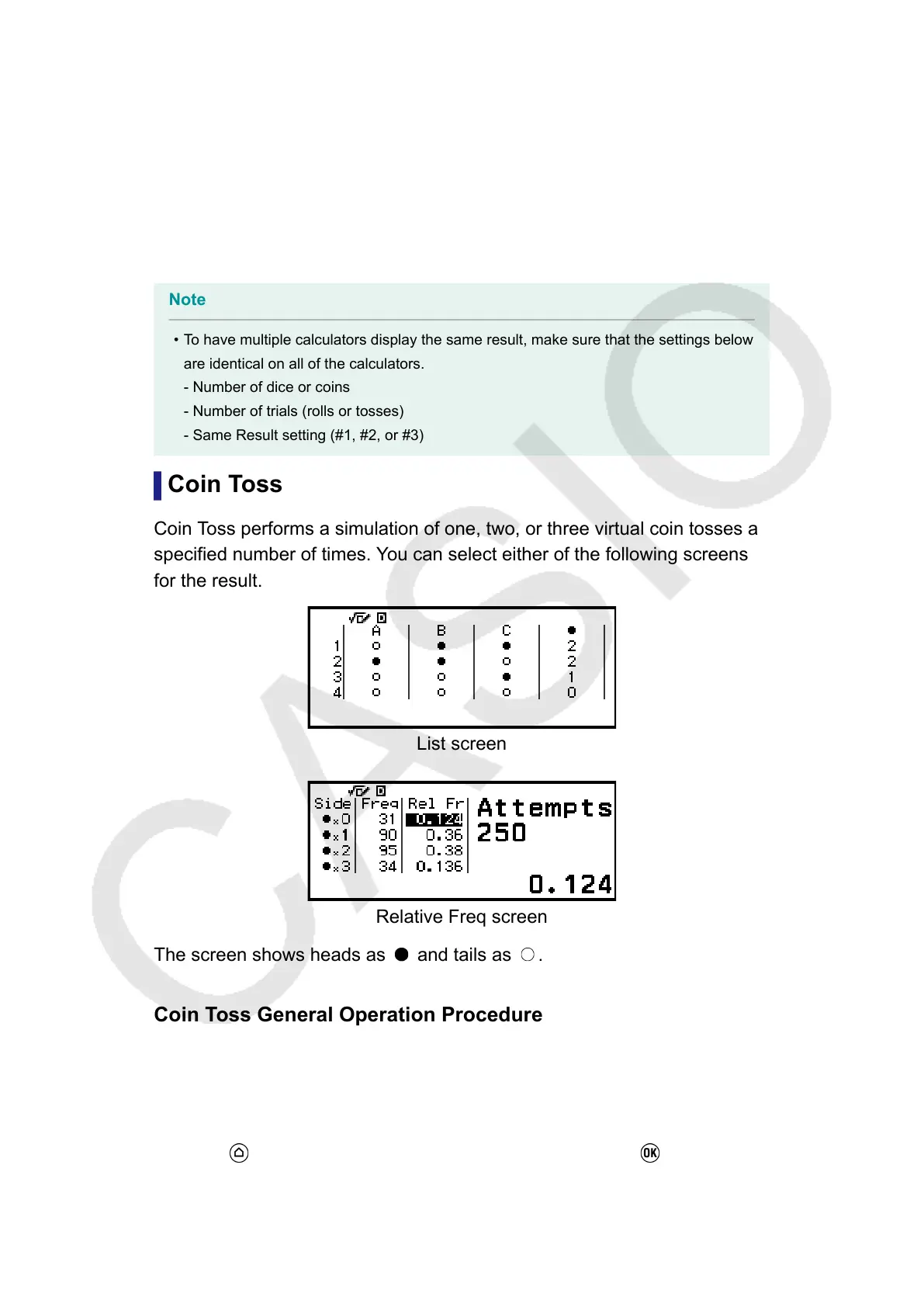
Coin Toss performs a simulation of one, two, or three virtual coin tosses a
specified number of times. You can select either of the following screens
for the result.
List screen
Relative Freq screen
The screen shows heads as and tails as .
Coin Toss General Operation Procedure
Example: To simulate 100 tosses of three coins. For this example, the
Relative Freq screen is used for simulation results, showing the number of
heads (0, 1, 2, 3) and the relative frequencies of heads of each toss.
1. Press
, select the Math Box app icon, and then press .
•
This displays the Math Box menu.
83



 To Next Page