28
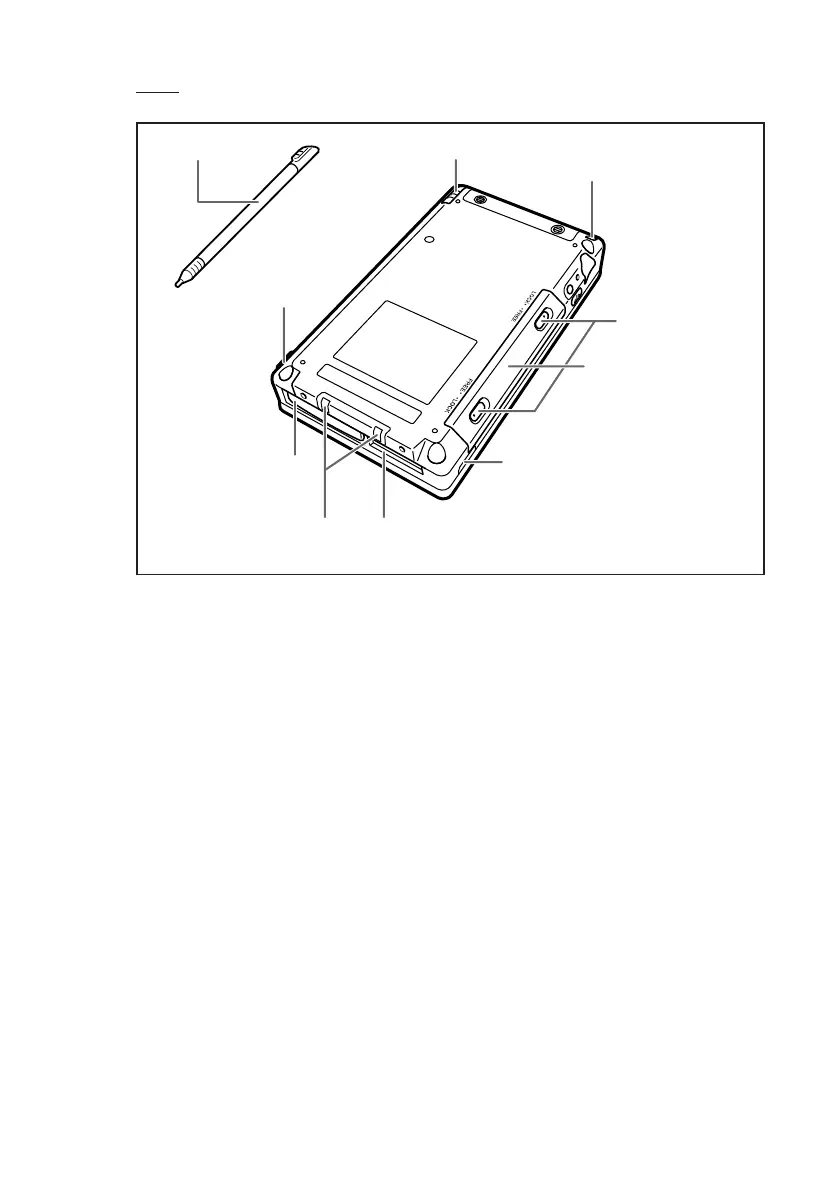
!9Stylus
@0Strap hole
@1Battery pack cover
@2Battery pack cover
lock switch
@3Infrared communication port
@4Serial connector
@5Power terminals
@7Power adaptor port
!9Stylus
@6Serial connector cover
!9 Stylus
Use this pen for entering items on the touch panel screen. (See page 29)
@0 Strap hole
You can attach a commercially available strap. (See page 31)
@1 Battery pack cover
This is the cover for the battery pack.
@2 Battery pack cover lock switch
Be sure to keep the lock switch locked. Locking the lock switch prevents the
battery pack from falling out.
@3 Infrared communication port
Used for data communications by the IrDA interface. (See page 91)
@4 Serial connector
Connect peripheral device via RS-232/USB interface.
Remove the rubber cover and store it before use.
@5 Power terminals
Terminals for supplying power from the Cradle.
Rear
IT-10_1/25-39-E.p65 06.6.15, 6:40 PM28



 To Next Page