32
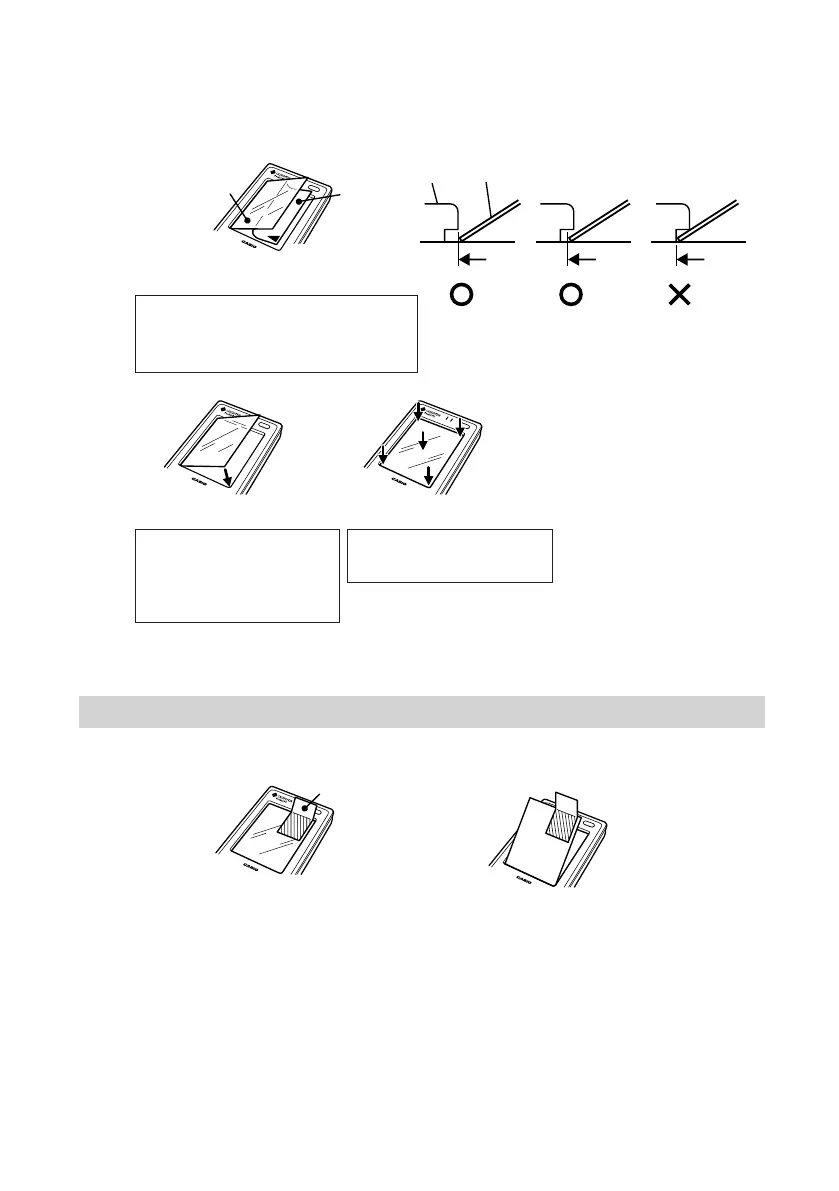
r With the adhesive side facing down, put the edge of the protect sheet along the
edge of the screen frame as shown in Fig. 3.
* Do not put it too far under the edge.
* Air bubbles caught under the protect sheet will not affect the input operability.
Removing the protect sheet
q Stick a piece of tape to the edge on the protect sheet to remove it.
Protect
sheet
Clearfilm
Fig. 3
Fig. 5 Fig. 6
* If the protect sheet is caught
on the edge, press it down
with the stylus provided.
Tape
Fig. 7 Fig. 8
ProtectsheetEdge
Fig. 4
* Stick about 1 cm of the protect sheet's
long side to the frame's edge and then
remove the rest of the clear film.
* Release the protect sheet
and let it fall on its own to
stick to the LCD screen as
shown in Fig. 5.
* Press the protect sheet
down completely.
IT-10_1/25-39-E.p65 06.6.15, 6:40 PM32



 To Next Page