3
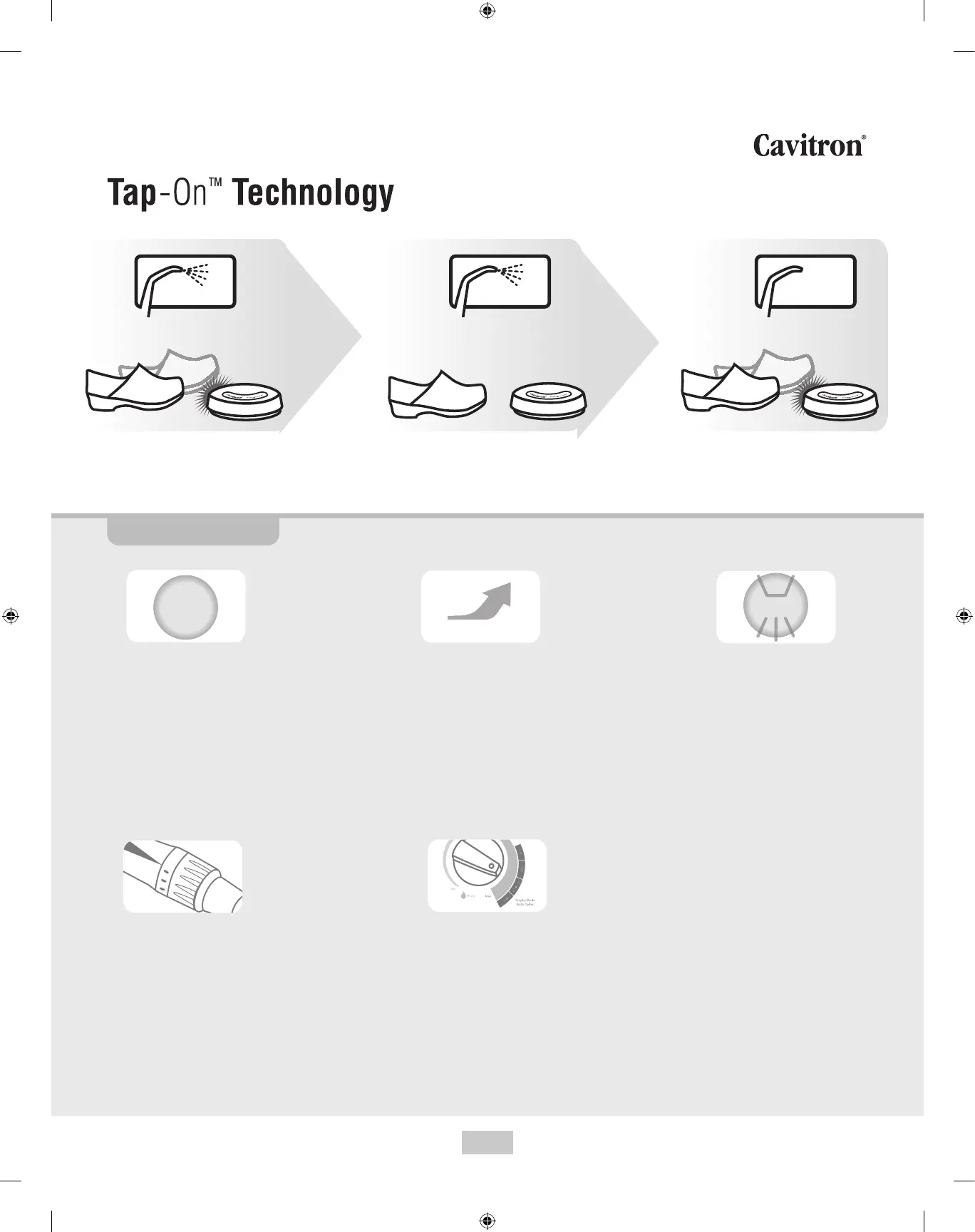
To activate Tap-On™ Technology:
Tap wireless foot pedal one time quickly.
Relax foot as you scale or air polish.
To deactivate Tap-On™ Technology:
Tap wireless foot pedal one time.
Turbo: When pressed,
increases power delivered
to the system by up to
25%; turbo power remains
on until the button is
pressed again.
Boost: Temporary, hands-
free activation by pressing
the foot pedal all the way to
the oor; enables quick
removal of tenacious calculus.
Tip: Quick release of pedal
from Boost will not deactivate
Tap-On™ Technology.
Purge: Remove insert
from Handpiece and
press Purge button; water
will purge through
system for two minutes
or until you press the foot
pedal or press the
Purge button again.
Finer Lavage Water Control:
Conveniently adjust lavage
water control directly on the
handpiece;
1 = lowest water ow
6 = highest water ow
> 6 = ush or purge
Prophy Mode Auto Cycles
(available on Cavitron® JET Plus
Systems): Automatically cycles
between air polish and rinse
without pumping the foot pedal.
Choose short, medium or long
prophy cycle times. Tap-On™
Technology will activate prophy
mode auto cycles.
User controls
Turbo
Purge
Boost
Quick Start User Guide


 To Next Page