21
ENCODER KNOB - V Adjusts the parameter displayed by the PARAMETER DISPLAY SCREEN - V.
GAS K
EY Activates the flow of gas.
SPECIAL FUNCTIONS (F
X) KEY
Only enables entering and exit afterwards from the SPECIAL FUNCTIONS Menu (SET UP
Fx) on the HT4 panel and not on the DH panel.
5 - WELDING MIG dual pulse
When welding takes place the fields in the displays show the same values as those included for pre-setting with the difference
that now, if possible, they are those measured.
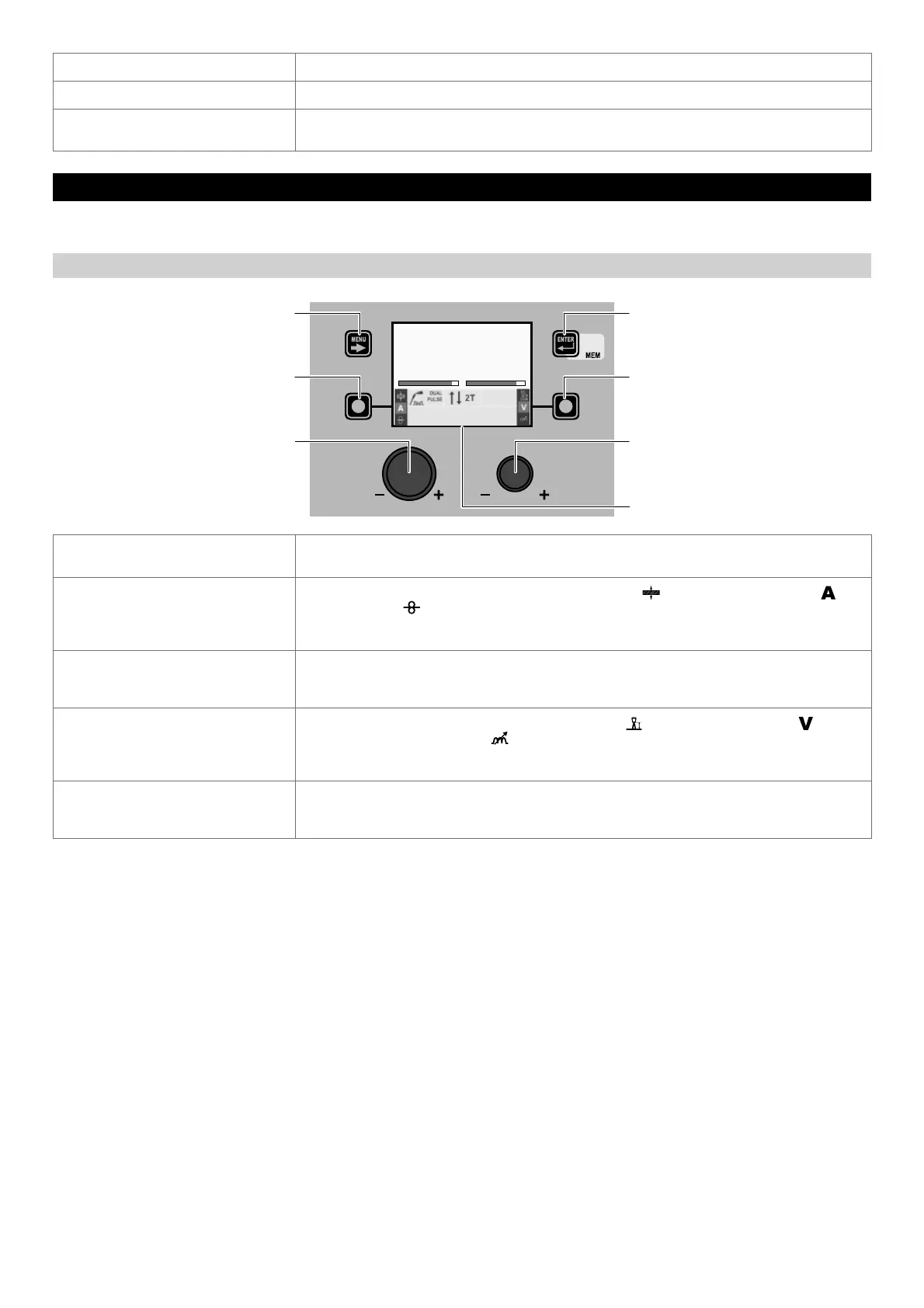
“DH” CONTROL PANEL
MENU KEY ENTER/MEM KEY
ENCODER KNOB - SX ENCODER KNOB - DX
VISION S
CREEN
SX KEY DX KEY
Fe G3 SI-1 Ø 0.8 Ar 16-20% CO2
PROGRAM 2011
AV
217 29.4
MENU KEY
Used to access the PROCESS SELECTION Menu (PROCESS) and subsequent menus, as
applicable.
SX K
EY
Scrolls in succession THICKNESS OF WELDED ITEM ( ) - WELDING CURRENT ( )
- WIRE SPEED (
) only on the VISION SCREEN (this operation is activated when the key is
released).
In this case, where possible, the values displayed will be those measured.
ENCODER K
NOB - SX
Adjusts the parameter selected using the SX K
EY.
In this case the values displayed become those pre-set.
After a period of 3 seconds the values displayed go back to those measured if possible.
DX K
EY
Scrolls in succession ARC LENGTH ADJUSTMENT ( ) - WELDING VOLTAGE ( ) -
ELECTRONIC INDUCTANCE (
) only on the VISION SCREEN (this operation is activated when
the key is released).
In this case, where possible, the values displayed will be those measured.
ENCODER K
NOB - DX
Adjusts the parameter selected using the DX K
EY.
In this case the values displayed become those pre-set.
After a period of 3 seconds the values displayed go back to those measured if possible.










 To Next Page