32
WELDING MODE SELECTION KEY Scrolls the various welding modes in succession, interrupting the HOLD Function.
WELDING MODE SELECTION LED The LED unit indicates the welding mode selected according to the VISION S
CREEN.
HOLD F
UNCTION LED Flashes for a set time, informing the operator that the HOLD Function is active.
PARAMETER DISPLAY S
CREEN - V Shows the parameter indicated by the PARAMETER SELECTION LED - V.
PARAMETER SELECTION LED - V
The LED unit indicates the welding parameter selected using the PARAMETER SELECTION K
EY
- V.
PARAMETER SELECTION K
EY - V
Scrolls in succession ARC LENGTH ADJUSTMENT (
) - WELDING VOLTAGE ( ) -
ELECTRONIC INDUCTANCE (
) only on panel HT4.
In this case the values displayed are those for: HOLD.
ENCODER K
NOB - V
Adjusts the parameter displayed by the PARAMETER DISPLAY S
CREEN - V interrupting the HOLD
Function.
GAS K
EY Activates the flow of gas without interrupting the HOLD Function.
SPECIAL FUNCTIONS (F
X) KEY
Only enables entering, interrupting the HOLD Function and exit afterwards from the
SPECIAL FUNCTIONS Menu (SET UP Fx) on the HT4 panel and not on the DH panel.
MIG-MAG manual
1 - WELDING MODE SELECTION Menu (MODE) MIG-MAG manual
“DH” CONTROL PANEL
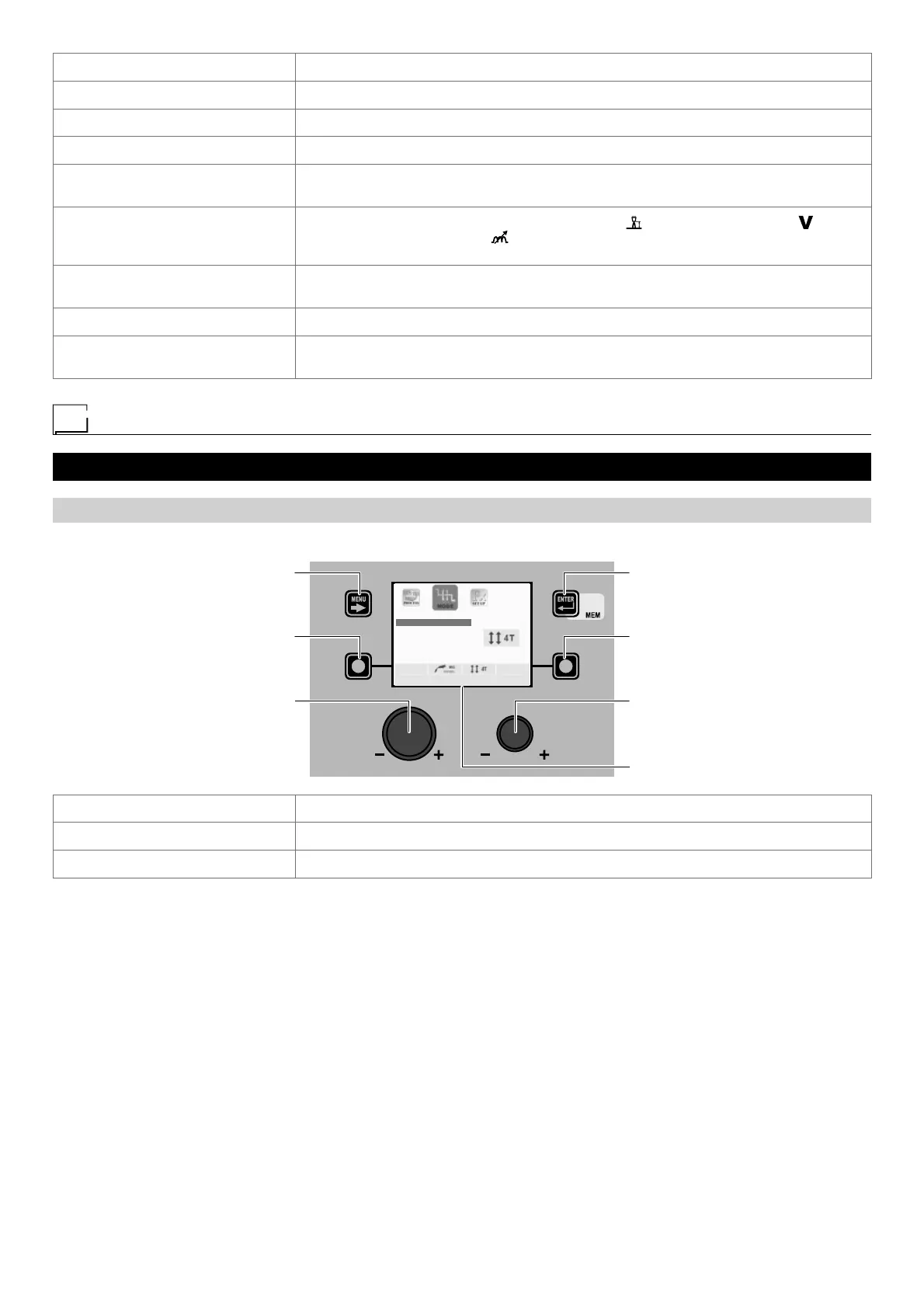
To access the WELDING MODE SELECTION Menu (MODE) push the WELDING MODE SELECTION KEY.
MENU KEY ENTER/MEM KEY
ENCODER KNOB - SX ENCODER KNOB - DX
VISION S
CREEN
SX KEY DX KEY
TWO STROKE (2T)
FOUR STROKE (4T)
CRATER 2T
CRATER 4T
SPOT WELDING
STITCH WELDING
MENU KEY Used to access subsequent menus if there are any.
ENCODER K
NOB - SX Select the weldin g mode.
ENTER/MEM K
EY Used to access the PRE-SETTING selected, with the MODE chosen.










 To Next Page