Filters
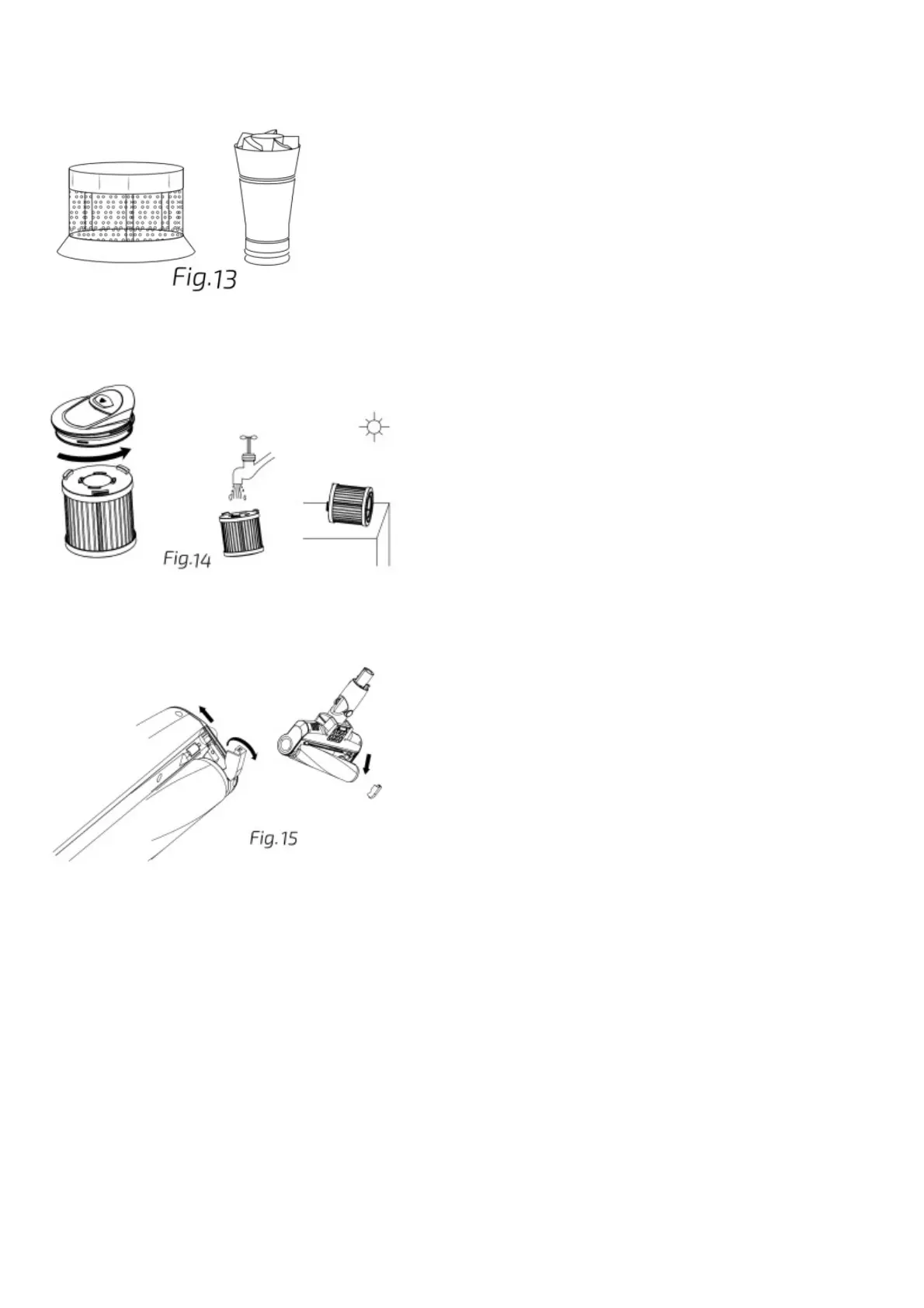
It is suggested to clean the filters regularly to ensure maximum efficiency. They can be cleaned with warm water. Dry them thoroughly before installing them back in the device. To take
filters out:
Open the dust tank following the instructions on the before section.
Turn the metallic filter anticlockwise and remove it.
Fig. 13
Unscrew the plastic cyclone and remove it too.
Pull from the tab located on the top of the handheld vacuum cleaner and remove the high efficiency filter.
Wash all of them with warm water.
Allow them to dry completely before installing and using them again.
Fig. 14
Jalisco brush
Recommendation: It is important to clean the brush regularly to avoid hair and other foreign objects from tangling and to prevent blockages.
Press the brush release button on the bottom part of the suction base and remove the brush.
Wash it with warm water. Do not use detergents or soap.
Make sure it is completely dry before installing it back in the device.
Fig. 15
WET ACCESSORY
Before use
Take the product out of the box.
Remove all packaging materials. Keep the original box.
Make sure all the components are included and in good conditions, otherwise, contact immediately the official Technical Support Service of Cecotec.
When you do not use the vacuum cleaner for a long time, please remove the water tank and empty the remaining water. Do not expose it to direct sunlight or to damp environments.
Mop installation/removal, Removing/installing the water tank
Fig. 16
In order to install/remove the cleaning cloth you must first disassemble the water tank from the rest of the appliance.
In order to remove the water tank, use your foot to hold it against the ground and pull upwards until it unclicks from position.
Once the cloth has been installed and the water tank has been filled, to reinstall the water tank, simply push it back together until it clicks into position.
Note: Do not use cleaning agents. Use clean and room temperature water only. Do not use the vacuum cleaner to vacuum water.






 To Next Page