Charging
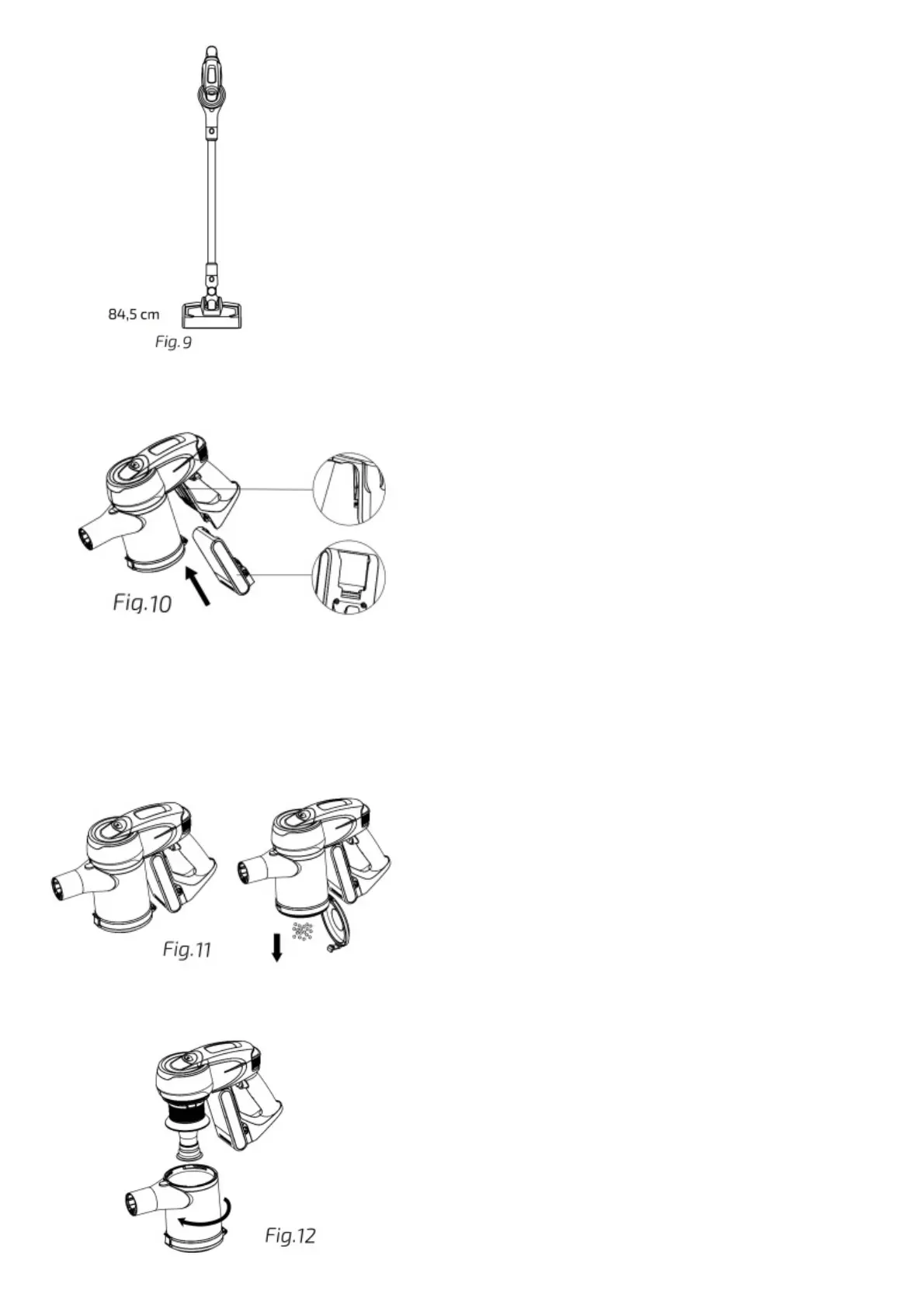
The device can be charged in 2 different ways. It can be charged directly through the handheld vacuum cleaner or the battery can be removed and charged separately.
It is important to charge it when the battery is low. While charging, the battery indicator will turn on red, and it will turn green when battery is fully charged again.
Disconnect it from the power adapter when the battery indicator is lit up in green.
Fig. 10
CLEANING AND MAINTENANCE
Do not use abrasive scouring pads, powders or cleaners to clean the product.
Use a soft, dampened and clean cloth to clean the product’s outer housing.
Do not let water enter into the vacuum cleaner.
Keep the appliance in a cool, dry place and out of reach from children.
Do not immerse the device in water and do not clean any of its parts in the dishwasher.
Dust tank
To empty the dust tank, first disassemble the handheld vacuum cleaner from the rest of the unit. Use the tab on the dust tank to open its cover and empty it. If necessary, shake it gently to
remove all the dust.
Fig. 11
To clean it, press the dust tank release button and turn the dust tank anticlockwise to the unlock position. Remove it. Use water to rinse it. If necessary, clean it with soap to remove all the
dust.
Recommendation: It is suggested to clean the dust tank after each use.
Fig. 12







 To Next Page