16
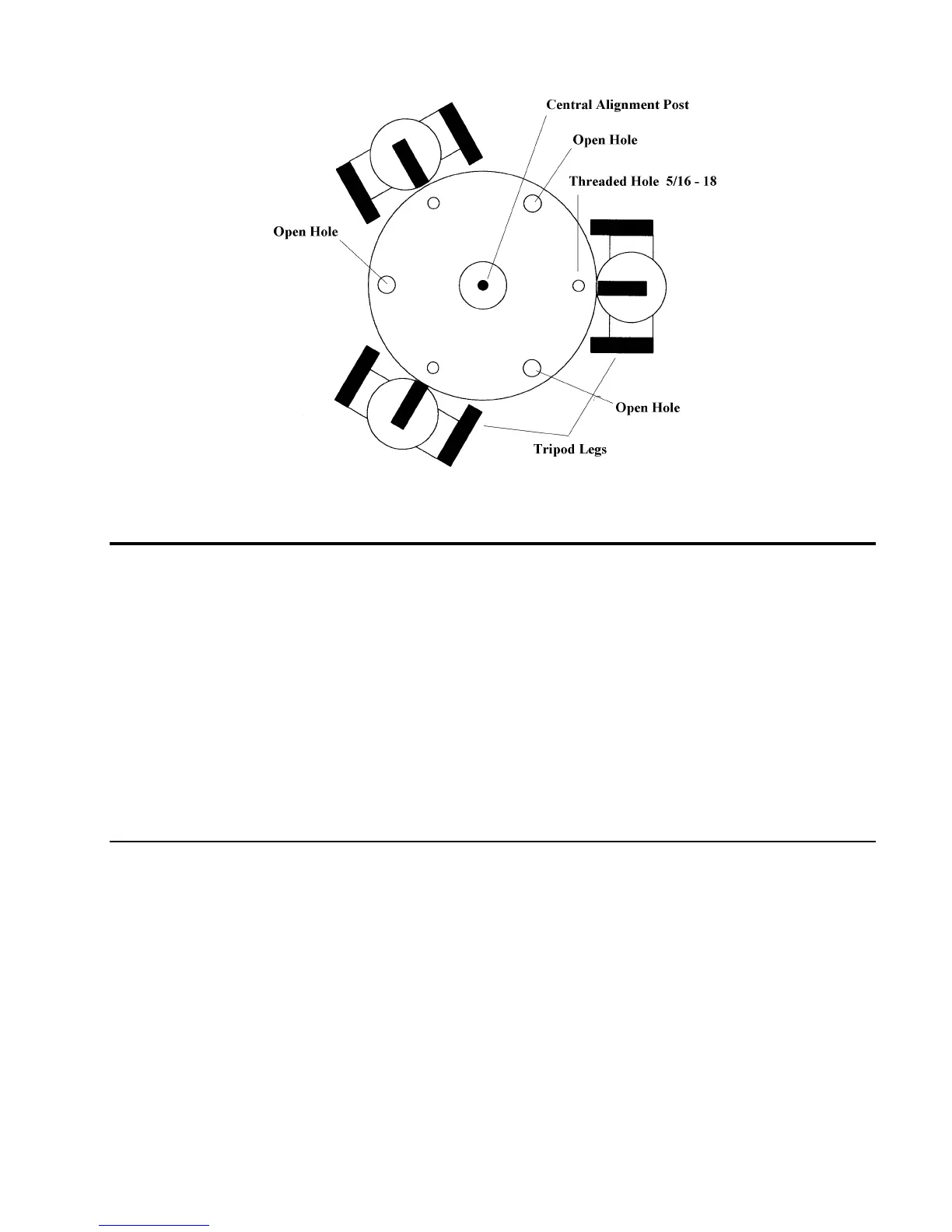
Figure 3-3b: Top view of the tripod head. Place the Ultima 2000 on top of the tripod. Use the open holes to mount
the Ultima 2000 to the tripod.
Installing the Finder
The finderscope is used to help you locate and center objects in the main field of your telescope. To start, remove the
finder and hardware from the plastic wrapper. Included are the following:
• 7x50mm Finderscope
• Finder Bracket
• Rubber O-ring
• Three Nylon-Tipped Thumbscrews (10-24x1/2”)
• Two Phillips Head Screws (8-32x1/2”)
Mounting the finderscope and bracket is a two step process; first mount the bracket to the telescope, then mount the
finderscope in the bracket.
Attaching the Finderscope Bracket to the Telescope
1. Find the two holes in the rear cell of the telescope (see Figure 3-4).
2. Remove the tape covering the two holes. The tape is there to prevent dust and moisture from
entering the optical tube before installing the finder bracket.
3. Place the finder bracket over the holes. The bracket should be oriented so that the ring with the
holes for the adjustment screws is closer to the rear cell of the telescope .
4. Thread the screws in by hand and then tighten fully.
WARNING:
If you remove the finderscope, do not thread the screws back into the rear cell of the telescope. The screws
are long enough to obstruct the movement of, and possibly chip the primary mirror.











 To Next Page