10
7.2 Two-way Intercom Conversation
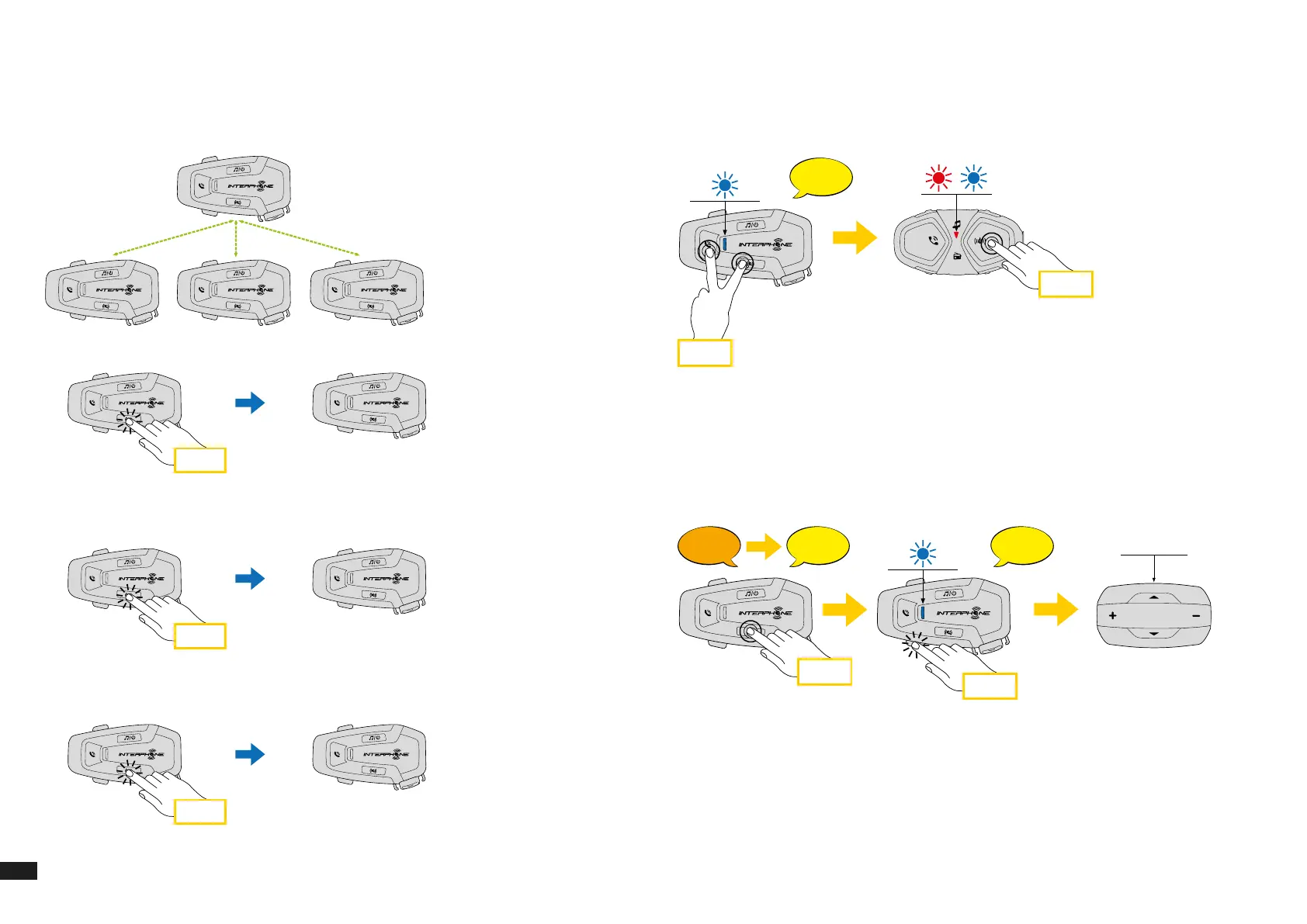
After pairing the control units, communication can be started, by pressing
the INTERCOM button, according to the diagram below.
1. Press once to connect the control unit D.
A
B C D
Start/stop intercom connection with unit “D”
x 1
A
D
2. Press twice to connect the control unit C.
Start/stop intercom connection with unit “C”
x 2
A
C
3. Press three times to connect the control unit B.
Start/stop intercom connection with unit “B”
x 3
A
B
7.3 Old Interphone Series
It is possible to pair previous Interphone series devices by pressing, with the
unit on, the INTERCOM and TELEPHONE buttons for 3 seconds. Then start
pairing mode on the second unit, usually pressing the power button (with
the control unit o) until the led ashes red/blue.
6 sec
3 sec
Bluetooth
Mesh
Interphone U-Com 16 (Utente) Aggiungi utente
Aggiungi utenteAggiungi utente
Fine intercom
Setup
Bluetooth
®
Intercom - other pairings
Other Interphone series pairing (to be done with unit OFF)
Anycom pairing for other brands (except Sena)
Anycom
pairing
Interphone
pairing
Intercom
pairing
Con guration
menu
Mobile phone
pairing
7.4 Anycom
Anycom feature allows intercom conversations with other intercom brands.
It is possible to pair the intercom with only one non-Interphone device at a
time. The intercom distance depends on the performance of the connected
Bluetooth
®
intercom. When a not-Interphone device is paired with the
Interphone device, if another Bluetooth
®
device is paired via the second
mobile phone pairing, it will be disconnected.
x 3
5 sec
?
Bluetooth
Mesh
Interphone U-Com 16 (Utente) Aggiungi utente
Aggiungi utenteAggiungi utente
Fine intercom
Setup
Bluetooth
®
Intercom - other pairings
Other Interphone series pairing (to be done with unit OFF)
Anycom pairing for other brands (except Sena)
Anycom
pairing
Intercom
pairing
Con guration
menu
Mobile phone
pairing
1. With U-COM 6R on, enter the conguration menu by pressing the
INTERCOM button for 5 seconds. Do not to release the button before the
led turns blue.
2. Press the VOLUME – button 3 times to activate the ANYCOM pairing
mode.
3. Set the not-Interphone intercom to mode Phone pairing.


 To Next Page