6
Multimedia TFT system of motorcycle must be paired with “PHONE
PAIRING”:
5 sec
x 1
TFT
UCOM16
Cascopilota
COLLEGAMENTI
UCOM6R
Bluetooth
®
devices pairing
Con guration
menu
Con guration
menu
Con guration
menu
Con guration
menu
Phone
pairing
Phone
pairing
Second
mobile phone
pairing
GPS pairing
Main phone pairing (to be done with unit on)
Second phone pairing (to be done with unit on)
Gps SATNAV & TFT pairing (to be done with unit on)
Rider’shelmet
CONNECTIONS
The primary phone will have priority over the second phone, in case of
simultaneous call reception on both phones.
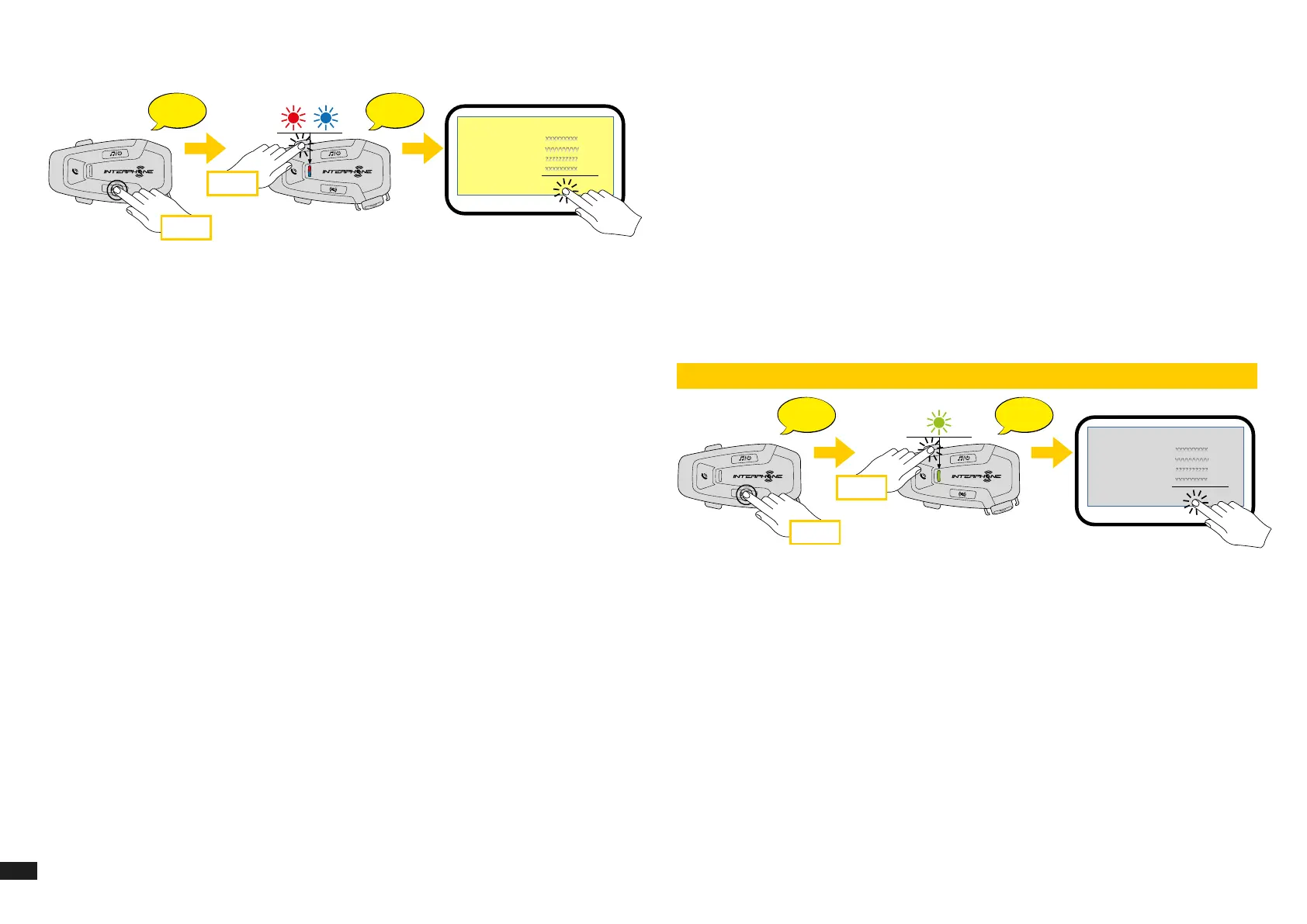
4.2 Second mobile phone pairing
1. Switch on Bluetooth
®
service on your phone (check device manual for
more details).
2. With U-COM 6R on, press and hold INTERCOM button for 5 seconds, to
enter settings menu. Don’t release the button until the led light is blue.
3. Press the VOLUME + button twice to activate Second mobile phone
pairing mode.
4. Start the search for new Bluetooth
®
devices on the mobile phone.
5. In few moments the phone will list “U-COM 6R vx.x” among available
devices to pair. Select this item.
6. If prompted for a PIN or code, enter 0000 (four times zero ).
7. UCOM Voice guide will conrm the successful pairing.
8. If your smartphone asks for additional authorization please conrm.
4.3 GPS Pairing
1. Switch on Bluetooth
®
service on your GPS (check device manual for more
details).
2. With U-COM 6R on, press and hold INTERCOM button for 5 seconds, to
enter settings menu. Don’t release the button until the led light is blue.
3. Press the VOLUME + button 3 times to activate GPS pairing mode.
4. Start the search for new Bluetooth
®
devices on the GPS.
5. In few moments the device will list “U-COM 6R vx.x” among available
devices to pair. Select this item.
6. If prompted for a PIN or code, enter 0000 (four times zero).
7. UCOM Voice guide will conrm the successful pairing.
8. If your device asks for additional authorization please conrm.
GPS
UCOM16
Bluetooth
UCOM6R
5 sec
x 3
TFT
UCOM16
Cascopilota
COLLEGAMENTI
UCOM6R
Bluetooth
®
devices pairing
Con guration
menu
Con guration
menu
Con guration
menu
Con guration
menu
Phone
pairing
Phone
pairing
Second
mobile phone
pairing
GPS pairing
Main phone pairing (to be done with unit on)
Second phone pairing (to be done with unit on)
Gps SATNAV & TFT pairing (to be done with unit on)
TFT
UCOM16
Rider’shelmet
CONNECTIONS


 To Next Page