5
FORGE OUTDOOR COAL FURNACE • OWNER'S MANUAL
5. Over Air / Under Air LEDs - illuminate to indicate the actuator for controlling
the Over or Under Air is open.
6. Connected LED - illuminates to indicate the controller is connected to a wi-
network.
7. PURGE button - pressed to purge the outdoor furnace before opening the
rebox or ash removal door.
8. RESET button - pressed after new fuel is loaded into the outdoor furnace.
9. IGNITION ASSIST button - pressed to assist in starting or tending to a new re.
Button and LED Status Indicators
Purge Mode
Status
Purge Over Air Under Air Connected
Power
PURGE
RESET
LEDs VIOLET
IGNITION
ASSIST
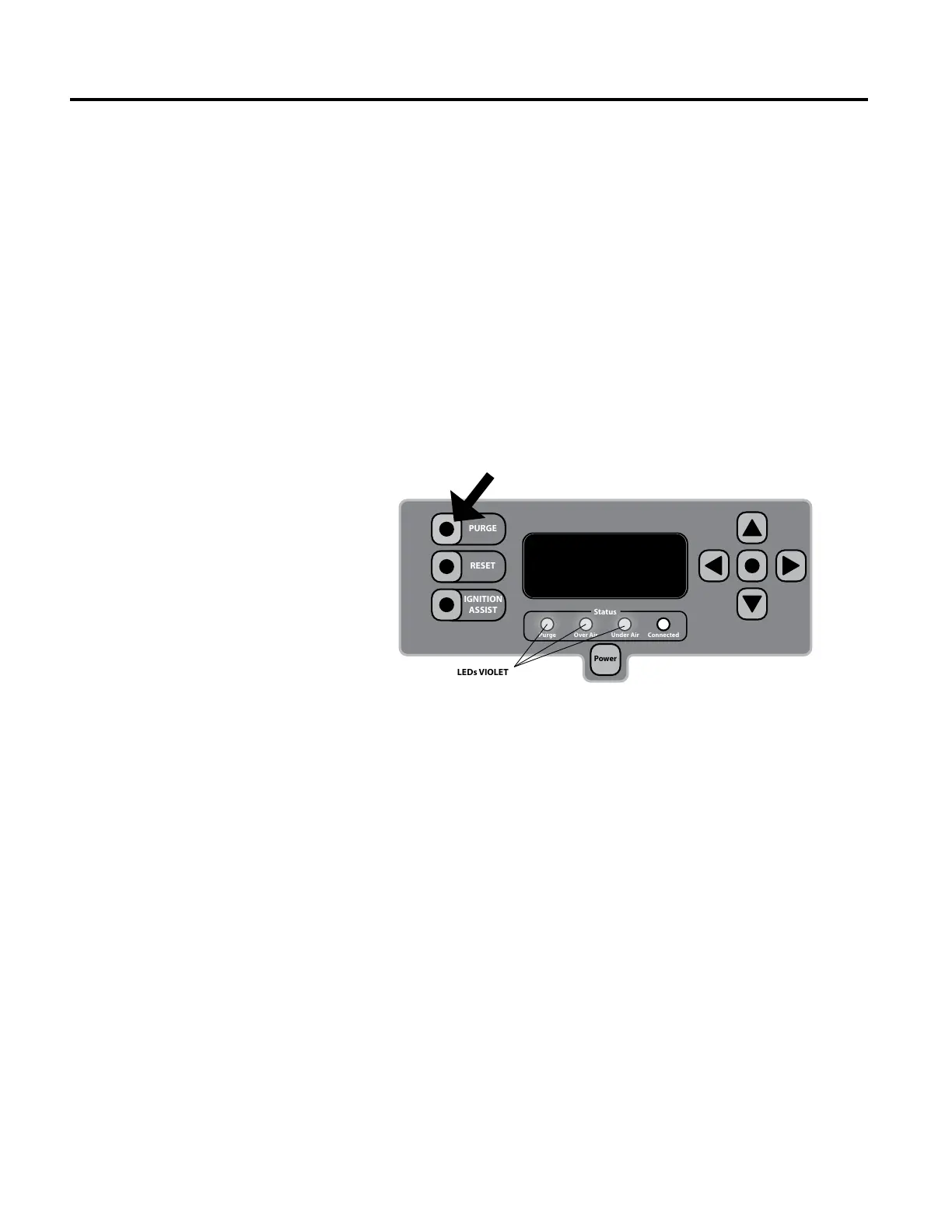
When the Purge button is pressed, the combustion fan starts and the over air
intake opens all the way to purge combustible gases and smoke above the re.
After 30 seconds in the purge cycle, the under air will increase to half of the
over air. is is done so that the ash collection chamber will also be purged of
combustible gases. When the Purge button is rst pressed, the purge LED and
over air LED will illuminate violet. e under air LED will illuminate violet 30
seconds into the purge cycle.


 To Next Page