21
22
2. Getting Started
2-2. Connecting & Installation 2-3. Basic Function
2. Getting Started
< USB Flash Memory Drive>
<Digital Camera/ External USB
HDD/Flash MP3 Player>
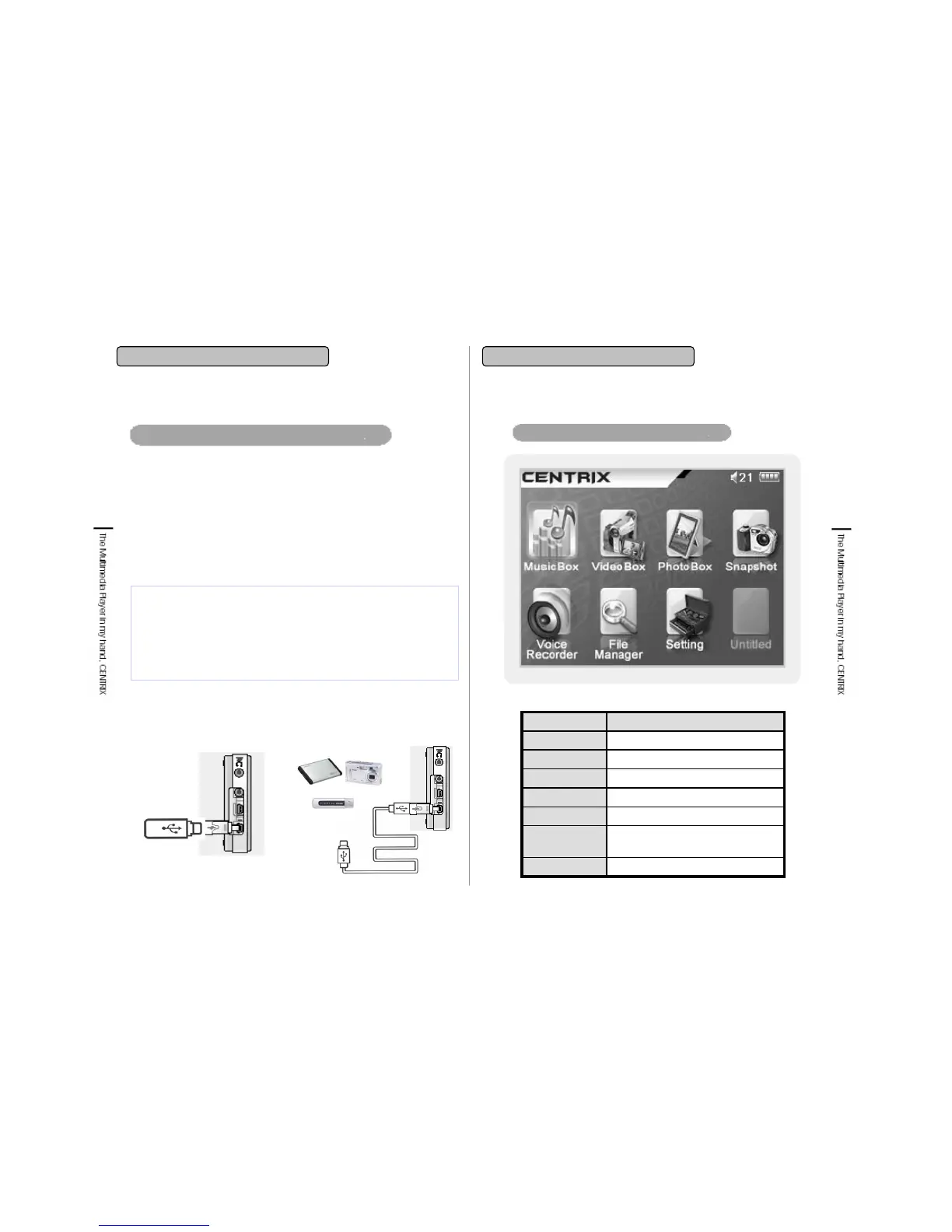
1. Connect USB 1.1 Host cable (Mini USB A, short cable) to USB
storage device (USB Flash Memory Drive).
2. Open USB port which is on the left side and connect USB Host cable
(short cable) with USB Host Jack which is on the lower end of player.
3. When it is connected to the main body, it is detected as a mass
storage (B: device) on PC.
4. Transfer, save, deletion of file is available at File Manager menu.
5. Connect two cables each other if certain product is not available to
connect to USB 1.1 Host cable (short cable).
Connecting external storage to USB OTG : USB1.1
Main Menu
FunctionMenu
Setting the functions
Setting
Managing external storage
using USB Host
File Manager
Recording voice
Voice Recorder
Taking pictures
Snapshot
Playing image files
Image
Playing video files
Video
Playing music files
Music
<Direct connection is available> <Direct connection is not available>
* Precaution
• This player has USB 2.0 & USB1.1 Host Jack. Do not use with
connecting USB 2.0 and USB1.1Host Jack at the same time.
• Separate application needed digital camera or various drives
appeared Multi Card Reader, Security function applied USB Storage
device is not recognized in this player.


 To Next Page