Download AP
To download AP to HMI, please make sure the download cable is connected properly.
During the operating or in startup menu the HMI is ready to receive AP data sent by PC
automatically. When download AP the SW2=ON.
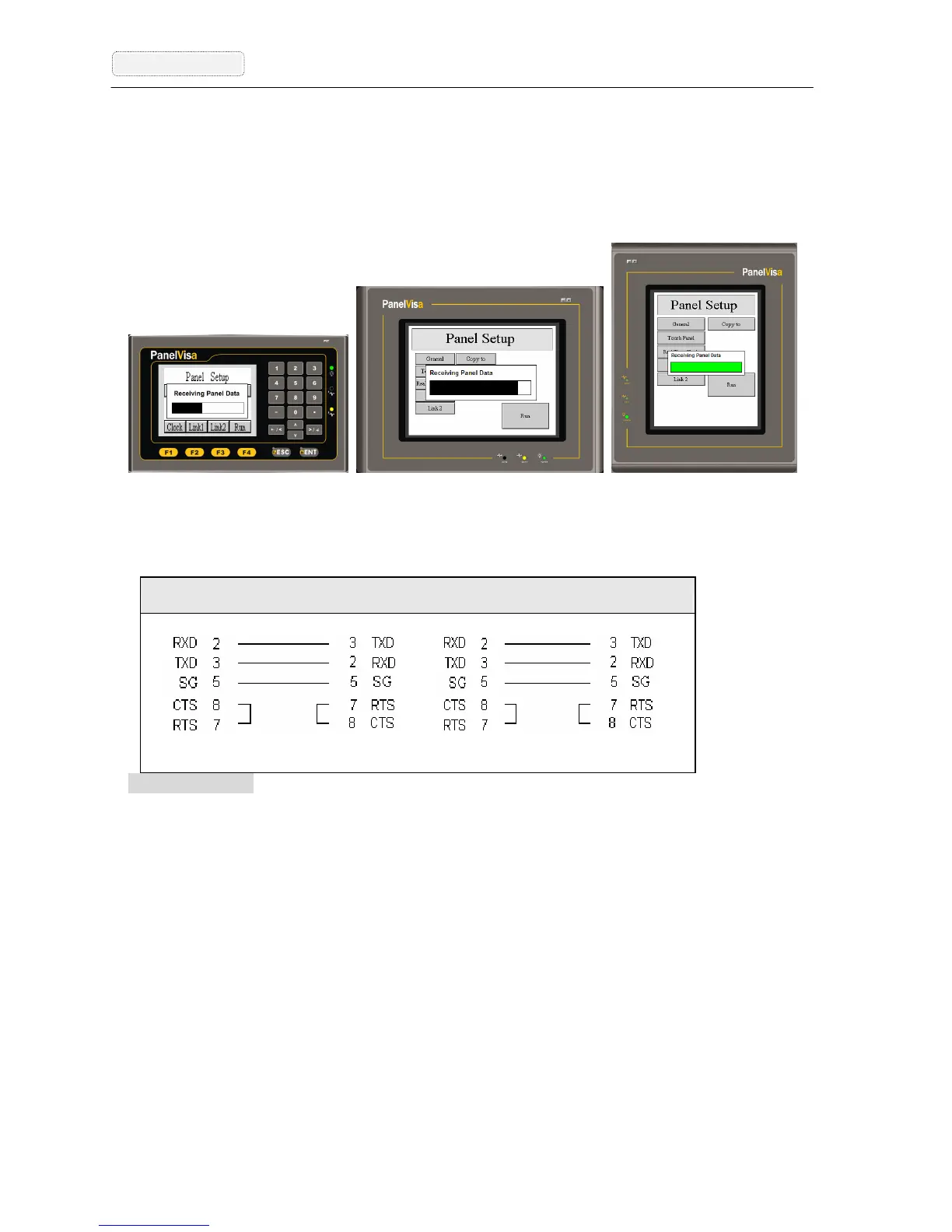
FigureA-3 The HMI downloading data from PC screens
1. Connect the PC COM1 or Com2 and HMI with a PC download cable.
Serious Caution: Be sure turn off the power before connecting or it will damage the HMI
communication components.
2. The HMI will judge the data correctness during downloading AP.
When the PC sends AP data to HMI, the HMI will show download AP screen and
display related information automatically to receive data. The HMI will show ”Incorrect
Model !” when the Model No. is not set correctly in the AP data. Please select a correct
Model No. from the software then download it again. If the HMI shows ”Incorrect User
ID Code !!”, then the hardware and software might not fit each other. Please check the
brand name of the HMI to make sure you purchased a right hardware.
HMI Connector PC RS232C HMI Connector PC Connector
9-pin Female --------- 9-pin Female 9-pin Male ---------- 9-pin Female
HMI COM2 ---- PC COM HMI COM1 ------ PC COM



 To Next Page