47
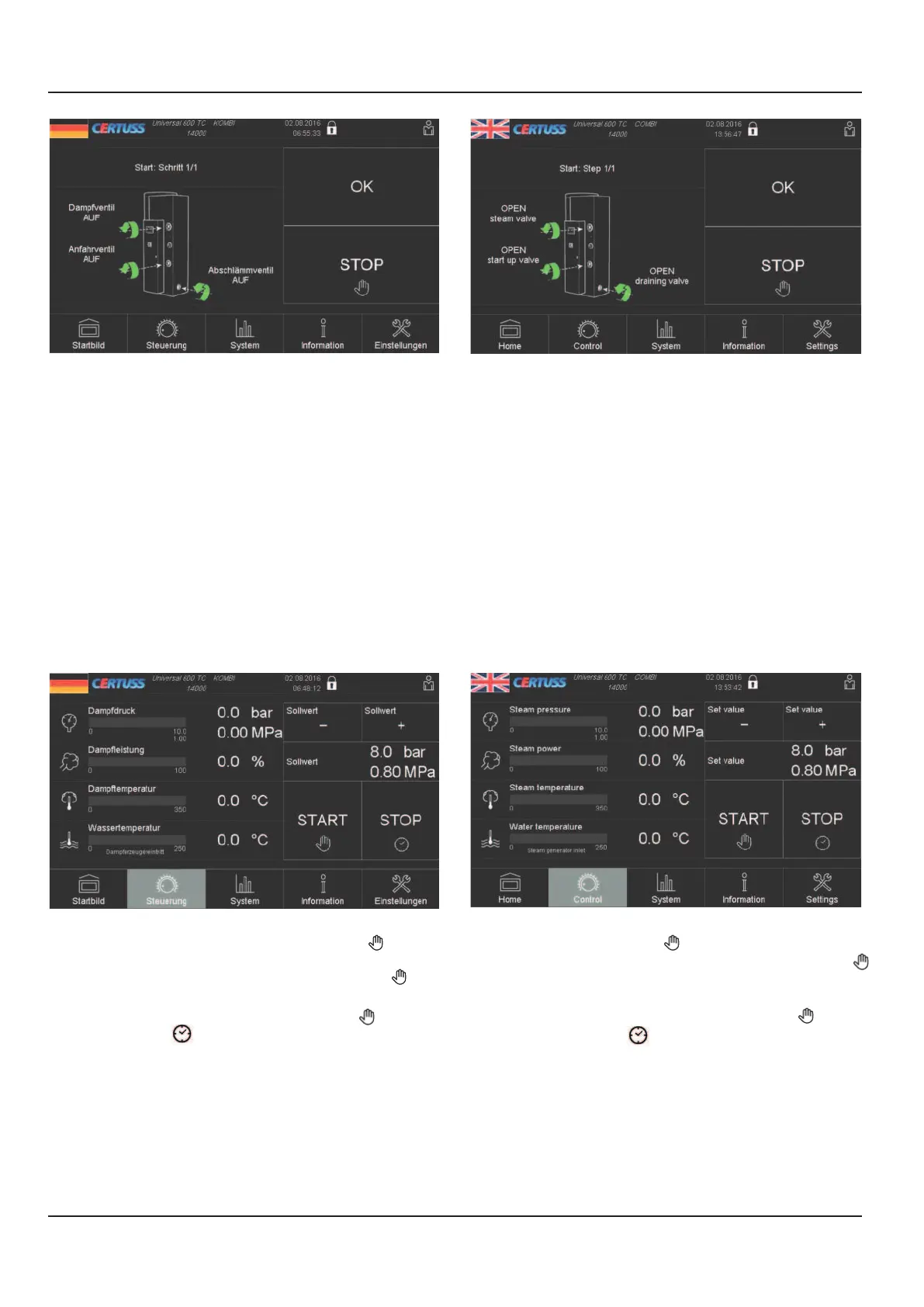
15. Kontrollieren ob Dampf-, Anfahr- und
Abschlämmventil geöffnet sind.
16.
Durch Berühren des Feldes „OK“ bestätigen.
Damit ist die Thermotimatfunktion aktiviert und
im Display erscheint wieder das Bild „Steuerung“.
17. Der Dampfautomat startet und schaltet ab zu
den programmierten Zeiten.
6.2.3 Manueller Start/Stop- Betrieb bei
aktiviertem Thermotimat
1. Außerhalb der programmierten Betriebszeiten
kann der Dampfautomat auch von Hand oder
durch einen Fernimpuls gestartet oder
abgeschaltet werden.
2. Bei durch den Thermotimat abgeschalteten
Dampfautomat ist im Display folgendes Bild
zu sehen:
3. Dampfautomat von Hand starten:
Im Bild des Displays das Feld „START “
berühren, der Dampfautomat startet und im
Bild erscheint nun in diesem Feld „STOP “.
4. Dampfautomat von Hand abschalten:
Im Bild des Displays das Feld „STOP “, dann
„START “ berühren, der Dampfautomat
schaltet ab und im Display erscheint wieder
das Bild „Steuerung“ und der Thermotimat ist
wieder aktiviert.
5. Bei Bedienung durch Fernimpuls erscheint im
Display das gleiche Bild.
6. Bei manuellem Betrieb muss zwingend nach
dem Start auch wieder manuell abgeschaltet
werden, da sonst der Dampfautomat ständig
in Betrieb bleibt.
15. Check whether the steam, start-up and
blowdown valves are opened.
16. Confirm by touching the "OK" field. The
Thermotimat function is then activated and
the "Control system" screen is displayed again.
17. The steam generator starts up and switches
off at the programmed times.
6.2.3 Manual Start/Stop operation at activated
Thermotimat
1. The steam generator can also be started or
switched off manually or by a remote pulse
outside the programmed operating times.
2. When the steam generator is switched off by
the Thermotimat, the following screen is
displayed:
3. Starting the steam generator manually:
Touch the "START " field in the display
screen. The steam generator starts and "STOP
" is now displayed in this field.
4. Switching off the steam generator manually:
In the display screen touch the "STOP " field,
then "START ". The steam generator
switches off and the "Control system" screen is
displayed again and the Thermotimat is
activated again.
5. The same screen is displayed when the remote
pulse is used.
6. In the case of manual operation it is
imperative that it be switched off manually
again after a start. Otherwise the steam
generator remains constantly in operation.
6 Starten und Abschalten
6 Starting and stopping



 To Next Page