EasyManua.ls Logo

Chamberlain 7200 - Install the Door Control

Chamberlain 7200
40 pages
Print Icon
To Next Page IconTo Next Page
To Previous Page IconTo Previous Page
Loading...
lnstallation
Step
6
Install the
Door
Control
WARNING
Children
operating
or
playing with a
garage
door
opener
can
injure
themselves
or
others'
The
garage
door
could
close
and
cause
serious
iniury
or
death.
lnstall the
Door
Gontrol
(or
any
additional
push
buttons)
out
of
the reach
of children
and
away
from
all
moving
parts
of
the
door
and
door
hardware,
but
where the
garage
door
is
visible.
Do not
allow
children
to operate
the
push
button(s)
or the
remote
control
transmitter(s)'
A moving
garage
door
could
iniure
someone
under
íf.
Activate
the
opener
only
when
the
door
is
properly
adjusted,
you
can
see
it
clearly,
and
there
are
no
obstructions
to
door
travel.
.
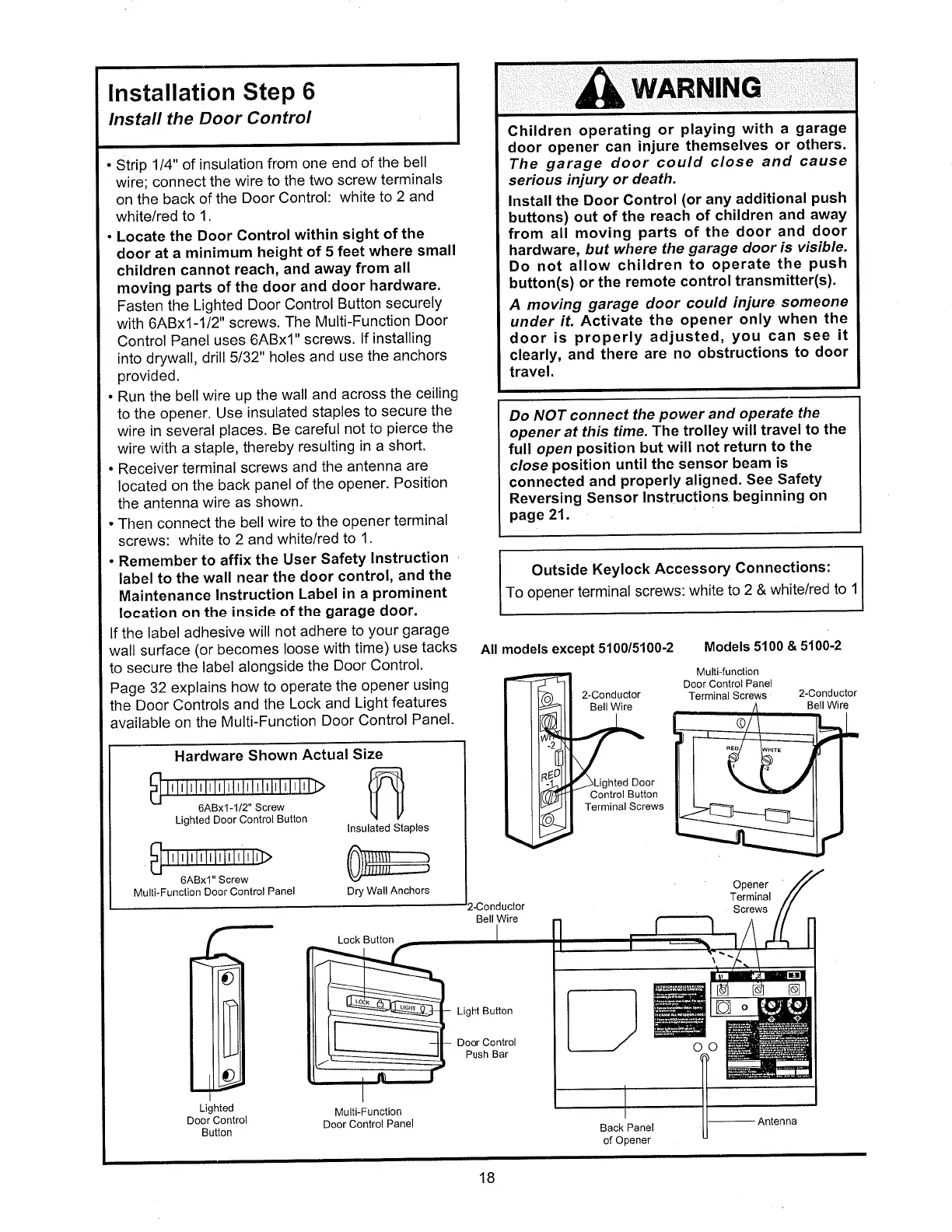
Strip
114"
of insulation
from
one
end of
the
bell
wire;
connect
the
wire
to the
two
screw
terminals
on the
back
of the
Door
Control:
white
to
2 and
white/red
to 1.
.
Locate
the
Door
Control
within
sight
of the
door
at a
minimum
height
of 5
feet
where
small
children
cannot
reach,
and
away
from
all
moving
parts
of the
door
and
door
hardware.
Fasten
the Lighted
Door
Control
Button
securely
with 6ABx1-1/2"
screws.
The Multi-Function
Door
Control
Panel
uses
6ABx'1"
screws.
lf
installing
into drywall,
drill Sl32"
holes
and
use
the
anchors
provided.
.
Run
the bellwire
up
the
wall
and
across
the
ceiling
to the
opener.
Use
insulated
staples
to secure
the
wire in several
places.
Be careful
not
to
pierce
the
wire
with
a staple,
thereby
resulting
in a
shot't'
.
Receiver
terminal
screws
and
the
antenna
are
located
on
the back
panel
of the
opener'
Position
the antenna
wire as
shown.
.
Tlren
connect
the bell
wire
to the
opener
terminal
screws:
white
to
2 and
white/red
to 1.
.
Remember
to affix
the
User
Safety
lnstruction
label
to
the
wall
near
the
door
control,
and
the
Maintenance
lnstruction
Label
in a
prominent
location
on
the inside
of the
garage
door.
lf the
label
adhesive
will
not
adhere
to
your
garage
wall surface
(or
becomes
loose
with
time)
use
tacks
to
secure
the
label
alongside
the
Door
Control.
Page
32
explains
how
to operate
the
opener
using
the
Door Controls
and
the
Lock
and
Light
features
available
on the
Multi-Function
Door
Control
Panel.
Lock
Button
Do NOT
connect
the
power
and
operate
the
opener
at
this
tíme.The
trolley
will travel
to
the
fulr open
position but
will not
return
to the
close
position
until
the sensor
beam
is
connected
and
properly
aligned.
See
Safety
Reversing
Sensor
lnstructions
beginning
on
page
21.
Outside
Keylock
Accessory
Connections:
To opener
terminal
screws:
white
to
2 &
white/red
to
1
All
models
except
5100/5100-2
Models
5100
& 5100'2
2-Conductor
Bell
Wire
Door
Control
Button
Terminal Screws
Back Pânel
Multi-function
Door
Control
Panel
Terminal Screws
Opener
Terminal
Screws
2-Conductor
Bell Wire
Lighted
Door Control
Button
Multi-Function
Door
Controì
Panel
Bell
Wire
Light
Button
Door Control
Push
Bar
fl
oo
Hardware
Shown
Actual
Size
6ABx1
-112" Screw
Lighted
Door
Control
Button
lnsulated
Staples
Dry
Wall
Anchors
ffi
Mulli-Functìon
Door Conlrol
Panel
6ABxl"
Screw
18
of
Opener
Antenna
Nortek, Exhibit 1012

Table of Contents

Related product manuals