EasyManua.ls Logo

Chamberlain 7200 - Adjust the Force

Chamberlain 7200
40 pages
Print Icon
To Next Page IconTo Next Page
To Previous Page IconTo Previous Page
Loading...
Adjustment
Step
2
Adjust
the
Force
A
NGIWARN
Too
much
force
on the
door
will interfere
with
the
proper
operation
of the
safety
reverse
system.
The door
might
not
reverse
properly
when
required
and
could
seriously
iniure
or
kill
someone
under
iú. Do
not
increase
the
force
beyond
the
minimum
amount
required
to
close
the
door.
Do not use
the
force
adjustments
to
compensate
for a
binding
or sticking
garage
door.
Test the
safety
reverse
system
following
all adjustments
to force
levels'
See
page
30.
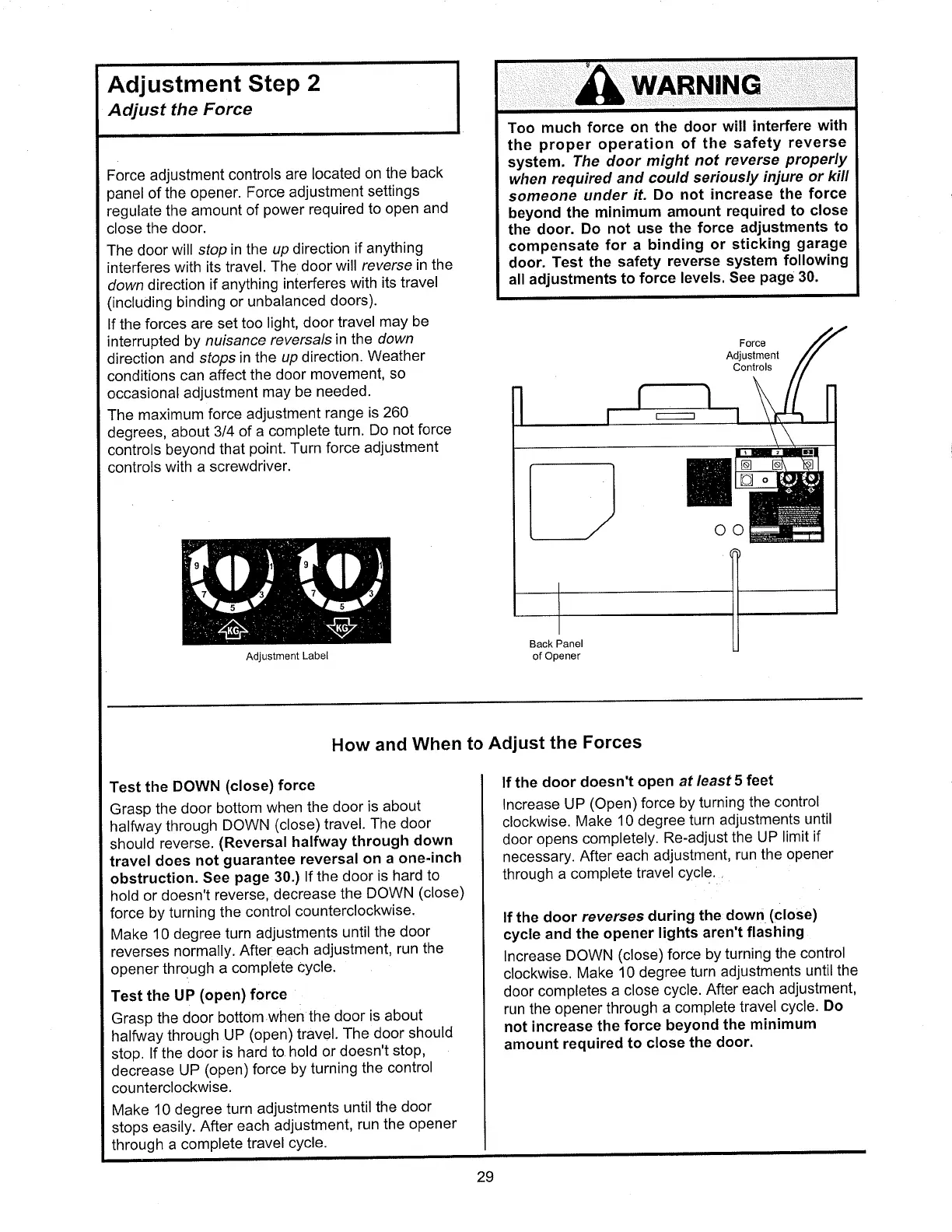
Force adjustment
controls
are located
on the
back
panel
of
the
opener.
Force
adjustment
settings
regulate
the
amount
of
power
required
to
open
and
close
the
door.
The door
will
sfop in
the up
direction
if anything
interferes
with
its travel.
The door
will
reverse
in the
down
direclion
if anything
interferes
with
its
travel
(including binding
or
unbalanced
doors).
lf the
forces
are set
too
light,
door
travel
may
be
interrupted
by nuisance
reversalsinThe
down
direction
and sfops
in
the
up direction.
Weather
conditions
can
affect
the
door
movement,
so
occasional
adjustment
may be
needed.
The
maximum
force
adjustment
range
is 260
degrees,
about
3/4
of a
complete
turn'
Do
not
force
controls
beyond
that
point.
Turn
force
adjustment
controls
with
a screwdriver.
Adjustment
Label
Force
Adjustment
Controls
Back Panel
of
Opener
ôô
Test the
DOWN
(close) force
Grasp
the
door
bottom
when
the
door
is
about
halfway
through
DOWN
(close)
travel.
The
door
should
reverse.
(Reversal
halfway
through
down
travel
does
not
guarantee reversal
on
a one'inch
obstruction.
See
page
30.)
lf
the door
is hard
to
hold
or
doesn't
reverse,
decrease
the
DOWN
(close)
force
by
turning
the
control
counterclockwise.
Make
'10
degree
turn
adjustments
until
the door
reverses
normally.
After
each
adjustment,
run
the
opener
through
a
comPlete
cYcle.
Test
the
UP
(open) force
Grasp
the
door
bottom
when
the
door
is about
halfway
ihrough
UP
(open)
travel.
The
door
should
stop.
lf
the door
is
hard
to
hold or
doesn't
stop,
decrease
UP
(open)
force
by turning
the control
counterclockwise.
Make
10
degree
turn adjustments
until
the
door
stops
easily.
After
each
adjustment,
run the
opener
through
a
comPlete
travel
cYcle.
How
and
When
to
Adjust
the
Forces
lf the
door doesn't
open
af
least 5
feet
lncrease
UP
(Open) force by
turning
the
control
clockwise.
Make
10 degree
turn
adjustments
until
door
opens
completely.
Re-adjust
the UP
limit
if
necessary.
After
each
adjustment,
run
the
opener
through
a complete
travel
cYcle.
lf the
door
reverses
during
the
down
(close)
cycle
and
the
opener
lights
aren't
flashing
lncrease
DOWN
(close)
force
by turning
the
control
clockwise.
Make
10
degree
turn
adjustments
untilthe
door
completes
a close
cycle.
After
each
adjustment,
run
the opener
through
a
complete
travel
cycle.
Do
not
increase
the
force beyond
the
minimum
amount
required
to
close
the
door.
29
Nortek, Exhibit 1012

Table of Contents

Related product manuals