EasyManua.ls Logo

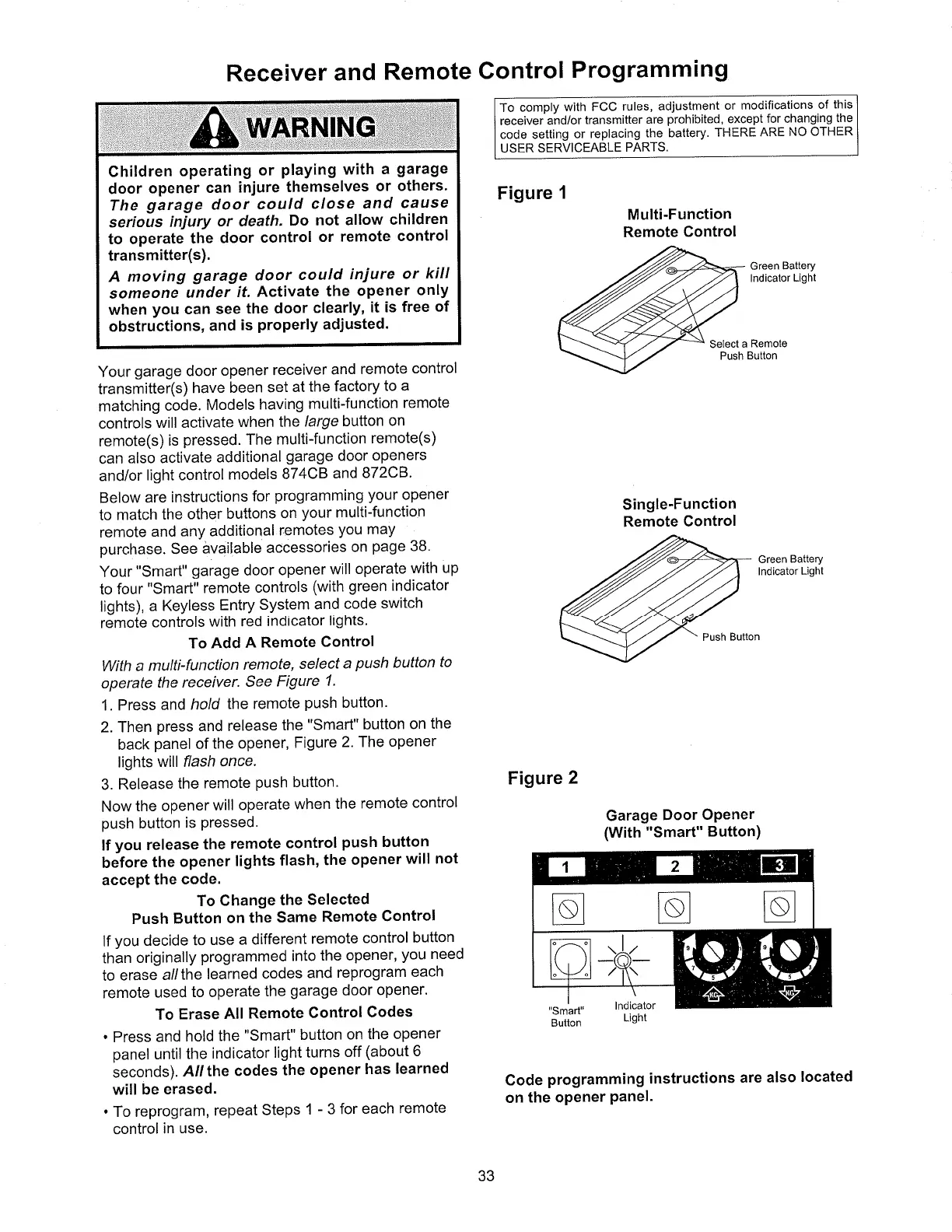
Chamberlain 7200 - Receiver and Remote Control Programming; Add or Erase Remote Controls

Chamberlain 7200
40 pages
Print Icon
To Next Page IconTo Next Page
To Previous Page IconTo Previous Page
Loading...
Children
operating
or
playing
with
a
garage
door
opener
can
injure
themselves
or
others.
The
garage
door
could
close
and
cause
serious
iniury
or death.
Do
not allow
children
to operate
the
door
control
or
remote
control
transmitter(s).
A
moving
garage
door
could
iniure
or
kill
someone
under
if. Activate
the
opener
only
when
you
can
see
the
door
clearly,
it is
free
of
obstructions,
and
is
properly
adjusted.
N
N
It
Receiver
and
Remote
Gontrol
Programm¡ng
Your
garage
door
opener
receiver
and
remote
control
transmitter(s)
have
been
set
at
the
factory
to
a
matching
code.
Models
having
multi-function
remote
controls
will activate
when
the
/arge
button
on
remote(s)
is
pressed.
The
multi{unction
remote(s)
can
also activate
additional
garage
door
openers
and/or
light control
models
874C8
and
B72CB.
Below
are
instructions
for
programming
your
opener
to
match
the
other
buttons
on
your
multi-function
remote
and
any additional
remotes
you
may
purchase. See
available
accessories
on
page
38.
Your
"Smart"
garage
door
opener
will
operate
with
up
to
four
"Smart"
remote
controls
(with
green
indicator
lights),
a Keyless
Entry
System
and
code
switch
remote
controls
with
red indicator
lights'
To Add
A
Remote
Control
With a
mutti-function
remote,
select
a
push
button
to
operate
the receiver.
See
Figure
1.
1. Press
and hold
the remote
push
button.
2. Then
press
and release
the
"Smart"
button
on
the
back
panel
of the
opener,
Figure
2. The
opener
lights
will flash
once.
3.
Release
the
remote
Push
button.
Now
the
opener
will
operate
when
the
remote
control
push
button
is
pressed.
lf
you
release
the
remote
control
push
button
before
the
opener
lights
flash,
the
opener
will not
accept
the
code.
To
Change
the
Selected
Push
Button
on
the
Same
Remote
Control
lf
you
decide
to
use
a different
remote
control
button
thân
originally
programmed into
the
opener,
you
need
to
erase
a//the
learned
codes
and
reprogram
each
remote
used
to operate
the
garage
door
opener.
To
Erase
All
Remote
Control
Godes
.
Press
and
hold
the
"Smart"
button
on
the
opener
panel
until
the
indicator
light
turns
off
(about
6
seconds).
AItthe
codes
the
opener
has
learned
will be
erased.
.
To reprogram,
repeat
Steps
1
-
3 for
each
remote
control
in use.
To
comply
with FCC
rules, adjustment
or modifications
of this
receiver
and/or
transmitter
are
prohibited,
except
for changing
the
code setting
or replacing
the battery.
THERE ARE
NO
OTHER
USER
SERVICEABLE
PARTS.
Figure
1
Multi-Function
Remote
Control
Green
Battery
lndicator
Light
Select
a
Remote
Push
Button
Single-Function
Remote
Control
Green
Battery
lnd¡cator
Lìght
Push
Button
Figure
2
Garage
Door
Opener
(With "Smart"
Button)
"Smart"
Button
lndicator
Light
Code
programming
instructions
are also
located
on
the opener
Panel.
(l
ñ
33
Nortek, Exhibit 1012

Table of Contents

Related product manuals