EasyManua.ls Logo

Chamberlain 7200 - Page 23

Chamberlain 7200
40 pages
Print Icon
To Next Page IconTo Next Page
To Previous Page IconTo Previous Page
Loading...
.
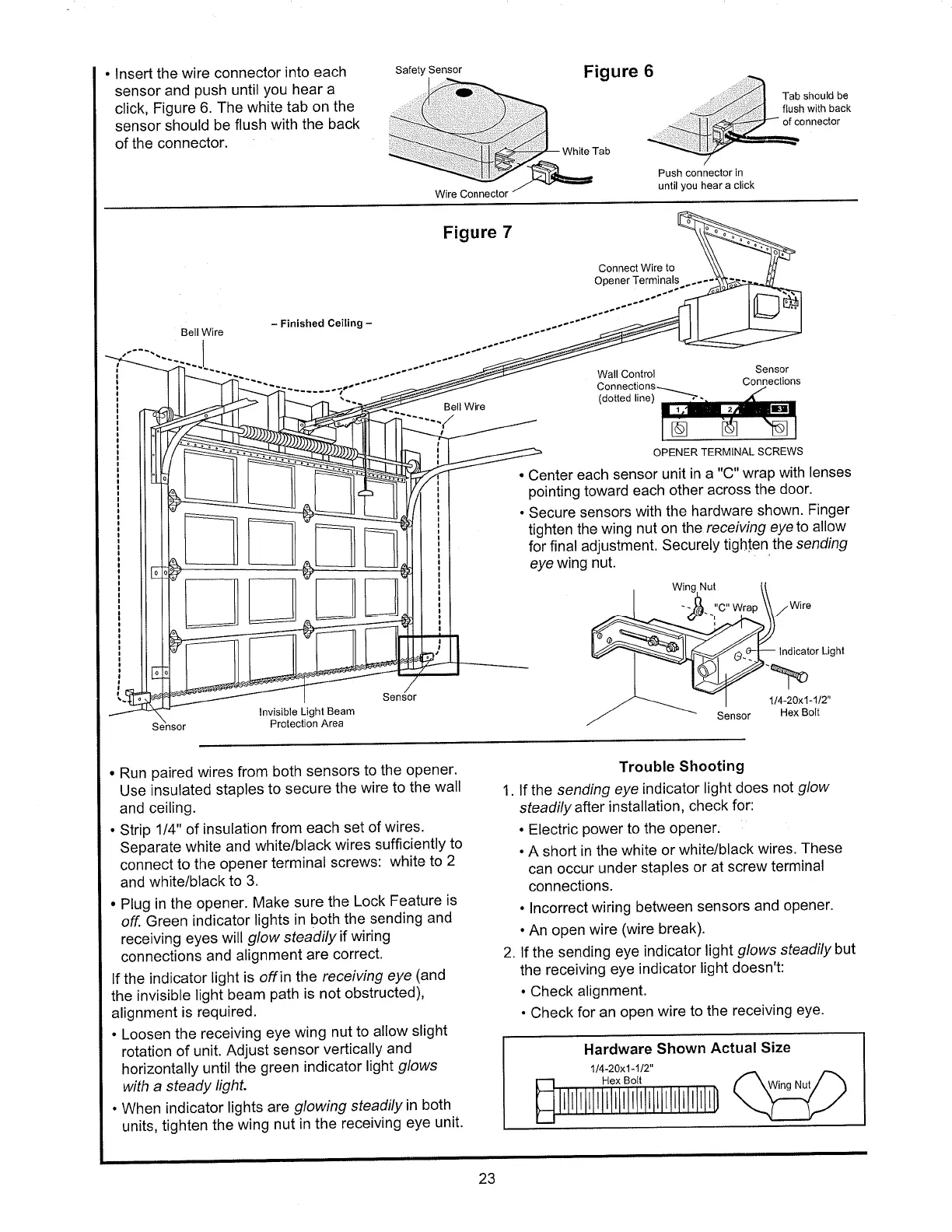
lnsert
the
wire connector
into
each
sensor
and
push
until
You
hear a
click,
Figure
6. The
white
tab on
the
sensor
should
be
flush
with the
back
of
the
connector.
Safety
SensoÍ
Figure
6
Tab
should
be
flush
wìth
back
of
connector
White Tab
Push connector
in
until
you
hear
a click
Wire Connector
Figure
7
-
Finished
Ceiling
-
Connect
W¡re
to
Opener
Terminals
Wall
Control
Sensor
(dotted
line)
OPENER
TERMINAL
SCREWS
.
Center
each
sensor
unit
in a
"C"
wrap
with
lenses
pointing
toward
each
other
across
the
door.
.
Secure
sensors
with
the
hardware
shown.
Finger
tighten
the
wing
nut
on the
receiving
eye
to allow
for
final
adjustment.
Securely
tighten
the
sending
eye
wing
nut.
Bell Wire
Bell
Wire
Wing,Nut
'#'-:'""
Wrap
Wire
lndicator
Light
þ
lnvisible
Light
Beam
Protection
Area
Sensor
114-20x1-112"
Hex Bolt
.
Run
paired
wires
from
both
sensors
to the
opener.
Use
insulated
staples
to secure
the
wire
to the
wall
and
ceiling.
.
Strip
1/4" of
insulation
from each
set of
wires'
Separate
white
and
white/black
wires
sufficiently
to
connect
to
the
opener
terminal
screws:
white
to 2
and
white/black
to 3.
.
Plug
in the
opener.
Make
sure
the
Lock
Feature
is
off. Green
indicator
lights
in
both
the
sending
and
receiving
eyes
will
glow
steadily
if
wiring
connections
and
alignment
are
correct.
lf the indicator
light
is offin
the
receiving
eye
(and
the invisible
light
beam
path
is not
obstructed),
alignment
is
required.
.
Loosen
the
receiving
eye
wing
nut
to
allow
slight
rotation
of unit.
Adjust
sensor
vertically
and
horizontally
until
the
green
indicator
light
g/ows
with a
steady
light.
.
When
indicator
lights
are
glowing
steadily
in
both
units,
tighten
the
wing
nut
in the
receiving
eye
unit'
Trouble
Shooting
1. lf
the
sending
eye
indicator
light
does
not
glow
steadily
after
installation,
check
for:
.
Electric
power
to the
oPener.
.
A
short
in the
white
or
white/black
wires'
These
can occur
under
staples
or at
screw
terminal
connections.
.
lncorrect
wiring
between
sensors
and
opener.
.
An open
wire
(wire
break).
2. lf the
sending
eye indicator
light
g/ows
steadilybul
the
receiving
eye
indicator
light doesn't:
.
Check
alignment.
.
Check
for an
open
wire to
the
receiving
eye.
Hardware
Shown
Actual
Size
114-20x1-112"
Wing Nut
23
Nortek, Exhibit 1012

Table of Contents

Related product manuals