16
Wired Setup
Install a second operator arm:
Install a second operator arm by following installation steps 1-2.
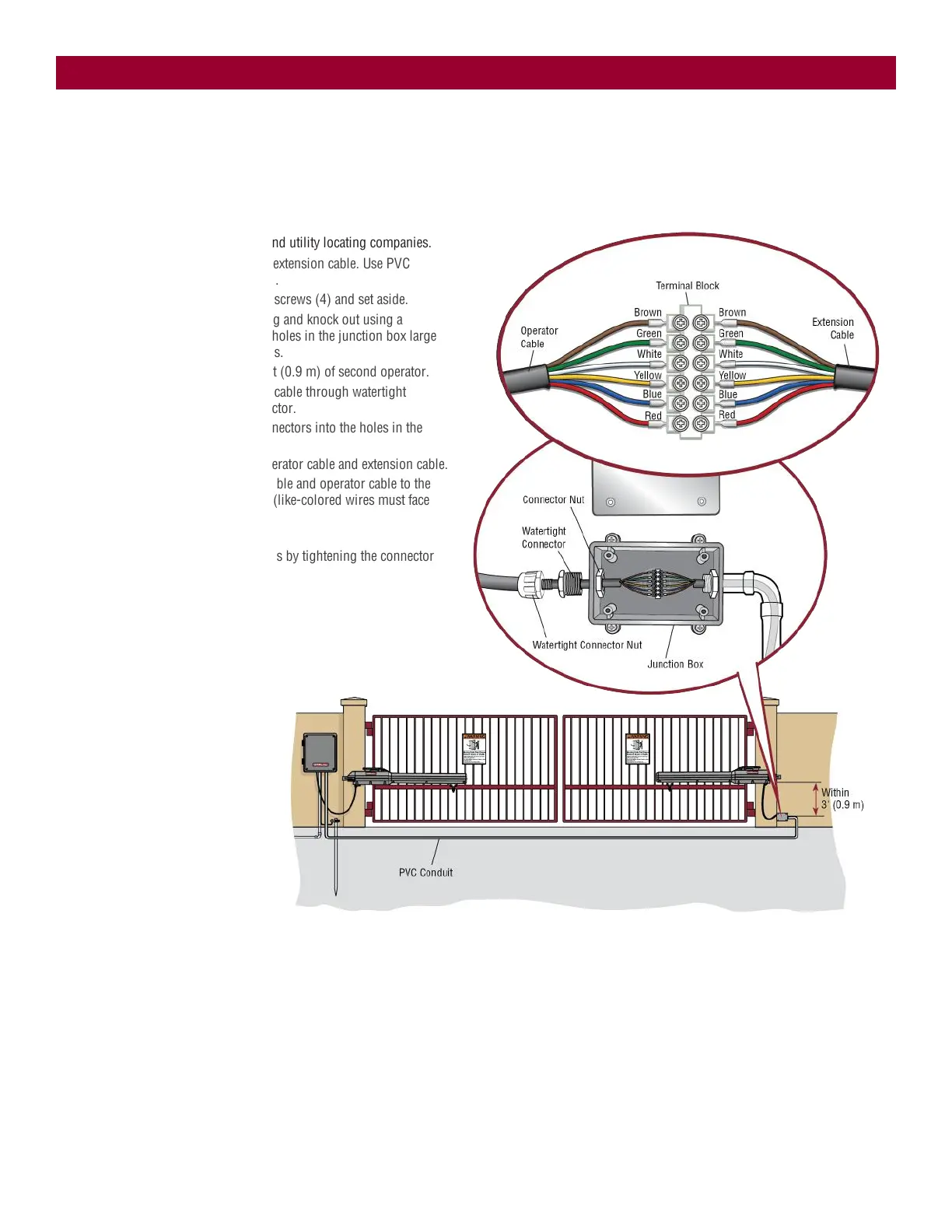
Install the extension cable and junction box:
Before digging, contact local underground utility locating companies.
1. Trench across driveway to bury the extension cable. Use PVC
conduit to prevent damage to cables.
2. Open the junction box by removing screws (4) and set aside.
3. Select holes to be used for mounting and knock out using a
screwdriver and hammer. Drill two holes in the junction box large
enough for the watertight connectors.
4. Mount the junction box within 3 feet (0.9 m) of second operator.
5. Route operator cable and extension cable through watertight
connector nut and watertight connector.
6. Insert the cables and watertight connectors into the holes in the
junction box.
7. Slide the connector nut onto the operator cable and extension cable.
8. Connect the wires from extension cable and operator cable to the
terminal block connector as shown (like-colored wires must face
each other).
9. Put wires inside of junction box.
10. Secure operator and extension cables by tightening the connector
nut.
11. Reinstall cover.
INSTALLATION













 To Next Page