-
-
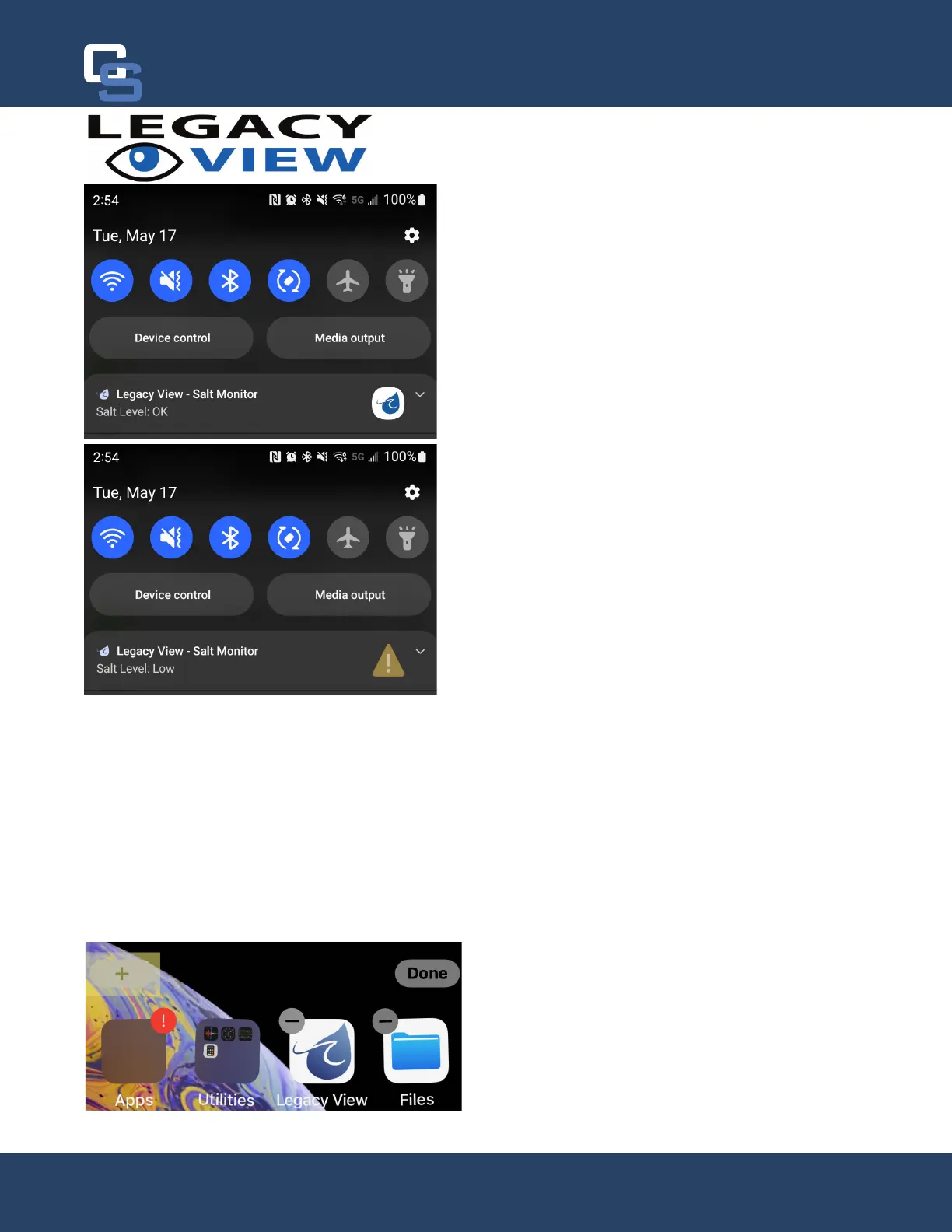
cation is a service that runs in the background and will
trigger a Bluetooth scan every 30 minutes, as mentioned
salt levels, then it will display “Salt Level: OK”. If a soften-
er is reporting that it has low salt, then “Salt Level: Low”
will be display with a warning symbol. Once you add more
salt to your brine tank and adjust the level in the app it
-
Note:
If no softeners have been included, then “No Softeners Detected” will be displayed. This will also be displayed
during initial setup as Bluetooth devices do not advertise when you’re connected to them. However, once monitor-
loaded again and show correctly. Also, if the softener(s) being monitored is not in Bluetooth range during the last
No Softeners Detected”.
iOS Salt Monitoring
iOS uses a widget to monitor the salt level and can be used on any device running iOS 14 or later. The widget can
be setup using the following steps:
From the Home Screen, touch and hold a widget or an
empty area until the apps start to jiggle. Once the apps
are jiggling, press the gray + button in the upper left-
hand corner.
A
12
Chandler Systems
12


 To Next Page