7698967.01 (1-01/18) 38
INSTALLER Section (en)
12. INITIAL IGNITION - SPECIAL FUNCTIONS
When the boiler is powered up, the code “311” appears on the display and the boiler is ready for “initial ignition”.
Follow the procedure “GAS EXTRACTION FUNCTION” as described in the section below and enable programme 312.
After this operation, the boiler is ready to ignite the burner.
During this phase it is recommended to keep the pressure in the system at a value between 1 and 1.5 bar.
12.1 SYSTEM GAS EXTRACTION FUNCTION
This function is used to facilitate the elimination of the air inside the heating circuit when the boiler is rst installed or after
maintenance when the water is drained from the primary circuit.
To enable the system gas extraction function press buttons together for 6 seconds. When the function is active, On
appears on the display for a few seconds, followed by programme row 312.
The electronic board will activate a pump on/off cycle lasting 10 minutes. The function will automatically stop at the end of the
cycle. To manually exit this function, press the above buttons together for 6 seconds once again.
12.2 CALIBRATION FUNCTION
To calibrate the gas valve, proceed as follows:
• Press buttons and together for at least 6 seconds. When the function is enabled, the displays shows “On” for a few
seconds followed by programme row “304” alternated with the % of boiler power.
• Press
to gradually adjust power (sensitivity 1%).
• To exit press both buttons together for at least 6 seconds, as described in point one
Press to display the instantaneous ow temperature for 15 seconds.
12.3 CHIMNEY SWEEPER
When this function is enabled, the boiler generates maximum heating power. To enable the function, proceed as follows:
• press together for 6 seconds. The display shows "303" alternated with the power output of the boiler.
• Press
and to adjust boiler power 1=minimum, 2=maximum DHW, 3=maximum heating.
• To interrupt the function repeat the procedure described in point one.
13. FAULTS THAT CANNOT BE RESET BY THE USER
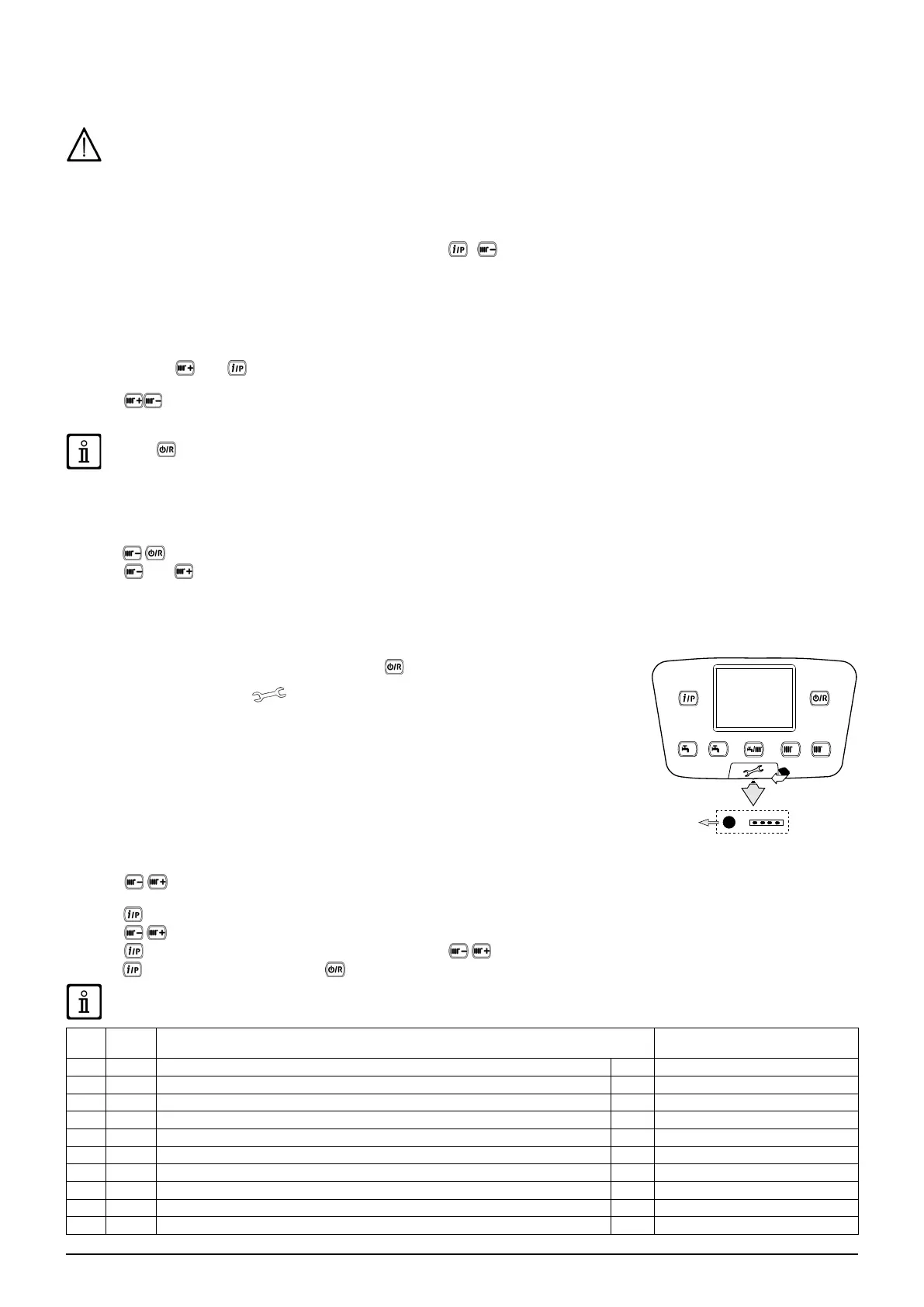
In case of FAULTS that cannot be reset by pressing (such as E151 or exceeding 5 manual
RESET attempts by the user) RESET the board by pressing the black button ( R) located
under the rubber cap (symbol ) of the front control panel (gure to side).
14. PARAMETERS SETTING
To programme the parameters of the boiler electronic board, proceed as follows:
• Press together and hold them down for 6 seconds until programme row “P02” appears on the display alternated with
the set value (°C);
• Press
and hold down for 6 seconds until "On" appears on the display. Release the button and "P01" appears on the display;
• Press
to scroll the list of parameters;
• Press
, the value of the selected begins ashing, press to change the value;
• press
to conrm the value or press to exit without saving.
Further information concerning the parameters listed in the following table are supplied together with the required
accessories.
(a) (b)
ZONE 1 HEATING PARAMETERS (main zone) Factory setting
P01 700 *Operating mode (0=Frost Protection, 1=Timed, 3=T.comfort) - 3
P02 712 *Reduced ambient temperature °C 16
P03 720 *“Kt” curve slope - 1,5
P04 721 *“Kt” curve drift - 0
P05 726 *“Kt” curve adaptation (0=off) - 1
P06 740 Flow temperature setpoint (minimum value) °C 25
P07 741 Flow temperature setpoint (maximum value) °C 80
P08 742 *Enable modulating temperature if set = “---” °C 80
P09 750 *Room inuence (“---” = disabled) % 50
P10 834 *Opening/Closing speed of mix valve S 30



 To Next Page