MAN250/04 Page 7
CHEMICAL FEEDERS
Make sure to inject all the chemicals downstream of the
sensors to avoid false readings, and downstream of all equipment
(pump, filter, heater) to avoid corrosion.
CHEMICAL FEED PUMPS
Install the feed pumps for liquid chlorine, calcium hypochlorite or
dichlor solutions as shown in Figure 2, according to the
manufacturer’s instructions.
EROSION FEEDER
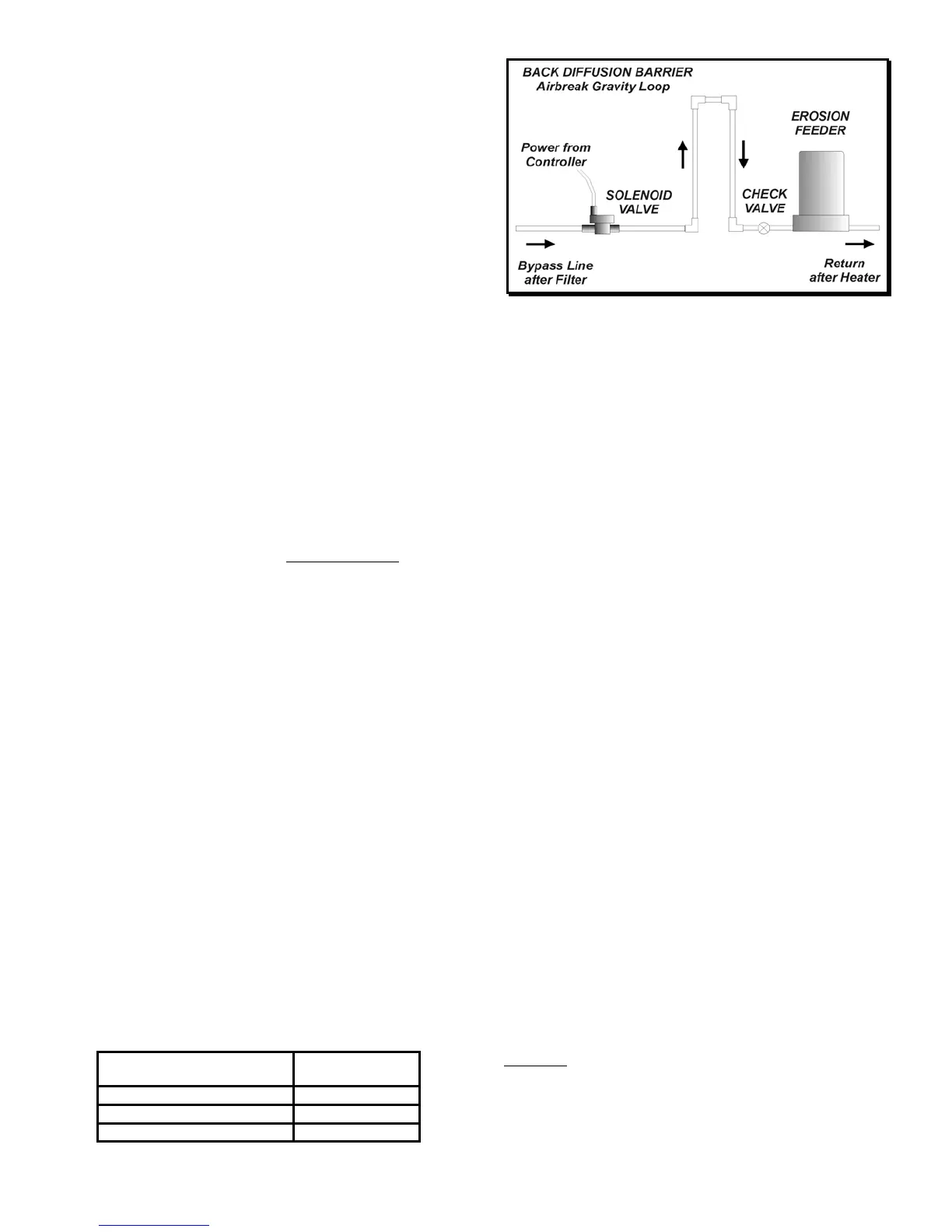
With an erosion feeder for bromine or chlorine tablets, install a
solenoid valve on the intake side of the bypass line to the erosion
feeder as shown in Figure 7.
OPERATION
PPM SENSOR CONDITIONING (Models 235/255)
IMPORTANT: DO NOT CONNECT THE PPM SENSOR before
the conditioning procedure is completed. Warranty may be void
if sensor is powered without proper conditioning.
Before using the PPM sensor for the first time – or after long
storage in air – it is important to hydrate the sensor. Remove the
sensor cap and place the sensor for at least 30 minutes in water
containing a small amount of chlorine without connecting it to the
controller.
Please note that the sensor’s time response for accurate chlorine
reading could take up to 30 minutes after first hydration and up to
15 minutes to stabilize after each water chemistry change.
SENSOR CALIBRATION
No calibration is required for the ORP sensor.
To calibrate the PPM and pH sensors, test the water with a
reliable, fresh test kit (DPD and Phenol Red). Note the values
and compare to the display values. Re-calibrate if needed, as
follows:
- press [CALIBRATION],
- press [PPM] or [pH]: the display flashes,
- use the [UP] and [DOWN] arrows to adjust the value,
- press [CALIBRATION] again to save the new value.
GAIN FACTOR (Models 235/255)
If the signal of the PPM sensor is too low due to excessive
cyanuric acid or other contaminants, the gain of the amplifier can
be increased in the Setup Menu.
Start the Setup Menu by pressing both arrows simultaneously.
When the display shows GF for Gain Factor, select 1, 2 or 4
depending on the cyanuric level.
CYANURIC ACID LEVEL
(ppm or mg/l)
GAIN FACTOR
GF
0-20 1x
20-60 2x
60 + 4x
CONTROL SETPOINTS
The PPM setpoint is factory set at 1.0 ppm.
The ORP setpoint is factory set at 700 mV, which is
recommended to maintain water quality by killing germs and
bacteria. There is no need for ORP calibration.
The pH setpoint is factory set at 7.5, which is recommended for
pool and spa applications.
To change a control setpoint:
- press [SETPOINT],
- press [PPM], [ORP] or [pH] : the display flashes,
- use the [UP] and [DOWN] arrows to adjust the setpoint,
- press [SETPOINT] again to save the new value.
OVERFEED SAFETY TIMERS
The internal safety timers are designed to alert the operator in
case of overfeeding of chemicals as a result of mechanical or
electronic failure or empty containers.
The timers are factory set at 15 minutes for PPM or ORP and 5
minutes for pH. This is normally sufficient to reach the setpoint.
At that time feeding stops and the timer resets to zero. If the
limit is reached however, the feeder is deactivated, the alarm
turned on and the display flashes the overfeed time. The
operator should then check the chemical feeders, feed lines and
tanks. After correcting the problem, the safety timer is reset by
switching the feed mode to OFF and then back to AUTO.
To change the limits of a safety timer:
- press [SAFETY TIMER],
- press [ORP], [PPM] or [pH] : the display flashes,
- use the [UP] and [DOWN] arrows to adjust the value,
- press [SAFETY TIMER] again to save the new value.
CAUTION: Increasing the limit on a safety timer may cause
overfeeding of chemicals.
Figure 7 - Erosion Feeder Installation


 To Next Page