MAN250/04 Page 8
OUT-OF-RANGE ALARMS
The out-of-range alarms are factory set at 650 to 900 mV for
ORP, 0.3 to 6.0 for PPM and 7.0 to 8.0 for pH. If the ORP or PPM
readings are below the low limit, the red LED alarm flashes but
sanitizer feed continues.
If the pH limits are exceeded, the red LED alarm flashes and all
feeders (pH and sanitizer) are deactivated - unless the
sanitizer/pH interlock is defeated (see below).
To change an alarm limit:
- press [LOW LIMIT] or [HIGH LIMIT],
- press [PPM], [ORP] or [pH]: the display flashes,
- use the [UP] and [DOWN] arrows to adjust the value,
- press [LOW LIMIT] or [HIGH LIMIT] again.
CAUTION: Increasing the out-of-range limits may cause
overfeeding of chemicals.
FEED MODE
The feed mode for the sanitizer or pH can be set to OFF, Manual
or Automatic. To select the desired feed mode, press [PPM],
[ORP] or [pH] until the corresponding LED indicator light is
illuminated. There is a short delay before activation. (Note:
Holding the switch for more than 5 seconds resets the setpoint
and calibration for [PPM], [ORP] or [pH] to original factory
values).
.
PROPORTIONAL FEED
There are two ways to control the feed rate.
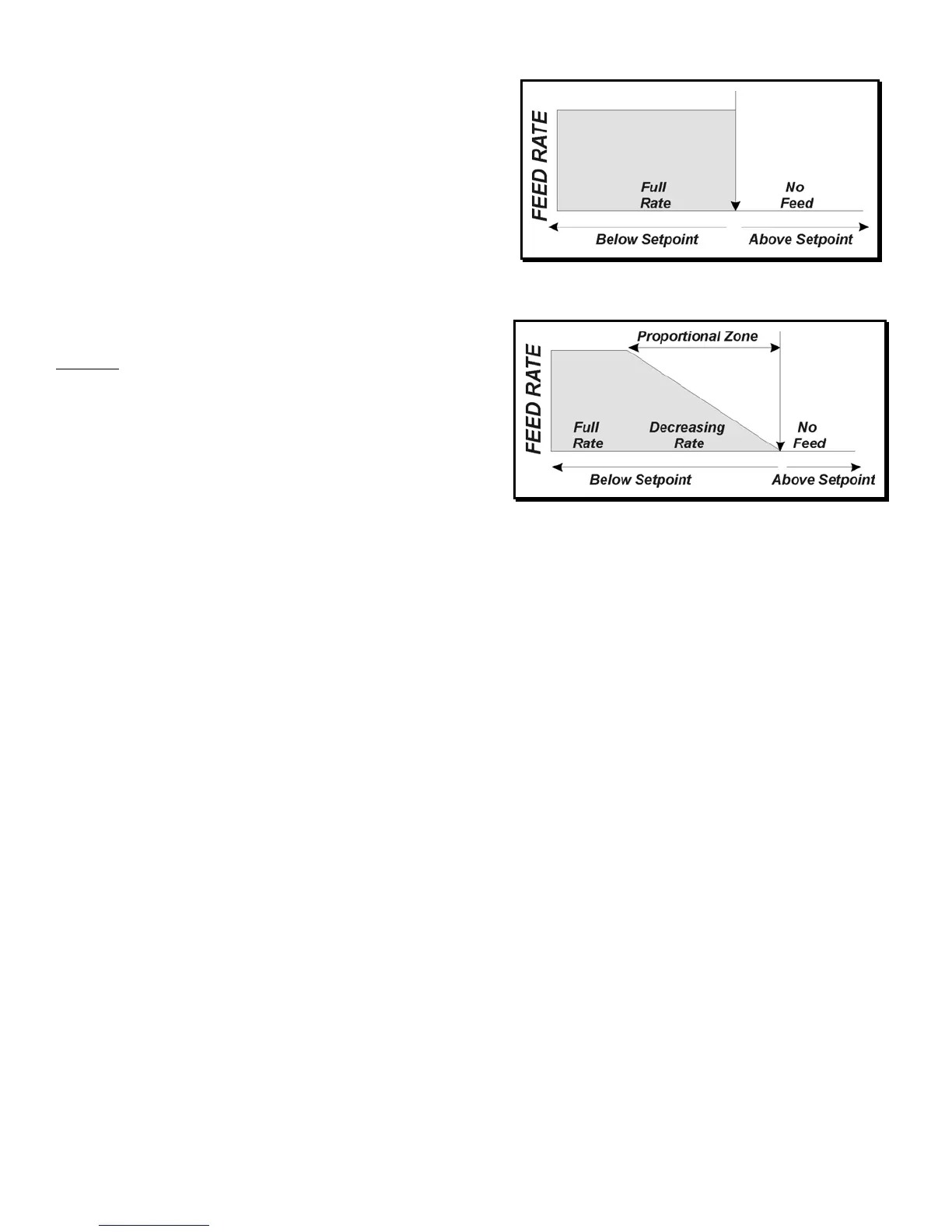
In standard ON/OFF control (Figure 8), the feed rate remains
constant until the setpoint is reached, whereupon it stops.
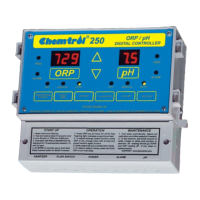
In the Proportional Zone, activation of the chemical feeder is
based on 1-minute cycles with varying ratios of ON and OFF feed
times. As the sensor reading approaches the setpoint value, the
ON portion of the cycle decreases progressively. During the OFF
portion, the feed light flashes continuously to indicate that the
controller is under proportional control.
In proportional control (Figure 9), the feed rate decreases
progressively as it approaches the setpoint. Proportional control
is particularly useful to avoid overfeeding of chemicals in small
bodies of water.
CONTROLLER RESET
The CHEMTROL
®
controller saves all user-defined values as
well as factory defaults in its internal non-volatile memory.
Therefore, user-modified setpoints and acid/base feed modes will
not be lost in the event of power failure and the factory default
values can be restored at any time.
To reset the setpoint and calibration values to the original factory
values, press and hold [PPM], [ORP] or [pH] for 5 seconds.
STARTUP
DEFAULT PARAMETERS
PPM ORP pH
Setpoint 1.0 ppm 700 mV 7.5
High/Low Alarms 0.3/6 ppm 650/900 mV 7.0/8.0
Overfeed Safety Alarm 15 min. 15 min. 5 min.
Proportional Bandwidth 1% 1% 1%
AUTOMATIC CONTROL
1. Run the recirculationpump with both sensors in line at least 30
minutes to stabilize the sensor readings.
2. Turn the controller on. The displays will show:
a. the software version number,
b. [pHF] with [AC] for Acid feed or [bA] for Base feed,
c. [IL] with 0 or 1 if the sanitizer/pH interlock is ON,
d. [FLO] with 0 or 1 if the flow switch is ON.
d. [Gn] with 1, 2 or 3 for the PPM Sensor gain (Models 235
and 255 only),
e. the sensor readings.
3. Press [ORP] or [PPM] until the feed control light is on AUTO.
4. Press [pH] until the feed control light is on AUTO.
5. After 30 minutes, test the pH of the water with a Phenol Red
test kit. Adjust the pH calibration if needed.
6. Test the free chlorine or bromine ppm in the water with a DPD
test kit. Adjust the PPM or ORP setpoint if required.
7. Test the water regularly as required by local health authorities.
Figure 8 - ON/OFF Control
Figure 9 - Proportional Control


 To Next Page