Climate Controls 8-3
Climate Touch Screen Controls
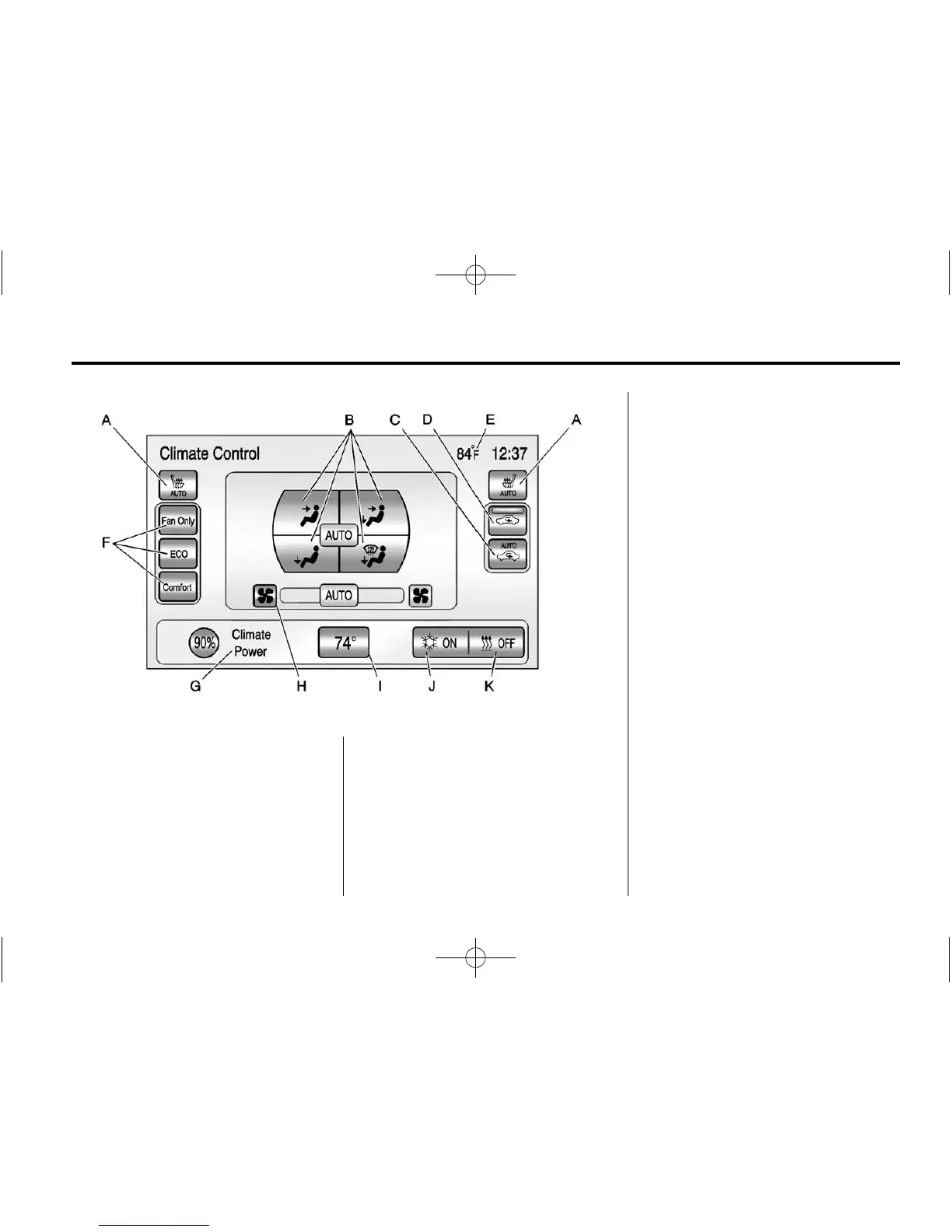
A. Driver and Passenger Auto
Heated Seats
B. Air Delivery Mode Controls
C. Auto Recirculation
D. Manual Recirculation
E. Outside Air Temperature
Display
F. Climate Modes: Fan Only, ECO,
Comfort
G. Climate Power Gauge
H. Manual Fan Control
I. Temperature Setting Display
J. Air Conditioning Indicator
K. Heat Status Indicator
Climate Control Touch Screen
The climate mode, fan, air delivery,
recirculation, and auto heated seats
are controlled by pressing the
CLIMATE button on the center stack
and viewing information in the
center stack display.
Climate Mode Operation
There are three climate mode
settings: Fan Only, ECO, and
Comfort. These settings adjust the
impact the climate control system
has on the vehicle's electric range
or fuel economy.
To select a climate mode:
1. Press CLIMATE on the center
stack.
2. Press the climate mode button
on the touch screen. The climate
mode will be lit.















 To Next Page