Driving and Operating 9-49
Charging
Start Charge
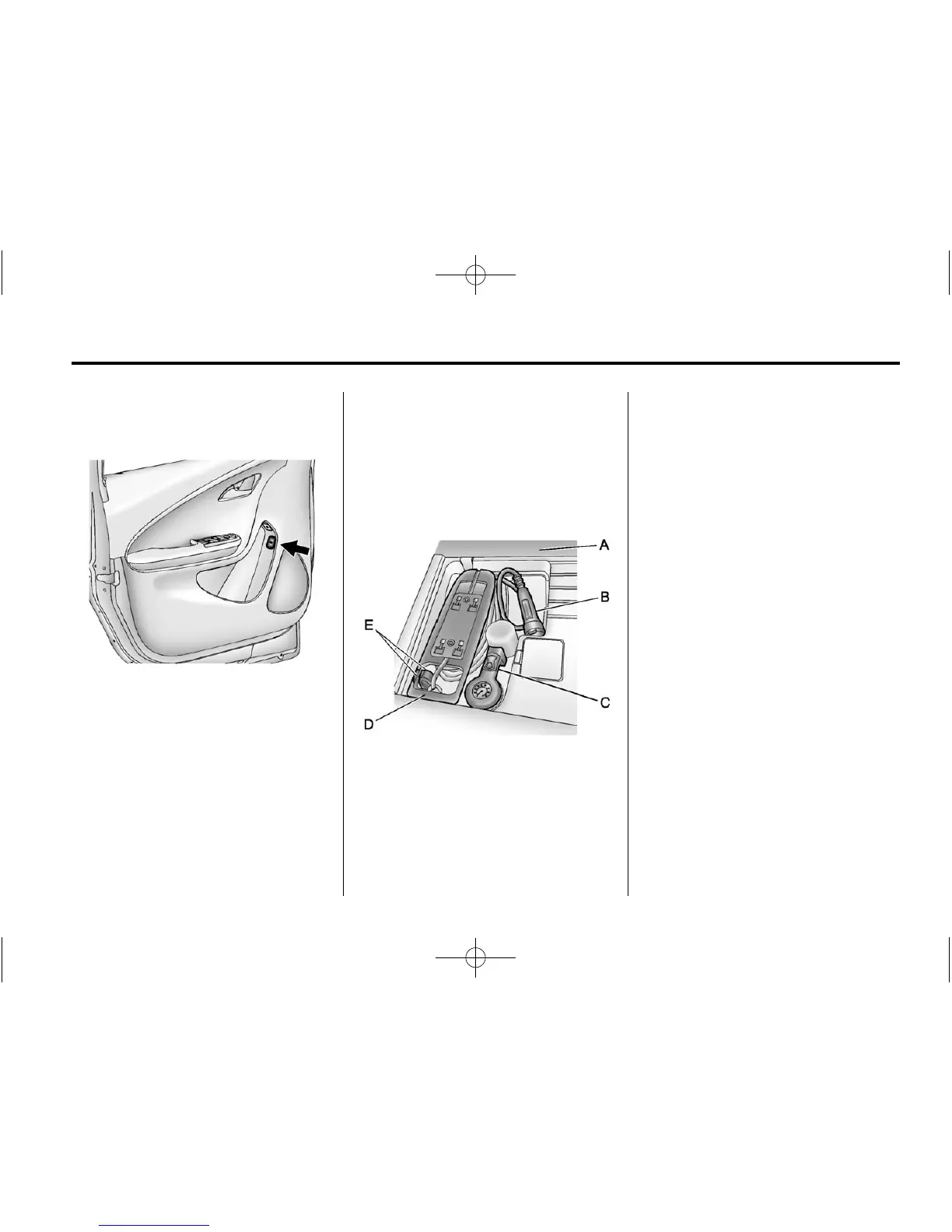
1. The charge port door release
button is on the driver door inner
trim panel. With the vehicle in
P (Park), press the button for
one second and release to open
the charge port door. The charge
port door can also be opened
using the RKE transmitter. See
Remote Keyless Entry (RKE)
System Operation on page 2‑3.
In cold weather conditions, ice
may form around the charge port
door. The charge port door may
not open on the first attempt.
Remove ice from the area and
repeat attempting to open the
charge port door.
2. Open the rear hatch, lift the load
support floor covering (A), and
remove the charge cord (D). It is
located near the tire sealant and
compressor kit (C). Pull up on
the charge cord handle (D) to
release it from the handle
clip (E).
Lift the charge cord up and
rearward to remove it from the
vehicle. The vehicle plug (B) is
stored as shown.
3. Plug the charge cord into the
electrical outlet. See Electrical
Requirements for Battery
Charging on page 9‑58. Verify
that the charge cord status
indicators are both green. See
Charge Cord on page 9‑55.
Select the appropriate charge
level. On some models, charge
level selection can be made
using the Select Charge Level
Preference screen on the center
stack. See “Charge Level
Selection” under Charging on
page 5‑32. On some models,
charge level selection can be
made using the charge level
button on the charge cord. See
“Charge Level Button” under
Charge Cord on page 9‑55.















 To Next Page