EasyManua.ls Logo

Chevrolet Light - Page 55

Chevrolet Light
107 pages
Print Icon
To Next Page IconTo Next Page
To Previous Page IconTo Previous Page
Loading...
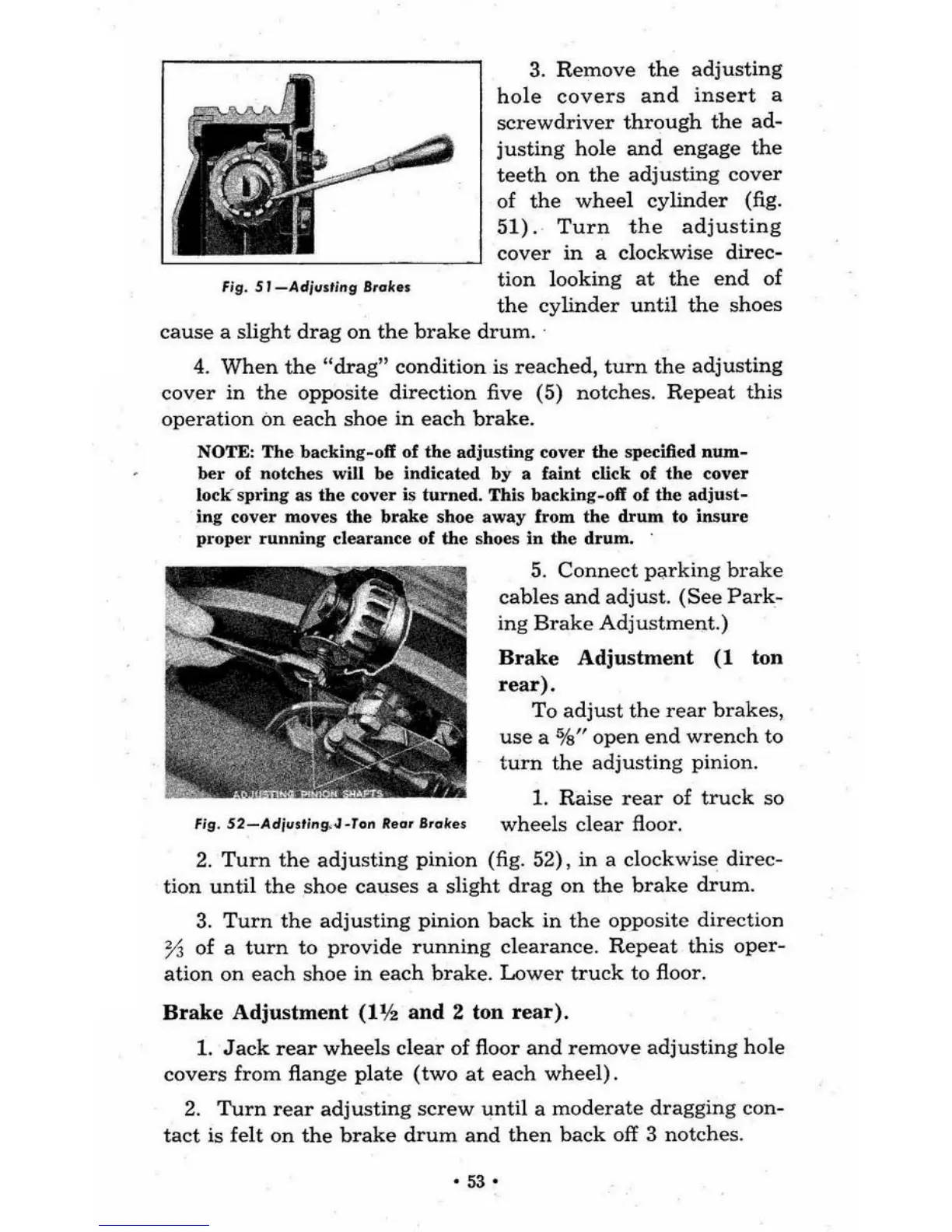
flg.51_Adj".,lngB,,,h.
3.
Remove
the
adjusting
hole
covers
and
insert
a
screwdriver
through
the
ad-
justing
hole
and
engage
the
teeth
on
the
adjusting
cover
of
the
wheel
cylinder
(fig.
51).
Turn
the
adjusting
cover
in
a
clockwise
direc-
tion
looking
at
the
end
of
the
cylinder
until
the
shoes
cause
a
slight
drag
on
the
brake
drum
.
4.
When
the
"drag"
condition
is
reached,
turn
the
adjusting
cover
in
the
opposite
direction
five (5) notches.
Repeat
this
operation
on
each
shoe
in
each
brake.
NOTE: The backing-oil
of
the
adjusting
cover
the
specified
num-
ber
of notches will be indicated by a faint click
of
the cover
lo
ck
'
spring
as
the
cover is
turned.
This backing-off of
the
adjust
-
ing
cover
moves the
brake
shoe
away from
the
drum
to
insure
proper
ru
nnin
g clearance
of
the
shoes
in
the
drum.
5.
Connect
parking
brake
cables
and
adjust.
(See
Park-
ing
Brake
Adjustment.)
Brake
Adjustment
(1
ton
rear).
To
adjust
the
rear
brakes,
use
a
%"
open
end
wrench
to
turn
the
adjusting
pinion.
1.
Raise
rear
of
truck
so
fig.
52-Adjll,';ng..J-T"n
Rea.
BT,,~e.
wheels
clear
floor.
2.
Turn
the
adjusting
pinion
(fig. 52),
in
a clockwise
direc-
tion
until
the
shoe
causes
a
slight
drag
on
the
brake
drum.
3.
Turn
the
adjusting
pinion
back
in
the
opposite
direction
73
of a
turn
to
provide
running
clearance.
Repeat
this
oper-
ation
on
each
shoe
in
each
brake.
Lower
truck
to
floor.
Brake
Adjustment
(1%
and
2 ton
rear).
1.
Jack
rear
wheels
clear
of
floor
and
remove
adjusting
hole
covers
from
flange
plate
(two
at
each
wheel)
.
2.
Turn
rear
adjusting
screw
until
a
moderate
dragging
con-
tact
is felt
on
the
brake
drum
and
then
back
off 3
notches
.
53
'

Related product manuals