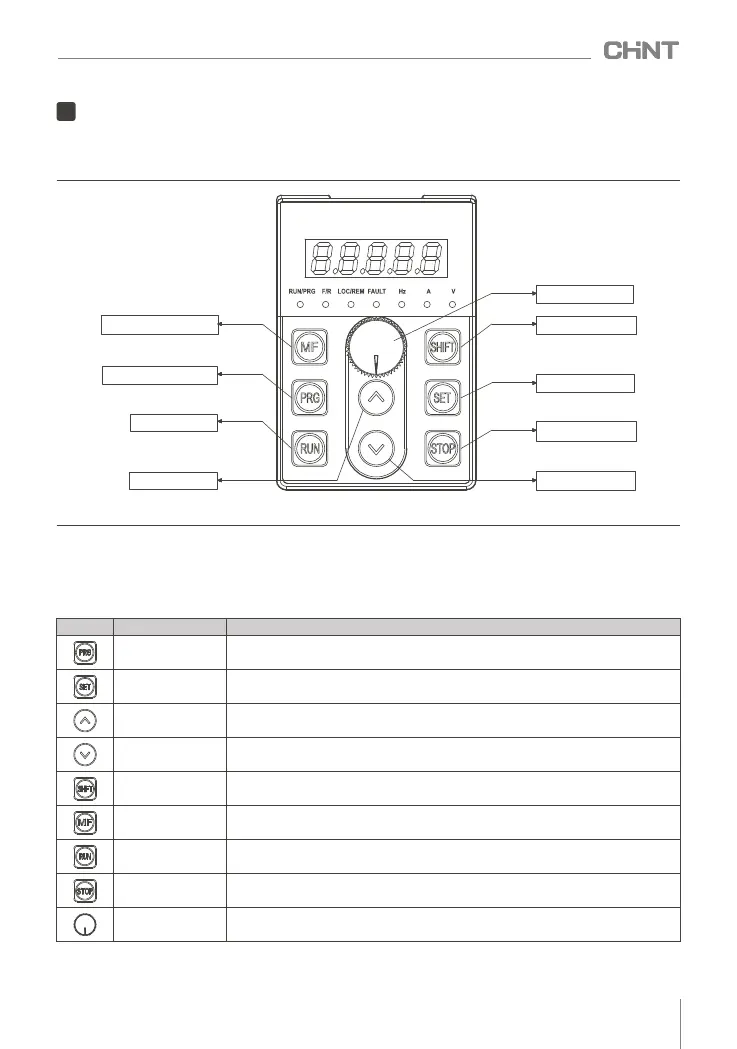
The operation panel is the main unit for the inverter to accept commands, display parameters and set
parameters. There are 8 keys and a navigation key on the inverter operation panel, and the function definition
of each key is shown in Table 7.1.
7.1.2 Operation panel function table
7
Operation and debugging
7.1 Operation panel introduction
7.1.1 Schematic diagram of the operation panel
Multi-function Key
Navigation Key
Programming Key
Shift Key
Run Key
Ok Key
Stop/Reset Key
Increment Key
Down Key
Figure 7.1 Schematic diagram of LED operation panel
Table 7.1 Operation panel function list
In addition to the single button function, the button can also realize the combined button function, as
shown in Table 7.2:
Key
Name
Program / Exit Key
Enter or exit programming state
Ok Key
Enter the lower menu or confirm the data
Increment Key
Increment of data or function code
Down Key
Decrement of data or function code
Shift Key
You can choose to set the modification bit of the data; in the main interface, you can
switch the display status parameters
Multifunction Key
Jogging, free stop or fast stop function can be performed, the function of this key is
set by F7.02
Run Key In operation panel mode, press this key to run
Stop / Reset Key
Navigation Key
When modifying the data, the rotation can realize the increment or decrement of the
data, and when the navigation key is pressed, it is the confirmation function
Shutdown or fault reset
Function
025
NVF2G Series Inverter User's Guide



 To Next Page