8 chorewarrior.com Customer Service: 651-370-7508
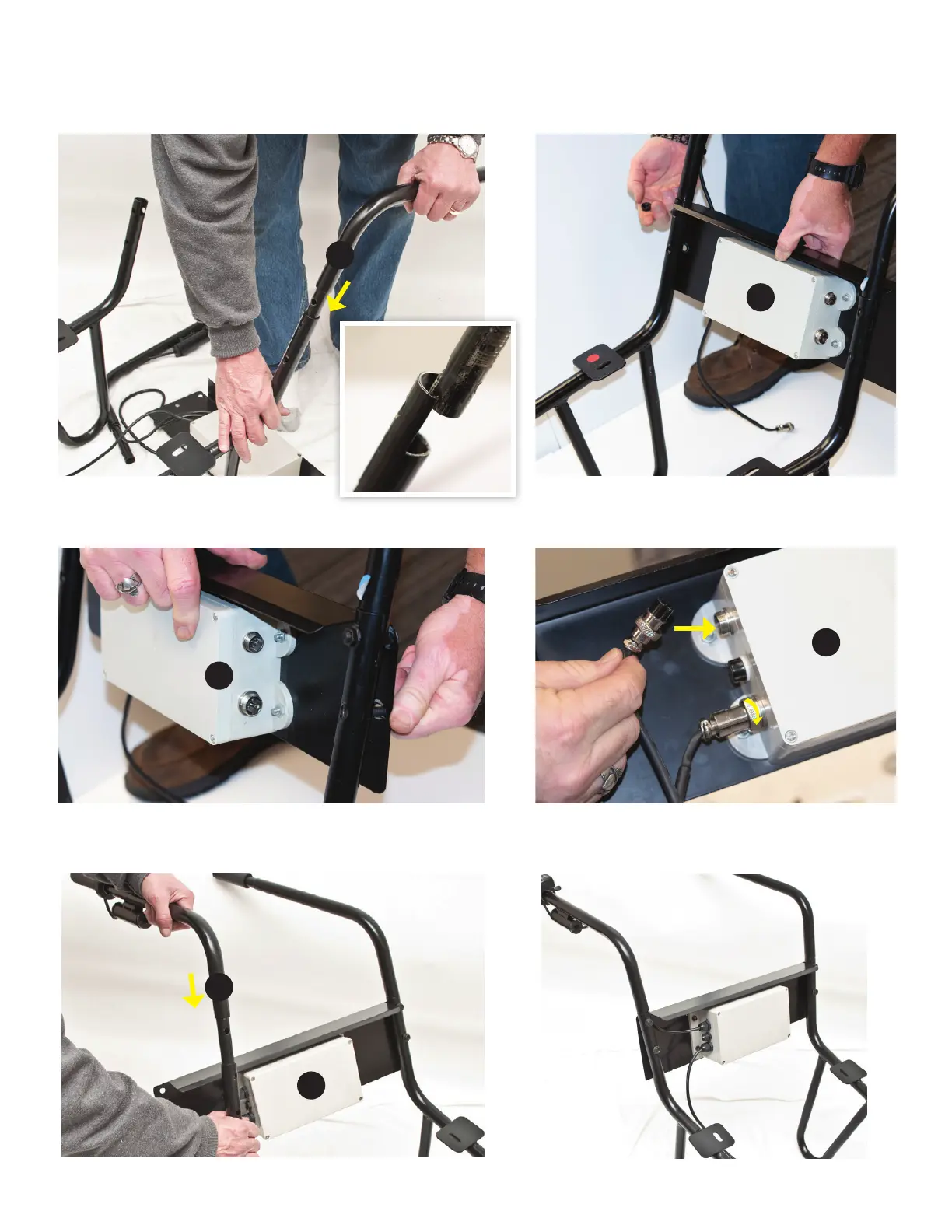
ATTACHING HANDLES AND ELECTRONICS BOX
1. Insert left handle (G) into assembled frame as shown. Be sure to line
up screw holes. Secure with M8 x 40mm hex bolts (V) and hex nuts ((T).
4. Attach the right side of electronics box to right handle as
shown using M8 x 40mm hex bolts (V) and hex nuts ((T).
5. Match up wires to their ports and plug in; twist threaded
couplers to secure.
2. Attach electronics box (H) to left handle using M8 x 40mm hex bolts (V)
and hex nuts (T).
3. Insert the right handle (F) into the frame as shown and secure with
M8 x 40mm hex bolts (V) and hex nuts (T).
G
H
H
H
H
F
Your handles and electronics box should look
like this when assembled:



 To Next Page