E Series User Manual
020-000515-01 Rev. 2 (03-2013)
Section 4: Operation
4-1
4. OPERATION
The projector has multilingual On-Screen Display (OSD) menus that allow you
to make image adjustments and change a variety of settings.
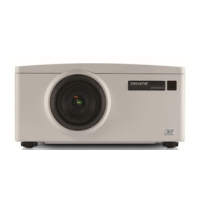
Most of the projector controls are accessed from within the projector menu •
system. There are several groups of related functions, with each group
selectable from the Main menu as shown below. Press the MENU button on
the remote control or on the built-in keypad on the rear of the projector to
display the main menu.
Use the arrow keys to navigate within the menu and adjust a setting up or •
down.
Press ENTER to select a highlighted menu item or use it to change or •
accept a value.
Select the next item that you want to adjust in the menu and adjust it as •
described above.
Press EXIT to return to the previous menu or exit menus if at top level.•



 To Next Page